Note: This is only for WINDOWS operating system
Jyotish Kundali Sangrah
Jyotish Kundali Sangrah (JKS) is a powerful Vedic astrology research tool that enables astrologers to build comprehensive databases of birth charts with advanced search and filtering capabilities. The software’s unique strength lies in its sophisticated search engine that allows users to query planetary positions, combinations, and astrological patterns across thousands of stored kundalis instantly. Users can search by specific planetary placements, dignities, house (bhava) positions, nakshatras, and even complex astrological combinations (yogas) to identify similar cases for research and analysis. Built with Swiss Ephemeris for precise calculations and featuring intuitive North/South Indian chart displays along with BNN (Bhrigu Nandi Nadi) Directional chart, the tool serves as an invaluable research companion for serious astrology practitioners. Perfect for astrologers conducting statistical research, pattern analysis, and comparative studies across large datasets of birth charts.
Jyotish Kundali Sangrah - Professional Vedic Astrology Research & Analysis Software
Transform Your Astrological Practice with Advanced Vedic Calculations
Jyotish Kundali Sangrah is a comprehensive, professional-grade Vedic astrology software designed for serious practitioners, researchers, and enthusiasts. Built with precision and powered by the renowned Swiss Ephemeris engine, this software delivers unparalleled accuracy in astrological calculations spanning from 4000 BCE to 2999 CE.
Why Choose Jyotish Kundali Sangrah?
Unmatched Accuracy & Reliability
- Swiss Ephemeris Integration: Industry-standard astronomical calculations with precision to the arc-second
- Ancient Date Support: Accurate calculations for historical dates back to 4000 BCE
- Multiple Ayanamsa Systems: Lahiri, Raman, KP, and other traditional systems
- Timezone Intelligence: Automatic DST handling and global timezone support
Complete Vedic Astrology Toolkit
- Traditional Chart Formats: Authentic North & South Indian chart displays
- Comprehensive Divisional Charts: All 16 Shodashavargas (D1-D60) with detailed analysis
- Advanced Nadi Jyotish Tools: Specialized progression systems and BNN analysis
- Yoga Detection Engine: 500+ classical yogas with detailed interpretations
Core Features
Professional Chart Generation
- Dual Chart Display: Side-by-side North and South Indian formats
- Planet Positioning: Precise degree calculations with nakshatra and pada details
- Nakshatra Lords (NAK-L): Instant display of ruling planets for each nakshatra
- Dignity Analysis: Automatic exaltation, debilitation, and own sign detection
- Combustion Detection: Real-time planetary combustion calculations
- Bhrigu Bindu: Advanced sensitive point calculations
Advanced Search & Analysis
- Multi-Criteria Search Engine:
- Planetary placement and aspects
- Name and profession filters
- Panchang elements (Tithi, Nakshatra, Yoga, Karana)
- Divisional chart analysis (Vargottam, exaltation states)
- Date range and location-based searches
- Pattern Recognition: Identify astrological patterns across multiple charts
- Comparative Analysis: Side-by-side chart comparison with insights
- Statistical Analysis: Frequency analysis of planetary combinations
Revolutionary Nadi Jyotish Tools
Advanced Progression System
- Four-Planet Analysis: Jupiter, Saturn, Rahu, Ketu progressions
- Hierarchical Structure: Rounds, years, and sub-periods
- Major & Minor Progressions: Long-term cycles and yearly variations
- BNN Aspect System: Traditional 1-5-9, 2, 12, 3-7-11 aspect analysis
- Current Year Highlighting: Automatic present-time focus
Specialized NADI Charts
- Native Rashi Chart: Personal birth chart analysis
- BNN Direction Chart: Directional strength assessment
- Kal Purush Kundali: Universal chart with Aries ascendant
- Jev Kundali: Jupiter-centric analysis chart
- Karma Kundali: Saturn-focused karmic chart
- Professional Layout: Five-chart grid with detailed descriptions
Enhanced Planet Analysis
- BNN Aspect Table: Complete aspectual relationships
- Same-House Analysis: 1st position planetary interactions
- Sign Exchange Detection: Mutual reception identification
- Color-Coded Display: Visual strength and dignity indicators
data Management & Research Tools
Comprehensive Database
- Unlimited Storage: Store thousands of birth charts
- Advanced Filtering: Multi-parameter search capabilities
- Export Options: JHora format compatibility
- Import Functionality: Bulk data import from JHORA
Research & Analysis
- Statistical Tools: Multi Pattern search analysis
- Batch Processing: Analyze multiple charts simultaneously
- Trend Identification: Discover astrological correlations in multiple charts
- Professional Reports: Detailed analysis details
Global Location Intelligence
Worldwide Coverage
- Global Database: 195+ countries with complete state/province data
- Intelligent Geocoding: Automatic coordinate lookup for 100,000+ cities
- Timezone Automation: Smart timezone detection with DST handling
- Coordinate Flexibility: Support for various coordinate formats (DMS, decimal)
- Historical Accuracy: Ancient location calculations for historical charts
User-Friendly Location Tools
- Searchable Dropdowns: Type-ahead country and state selection
- Coordinate Validation: Real-time coordinate format checking
- Multiple Input Formats: Flexible data entry options
Professional User Interface
Intuitive Design
- Clean Layout: Professional, distraction-free interface
- Tabbed Organization: Logical feature grouping
- Responsive Design: Adapts to different screen sizes
- Context Tooltips: Helpful guidance throughout the application
Customization Options
- Multiple Ayanamsa: Choose from traditional calculation systems
- House Systems: Whole Sign, Placidus, Equal, Koch, and more
- Node Calculations: Mean or True Rahu/Ketu options
- Display Preferences: Customize chart appearance and data display
Data Security
- Local Storage: Your data remains on your computer
- Privacy Focused: No data transmission to external servers
- Reliable Calculations: Consistent, reproducible results
Advanced Analysis Features
Yoga Detection Engine
- 500+ Classical Yogas: Comprehensive yoga database
- Automatic Detection: Real-time yoga identification
- Strength Assessment: Yoga potency and effectiveness analysis
- Detailed Interpretations: Traditional meanings and modern applications
Transit Analysis
- Real-Time Transits: Current planetary positions overlay
- Transit Calendar: Visual transit tracking and planning
- Event Correlation: Transit-to-natal aspect analysis
- Timing Predictions: Precise transit timing calculations
- Multiple Chart Overlay: Compare transits across different charts
Educational & Learning Tools
Built-in Reference
- Comprehensive Help: Detailed feature explanations
- Astrological Glossary: Traditional terms and meanings
- Calculation Methods: Transparent calculation processes
- Learning Mode: Step-by-step calculation displays
Research Support
- Batch Analysis: Process multiple charts for studies
- Pattern Documentation: Save and share discovered patterns
Professional Applications
For Practicing Astrologers
- Client Management: Organize and track client charts
- Professional Reports: Generate detailed analysis documents
- Consultation Tools: Quick reference during readings(Jhora)
- Timing Analysis: Precise transit calculations
- Teaching Support: Educational tools for students
For Researchers & Academics
- Large Dataset Analysis: Process thousands of charts
- Statistical Tools: Quantitative astrological research
- Historical Studies: Ancient date calculation support
- Pattern Recognition: Discover new astrological correlations
For Enthusiasts & Students
- Learning Platform: Comprehensive educational features
- Practice Tools: Experiment with different techniques
- Reference Library: Built-in astrological knowledge base
- Skill Development: Progressive learning capabilities
- Community Features: Share and discuss findings
What Sets Us Apart
Accuracy & Precision
- Swiss Ephemeris: The gold standard in astronomical calculations
- Peer-Reviewed Algorithms: Calculations verified against traditional texts
- Historical Accuracy: Reliable calculations for ancient dates
- Its FREE
Comprehensive Coverage
- Complete Toolkit: Everything needed for professional practice
- Traditional Methods: Authentic Vedic calculation techniques
- Modern Interface: Contemporary usability with classical accuracy
- Scalable Solution: Suitable for beginners to advanced practitioners
Innovation & Tradition
- Classical Foundation: Based on traditional Vedic principles
- Modern Technology: Leveraging contemporary computational power
- User-Centric Design: Built based on practitioner feedback
- Continuous Evolution: Regular feature additions and improvements
System Requirements
Minimum Requirements
- Operating System: Windows 10 or later
- Memory: 4 GB RAM
- Storage: 2 GB available space
- Display: 1024×768 resolution
- Internet: Required for location services (optional)
Recommended Specifications
- Operating System: Windows 11
- Memory: 8 GB RAM or more
- Storage: 4 GB available space
- Display: 1920×1080 resolution or higher
- Internet: Broadband connection for enhanced features
Perfect For
Professional Astrologers
- Consultation practice management
- Client chart analysis and storage
- Professional report generation
- Advanced timing calculations
- Research and pattern analysis
Vedic Astrology Students
- Comprehensive learning platform
- Practice chart calculations
- Understanding traditional methods
- Exploring different techniques
- Building foundational knowledge
Researchers & Academics
- Large-scale astrological studies
- Statistical analysis capabilities
- Historical chart calculations
- Pattern recognition research
Serious Enthusiasts
- Personal chart exploration
- Family astrology projects
- Deep dive into Vedic techniques
- Advanced calculation verification
- Continuous learning journey
Download Now and Experience
- ✅ Unmatched Calculation Accuracy
- ✅ Comprehensive Vedic Toolkit
- ✅ Revolutionary Nadi Features
- ✅ Professional Search/Analysis/Research Tools
- ✅ FREE Software Access
- ✅ Expert Support & Updates
Submit the form for any Feedback / Suggestion / Query / Complaint
Check FAQs before submitting the question
The application uses Swiss Ephemeris with Lahiri Ayanamsa for planetary calculations, which provides high-precision astronomical data. Minor differences with JHORA can occur due to different calculation methods, precision levels, or ephemeris data versions. The application specifically uses LAHIRI settings including non-linear precession and true positions. Both systems are accurate, but slight variations (usually within minutes of arc) are normal due to different computational approaches and rounding methods.
Currently, the application doesn't provide a direct "delete" function for individual records. You can uninstall and re-install the application to start fresh.
No, all data is stored locally on your computer only. The geocoding service (Nominatim) is only used to fetch coordinates for location names, but your personal birth details are never sent to external services.
The application uses the Vedic (Indian) astrological system with Lahiri Ayanamsa for sidereal calculations. It calculates planetary positions, nakshatras, rashis, and houses according to traditional Vedic astrology principles. The Swiss Ephemeris library ensures high astronomical accuracy for all planetary computations.
Yes, the application includes integration with JHORA software. You can export selected charts directly to JHORA using the "📊 Jhora" button in the search results. The application automatically formats the birth data and opens it in JHORA for further analysis.
The application uses Nominatim geocoding service to automatically fetch coordinates for entered locations. It includes multiple fallback strategies and caches results for better performance. The application handles various coordinate formats and provides proper timezone detection for accurate chart calculations.
Yes, the application supports ancient dates including BCE (Before Common Era) dates. It automatically converts BCE notation to astronomical year numbering for accurate calculations. For example, "15/03/5113 BCE" is properly handled and converted for Swiss Ephemeris calculations. However, some modern features like Bhrigu Chakra Paddati is disabled for ancient dates.
Click on "User Details" in the main menu to open the user profile window. You can update your name, birth details, current location, and other personal information. The changes are automatically saved and will be used for transit calculation.
If you encounter coordinate lookup errors, try entering the location with different spelling variations or use a nearby major city. The application includes fallback mechanisms for common Indian cities (Mumbai/Bombay, Chennai/Madras, etc.). You can also manually enter coordinates if automatic geocoding fails.

Enhancing Data Richness
Add optional details for the native, such as profession, marital status, country of birth/residence, or notable life events. These enrich your database for targeted filtering and deeper demographic studies in Jyotish research.
Jyotish Kundali Sangrah (JKS) v2.5
Vedic Astrology Analysis & Research Tool
User Guide with Screenshots
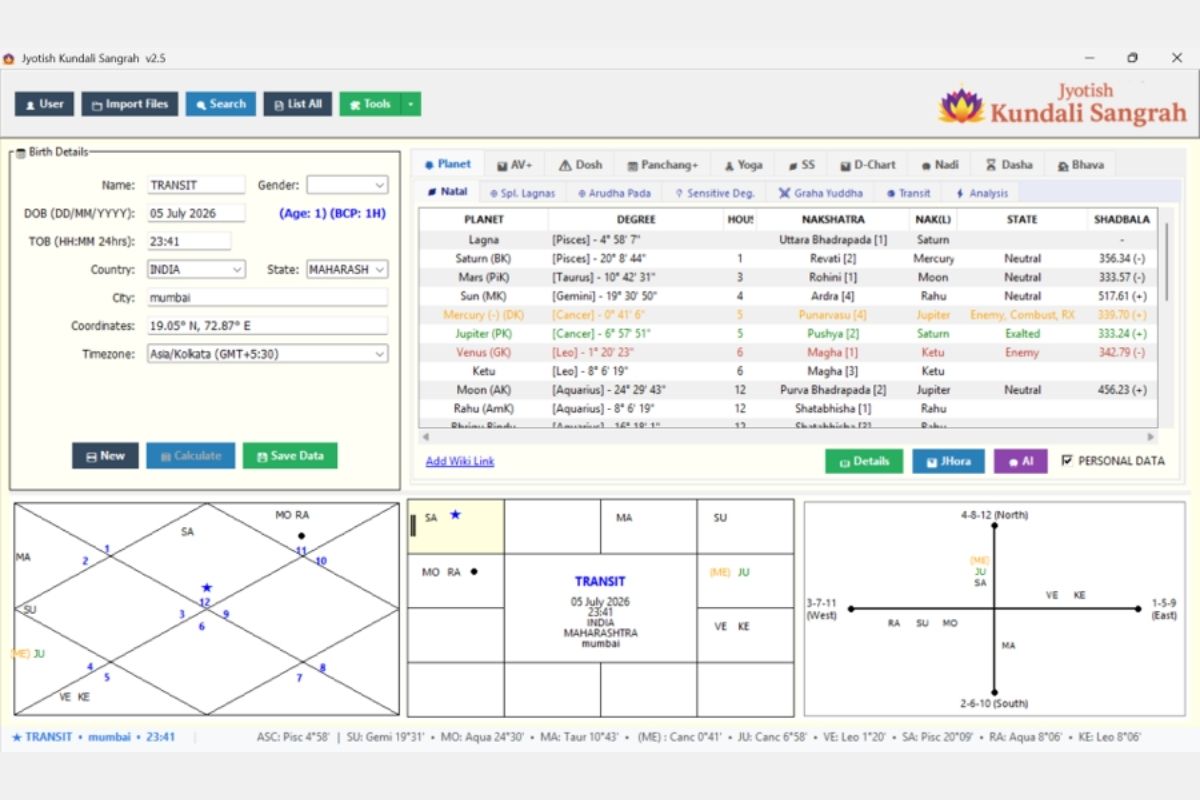
APPLICATION OVERVIEW
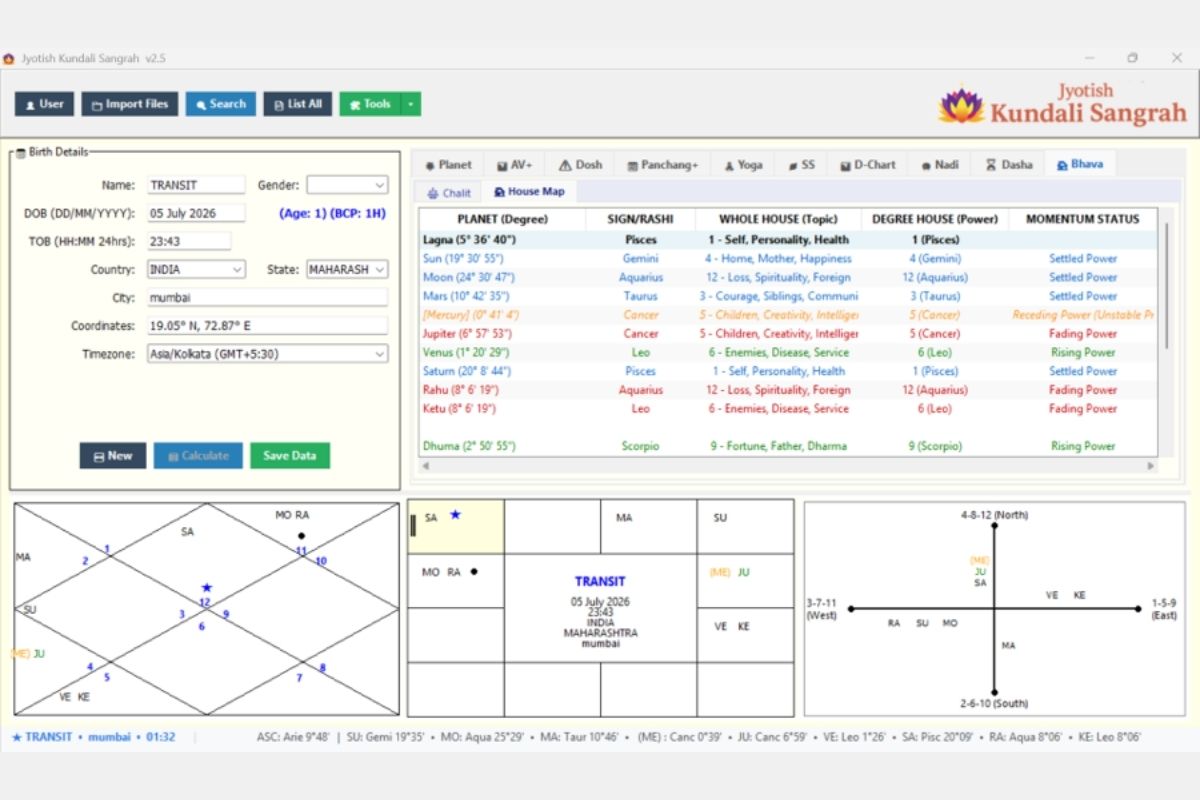
The main workspace of JKS v2.5 showing:
- Left Panel: Birth details input (Name, DOB, TOB, Country, State, City with auto-coordinate lookup, Timezone)
- Right Panel: Tabbed analysis area with 9 main tabs — Planet, AV+, Dosh, Panchang+, Yoga, SS, D-Chart, Nadi, Dasha, Bhava
- Sub-tabs under Planet: Natal, Spl. Lagnas, Arudha Pada, Sensitive Deg., Graha Yuddha, Transit, Analysis
- Bottom Panel: Three simultaneous chart formats — North Indian (diamond), South Indian (grid), and BNN Directional Chart (cross-axis)
- Status Bar: Live transit positions with precise degrees
- Toolbar: User, Import Files, Search, List All, Tools buttons
- Action Buttons: New, Calculate, Save Data, Details, JHora export, AI Analysis
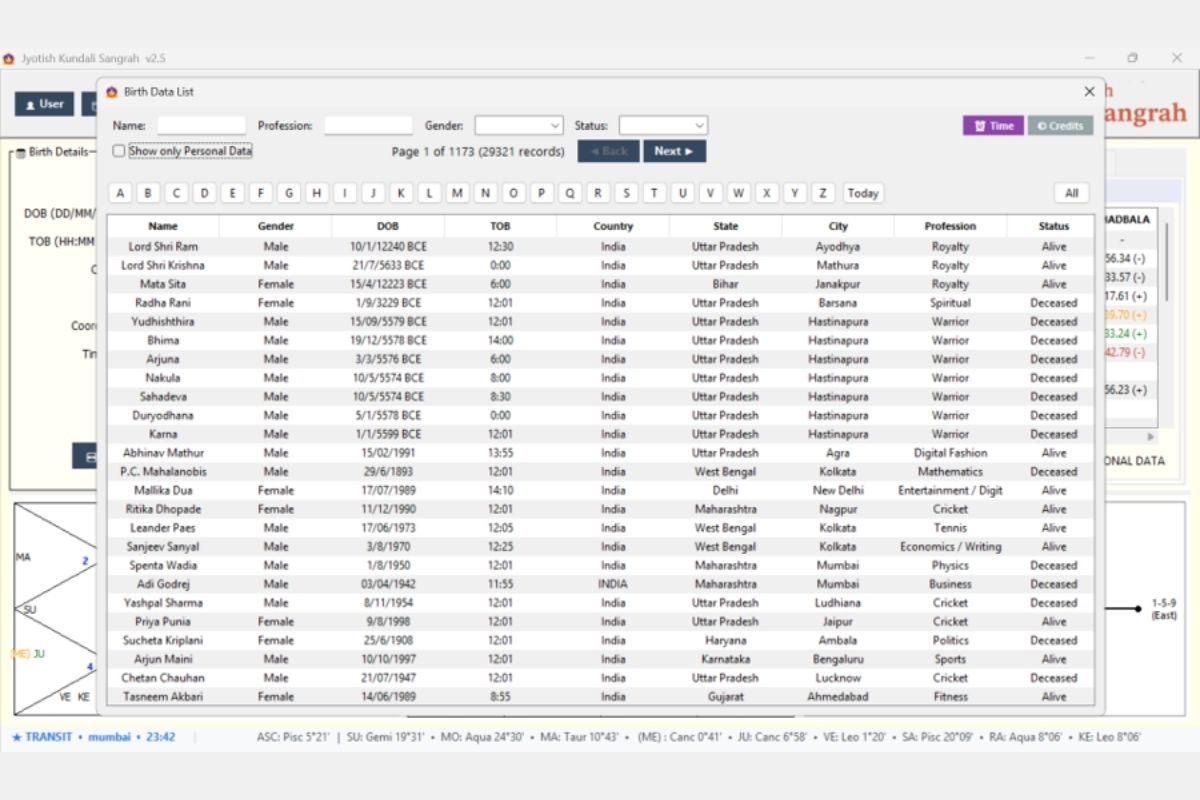
DATABASE & DATA MANAGEMENT
Comprehensive database browser showing around 29k records with:
- Alphabetical quick-filter (A-Z buttons)
- Filters by Name, Profession, Gender, Status
- Pagination (Page 1 of 1173)
- Record columns: Name, Gender, DOB, TOB, Country, State, City, Profession, Status
- Supports ancient dates (e.g., Lord Shri Ram 10/1/12240 BCE) through modern records
- “Show only Personal Data” toggle for privacy
- Time and Credits buttons for quick access
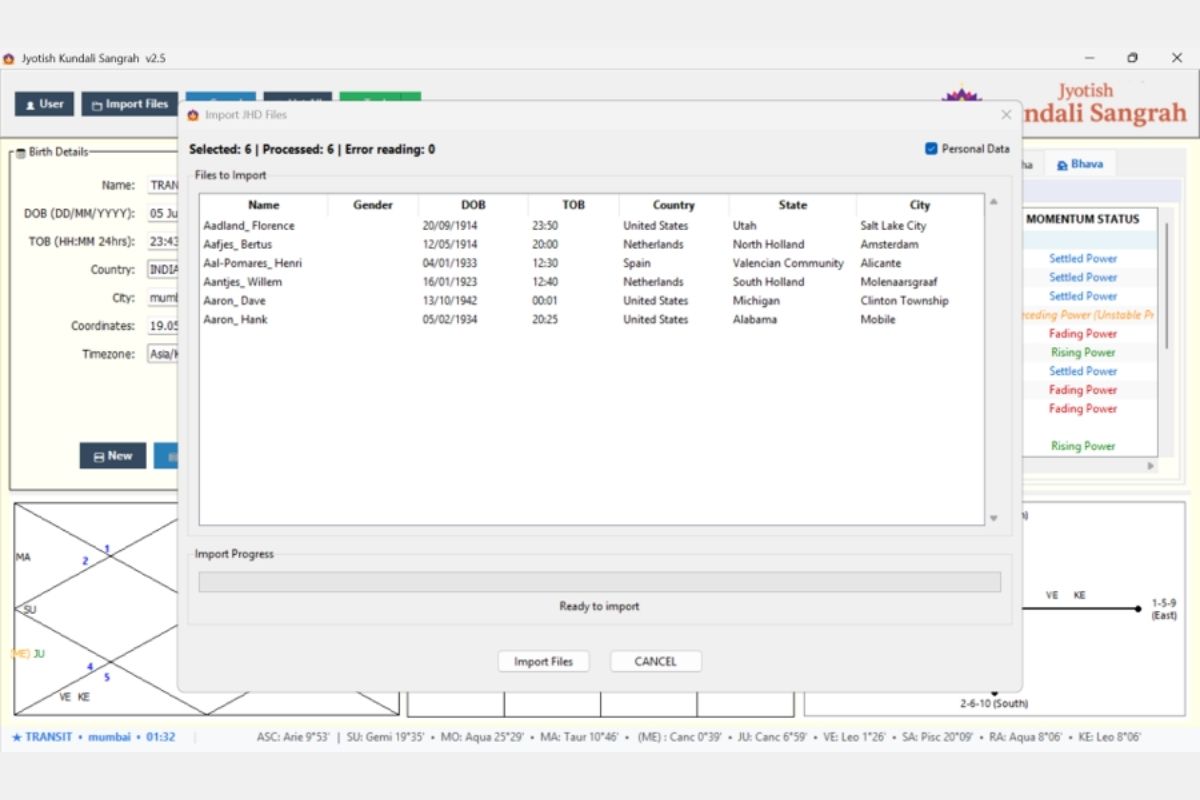
Import JHD Files
Bulk import from Jagannatha Hora (.jhd) files:
- Multi-file selection with preview table
- Shows Name, Gender, DOB, TOB, Country, State, City
- Processing status (Selected: 6 | Processed: 6 | Error reading: 0)
- Progress bar with “Ready to import” status
- Personal Data checkbox toggle
- Seamless integration into the JKS database
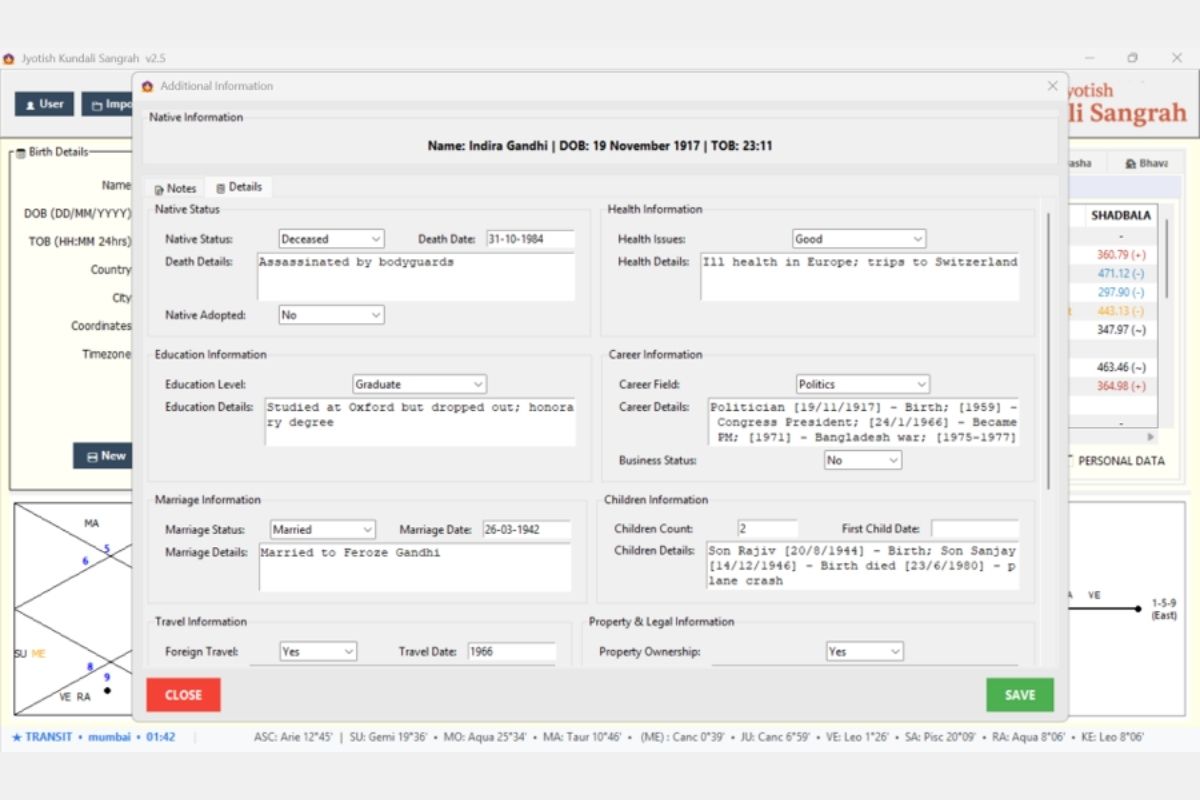
Additional Information (Details)
Rich biographical data storage for each record:
- Native Status: Alive/Deceased, Death Date, Death Details
- Health Information: Health Issues category, Health Details
- Education: Level, Details
- Career: Field, Career Details with dates, Business Status
- Marriage: Status, Date, Details
- Children: Count, First Child Date, Details
- Travel: Foreign Travel, Travel Date
- Property & Legal Information
This enriched metadata powers the advanced search and filtering capabilities.
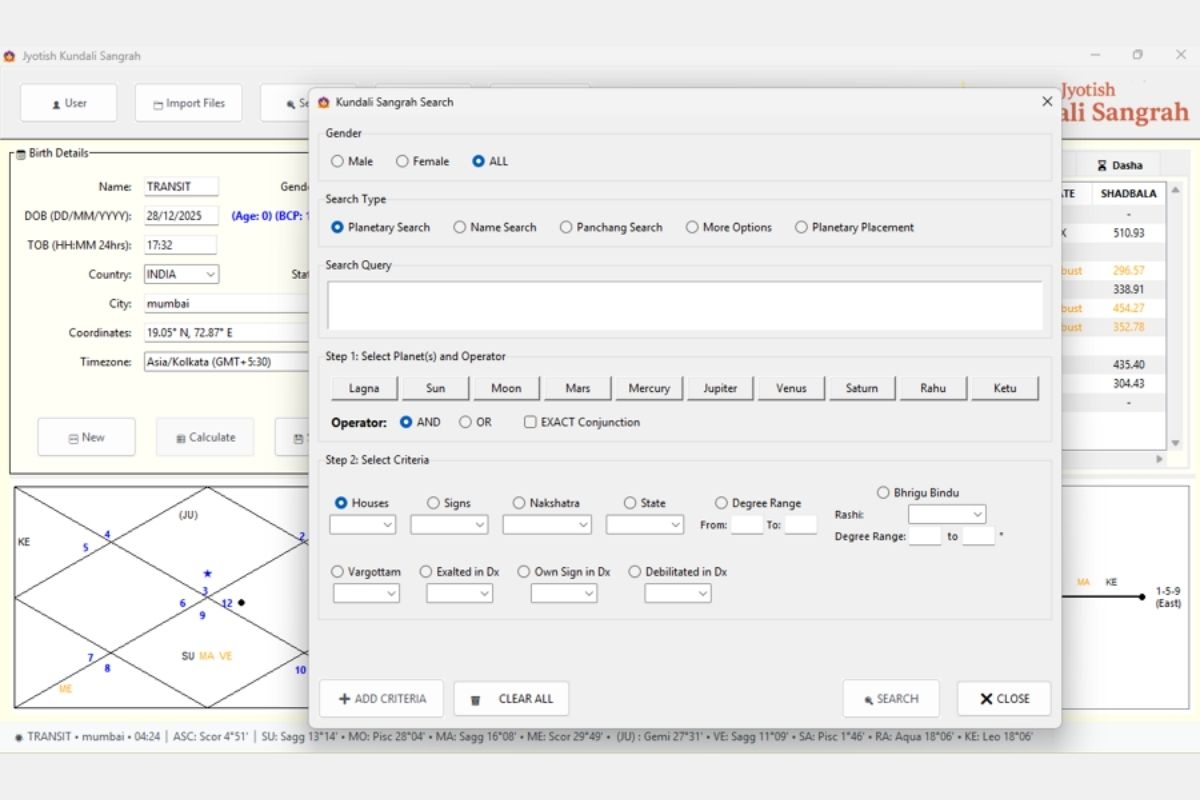
ADVANCED SEARCH MODULE
Powerful database search engine with 5 search types:
- Search Types: Planetary Search, Name Search, Panchang Search, More Options, Planetary Placement
- Gender Filter: Male / Female / ALL
- Step 1 — Select Planet(s) and Operator:
- Planet buttons: Lagna, Sun, Moon, Mars, Mercury, Jupiter, Venus, Saturn, Rahu, Ketu
- Operators: AND, OR, EXACT Conjunction
- Step 2 — Select Criteria:
- Houses (H1-H12), Signs (12 rashis), Nakshatra, State (Exalted/Debilitated/Own/Enemy)
- Degree Range (From/To) for precision search
- Bhrigu Bindu: Search by BB position in specific Rashi and degree range
- Divisional chart filters: Vargottam, Exalted in Dx, Own Sign in Dx, Debilitated in Dx
- + ADD CRITERIA button for multi-condition queries
- Search Query text area showing constructed query in plain English
- CLEAR ALL and SEARCH action buttons
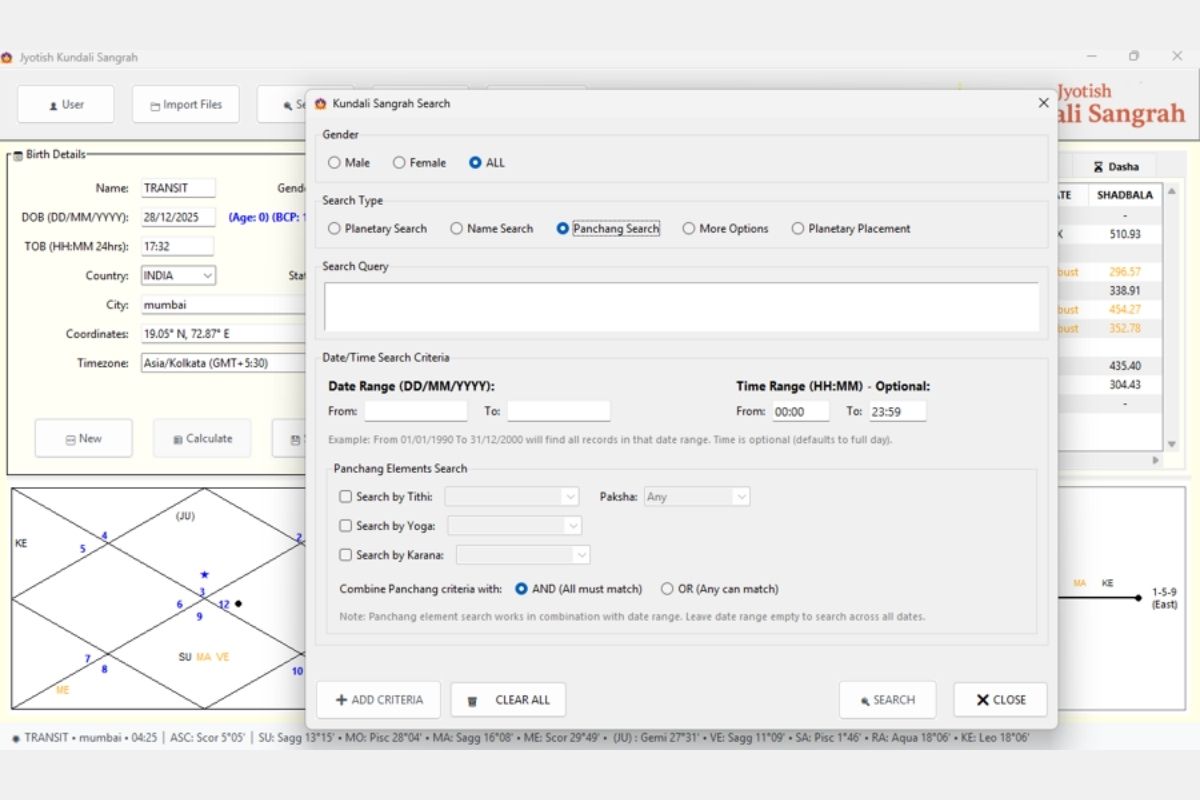
Search — Panchang Search
Date/Time and Panchang-based record search:
- Date Range (DD/MM/YYYY): From/To fields for filtering by birth date
- Time Range (HH:MM) — Optional: From/To (defaults to full day 00:00–23:59)
- Panchang Elements Search:
- Search by Tithi (with Paksha: Shukla/Krishna/Any)
- Search by Yoga (27 Vedic yogas)
- Search by Karana (11 karanas)
- Combine Panchang criteria with: AND (All must match) / OR (Any can match)
- Note: “Panchang element search works in combination with date range. Leave date range empty to search across all dates.”
- Example: Find all charts born on Ekadashi Tithi in Shukla Paksha
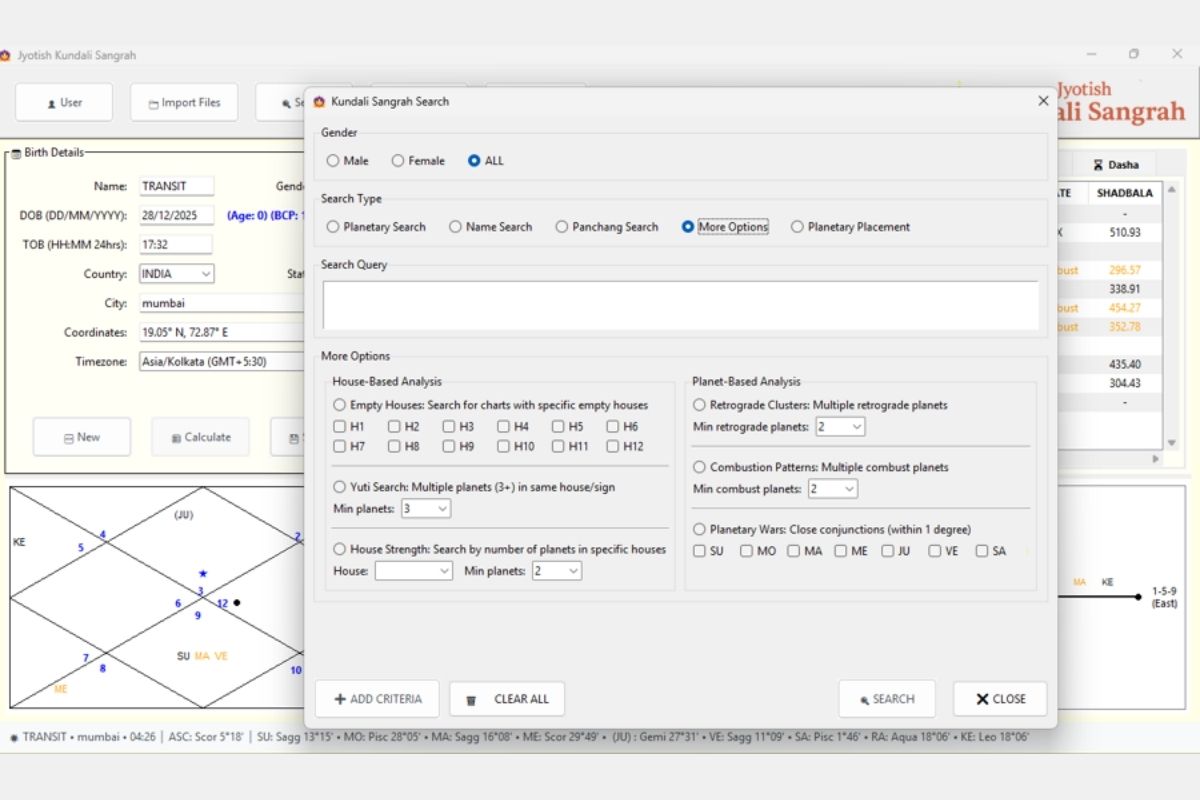
Search — More Options (Advanced Patterns)
Pattern-based search for special chart configurations:
- House-Based Analysis:
- Empty Houses: Search for charts with specific empty houses (H1-H12 checkboxes)
- Yuti Search: Multiple planets (3+) in same house/sign (configurable minimum)
- House Strength: Search by number of planets in specific houses (House selector + Min planets)
- Planet-Based Analysis:
- Retrograde Clusters: Multiple retrograde planets (Min retrograde planets: 2+)
- Combustion Patterns: Multiple combust planets (Min combust planets: 2+)
- Planetary Wars: Close conjunctions within 1 degree (select planet pairs: SU, MO, MA, ME, JU, VE, SA)
- Ideal for research: finding rare chart patterns across 29,000+ records
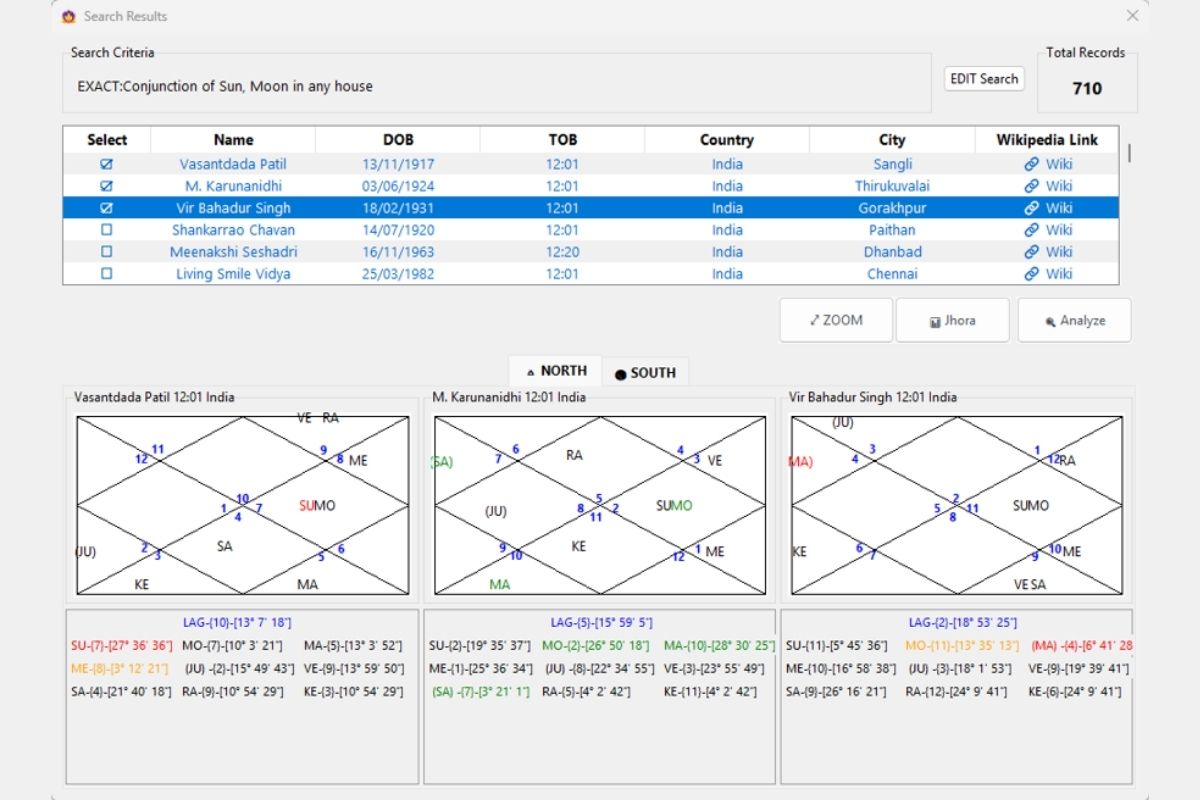
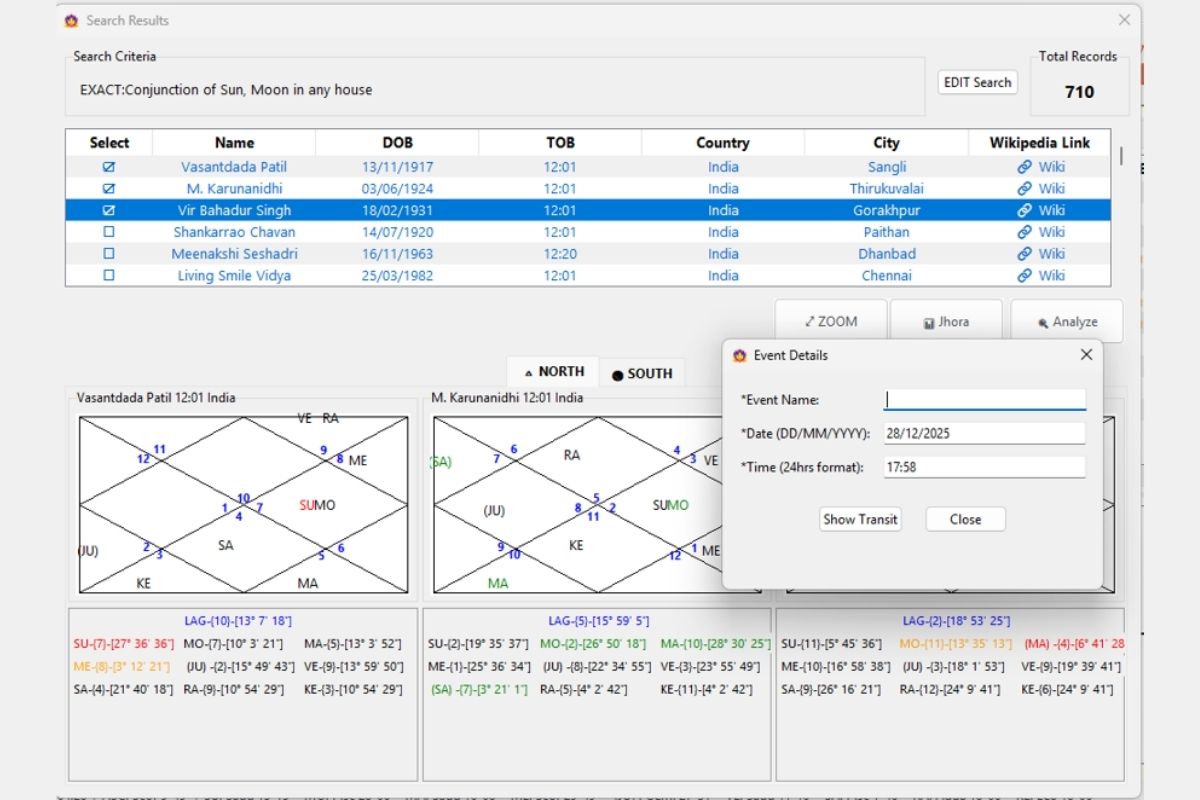
Search Results — Chart Comparison
Interactive search results with visual comparison:
- Search Criteria display: Shows the query (e.g., “EXACT: Conjunction of Sun, Moon in any house”)
- Total Records found: (e.g., 710 matching records)
- Results table: Select checkbox, Name, DOB, TOB, Country, City, Wikipedia Link
- Multi-select: Check multiple records for side-by-side comparison
- Chart display: Up to 3 selected charts shown simultaneously in North Indian format
- Planet details: Full planetary positions below each chart (Lagna, all planets with house, degree)
- Format toggle: NORTH / SOUTH Indian chart styles
- Action buttons: ZOOM (enlarge), Jhora (export to JHora), Analyze (AI analysis)
- EDIT Search button to refine criteria
- Wikipedia links for celebrity/historical charts
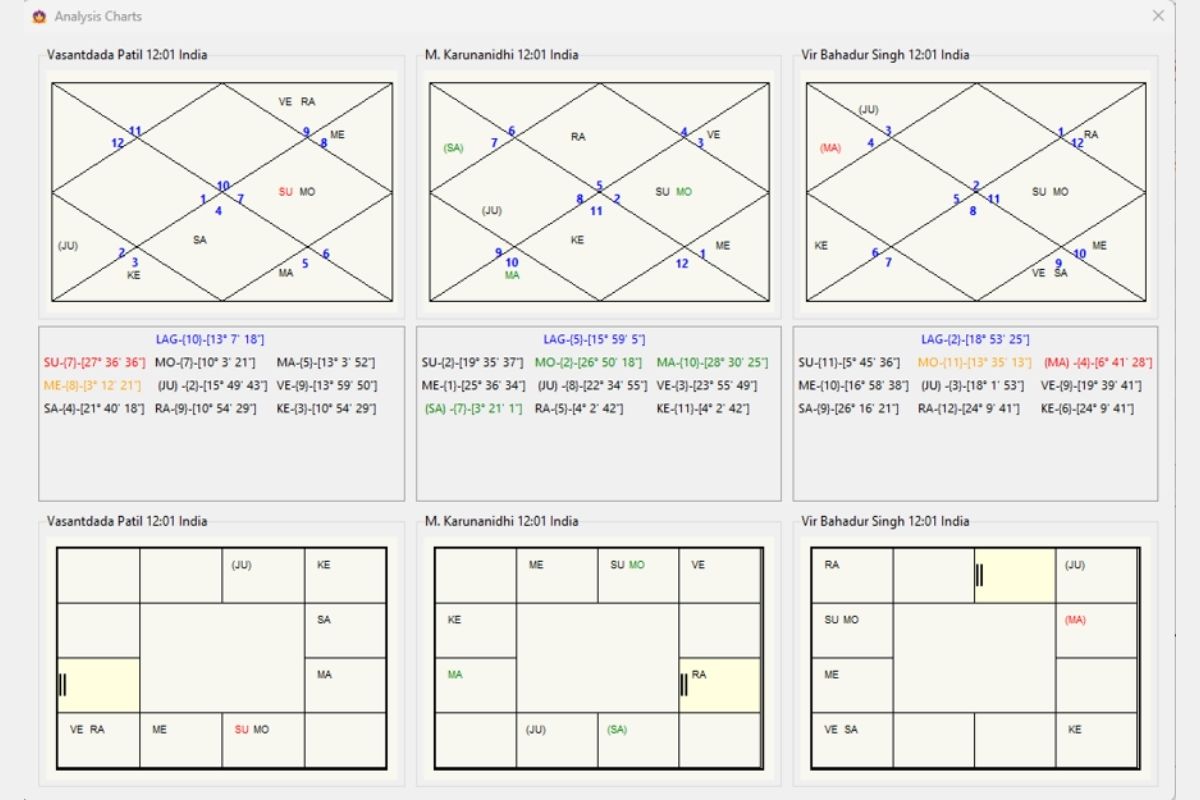
Search Results — Analysis Charts (Full View)
Expanded chart comparison window:
- Full-screen “Analysis Charts” window showing selected records side-by-side
- Top row: North Indian diamond charts for all selected records (up to 3)
- Middle row: Complete planetary position tables for each chart (Planet-House-Degree format)
- Bottom row: South Indian grid charts for the same records
- Each chart labeled with name, time, and location
- Color-coded planets (functional benefics/malefics) matching main application scheme
Ideal for research comparison of charts with similar planetary patterns
Search Results — Event Details (Transit Overlay)
Transit overlay for search results:
- Event Details dialog: Enter event name, date (DD/MM/YYYY), and time (24hrs format)
- “Show Transit” button: Overlays transit positions on the selected natal chart
- Allows researchers to check specific dates against any chart in the search results
- Use case: Verify transit conditions during life events for multiple charts simultaneously
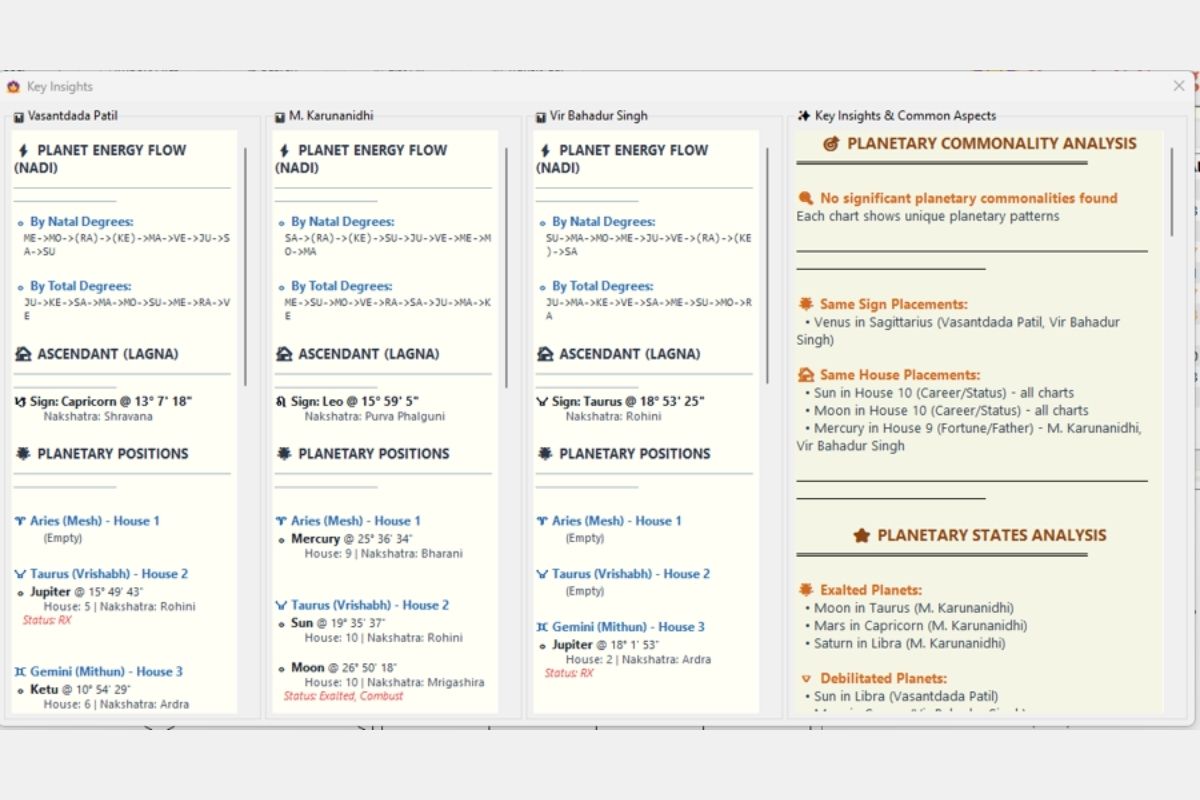
Search Results — Key Insights & Commonality Analysis
AI-powered comparative analysis of selected charts:
- Individual chart panels (side-by-side for each selected record):
- Planet Energy Flow (Nadi): Sequence by natal degrees and total degrees
- Ascendant (Lagna): Sign, degree, nakshatra
- Planetary Positions: House-by-house listing with sign, degree, nakshatra, status
- Key Insights & Common Aspects panel (right side):
- Planetary Commonality Analysis: Identifies shared patterns across selected charts
- Same Sign Placements: Planets in identical signs across charts (e.g., “Venus in Sagittarius — Vasantdada Patil, Vir Bahadur Singh”)
- Same House Placements: Planets in identical houses across charts (e.g., “Sun in House 10 (Career/Status) — all charts”)
- Planetary States Analysis: Exalted Planets, Debilitated Planets across the selection
- Powerful research tool for identifying patterns in charts sharing planetary configurations
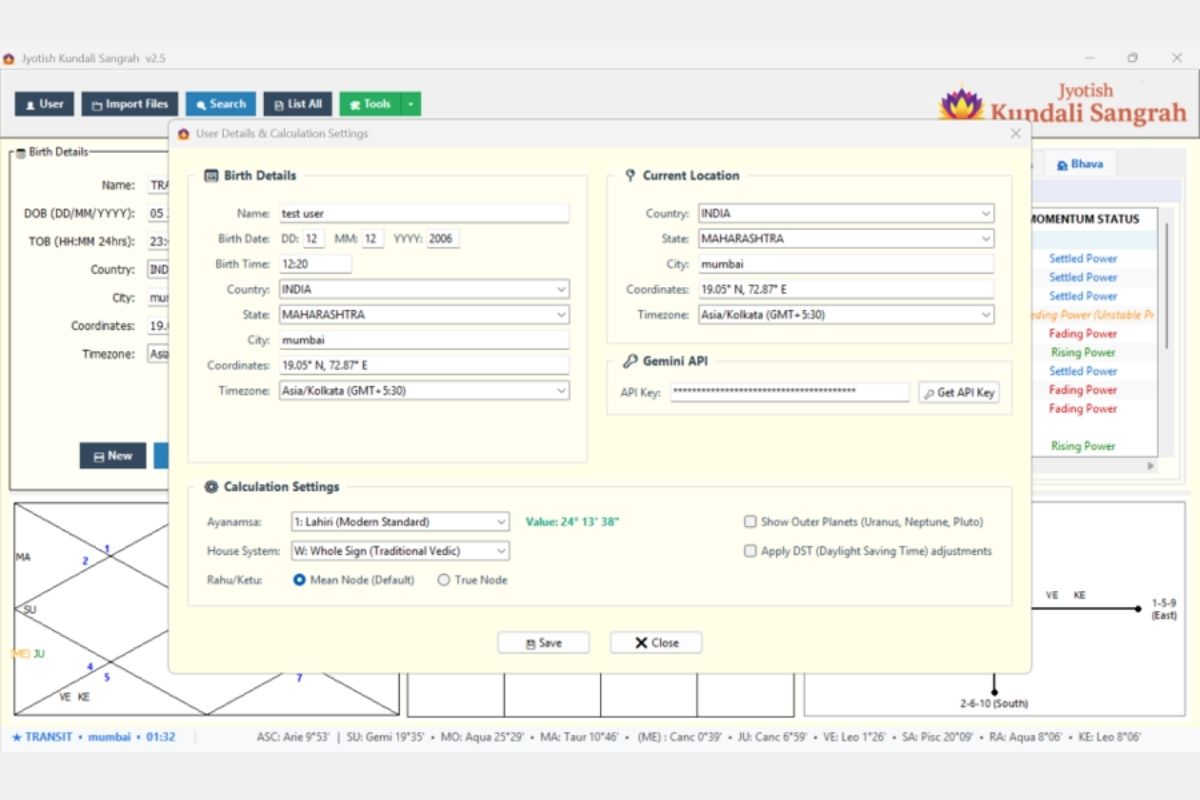
USER SETTINGS & CONFIGURATION
Complete configuration panel:
- Birth Details: User’s own chart data
- Current Location: Country, State, City, Coordinates, Timezone (used for transit/Prashna calculations)
- Gemini API: API key registration for AI-powered chart analysis
- Calculation Settings:
- Ayanamsa: Lahiri (Modern Standard) — with live value display (24° 13′ 38″)
- House System: Whole Sign (Traditional Vedic) — 9 systems available
- Rahu/Ketu: Mean Node (Default) or True Node
- Show Outer Planets (Uranus, Neptune, Pluto) toggle
- Apply DST (Daylight Saving Time) toggle
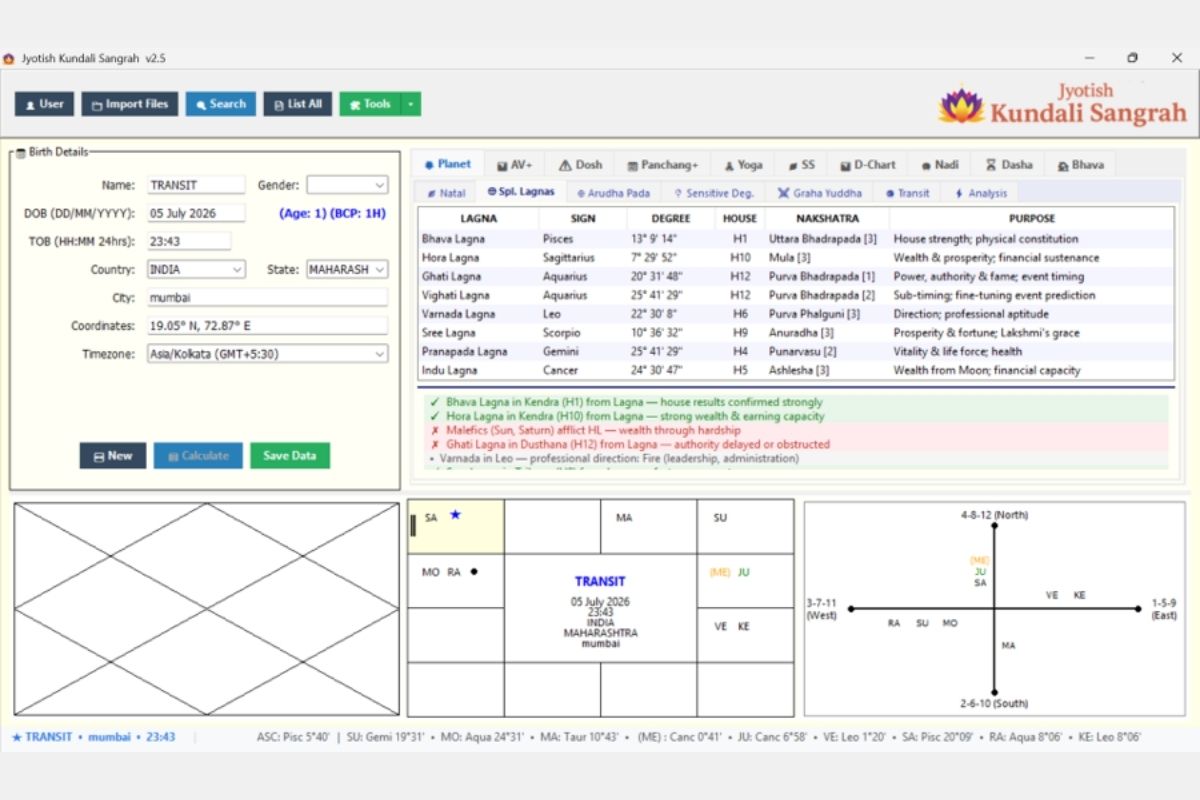
PLANET TAB — CORE CALCULATIONS
Eight special ascendant points with full detail:
- Bhava Lagna, Hora Lagna, Ghati Lagna, Vighati Lagna, Varnada Lagna, Sree Lagna, Pranapada Lagna, Indu Lagna
- Each showing: Sign, Degree, House placement, Nakshatra, Purpose
- Color-coded interpretation panel below showing positive confirmations (green checkmarks) and challenges (red X marks)
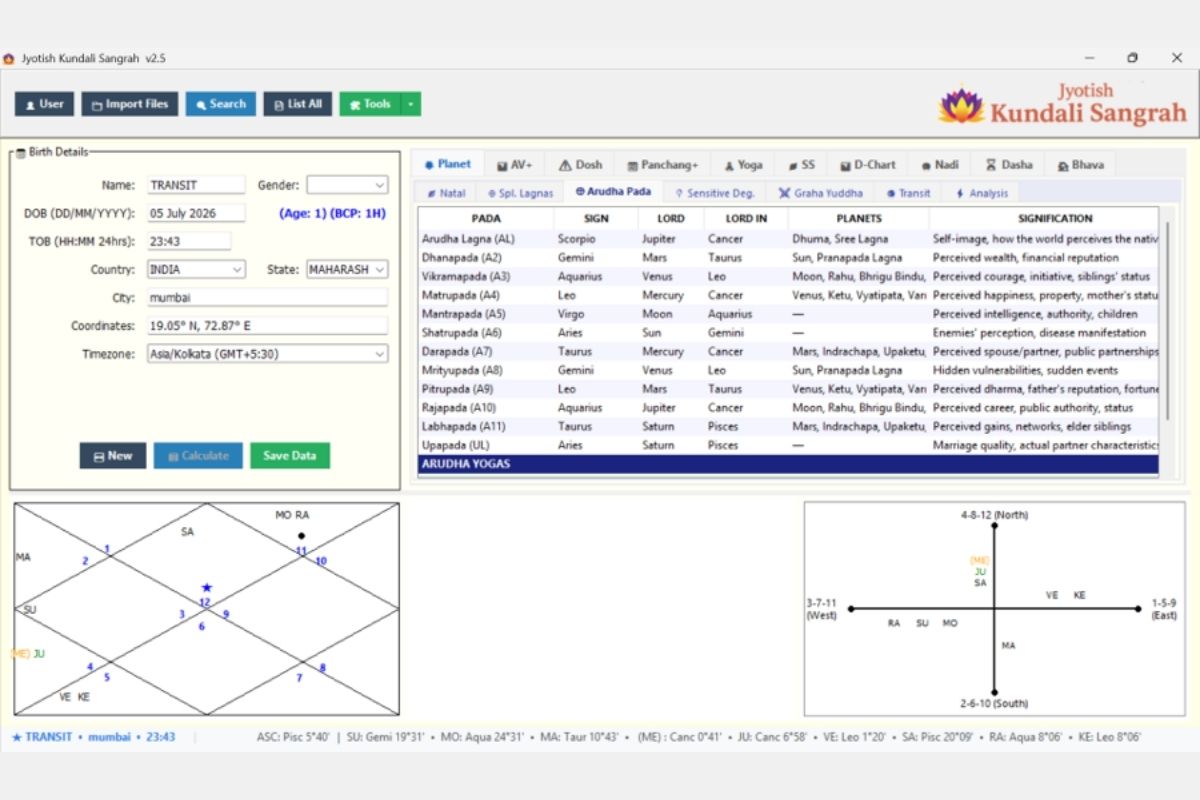
Arudha Pada
Complete Arudha Pada (A1-A12 + UL) calculations:
- All 12 house padas plus Upapada Lagna
- Columns: Pada name, Sign, Lord, Lord-In sign, Planets in pada, Signification
- Arudha Yogas section at bottom for combined interpretations
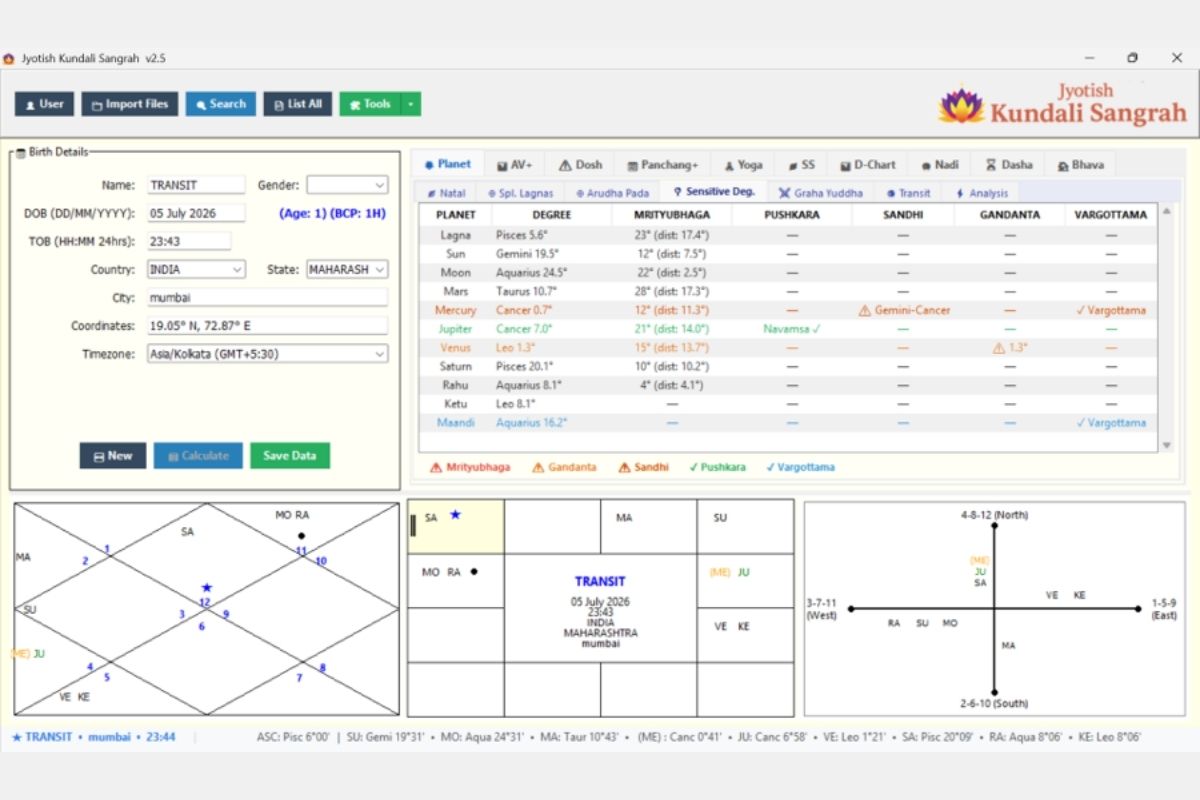
Sensitive Degrees
Critical degree analysis for all planets:
- Mrityubhaga: Death degrees with distance calculation
- Pushkara: Auspicious degrees (Navamsa-level detection)
- Sandhi: Junction degrees between signs
- Gandanta: Water-Fire sign junction points
- Vargottama: Same sign in D1 and D9
- Color-coded legend: Red triangles (danger), Green checkmarks (auspicious)
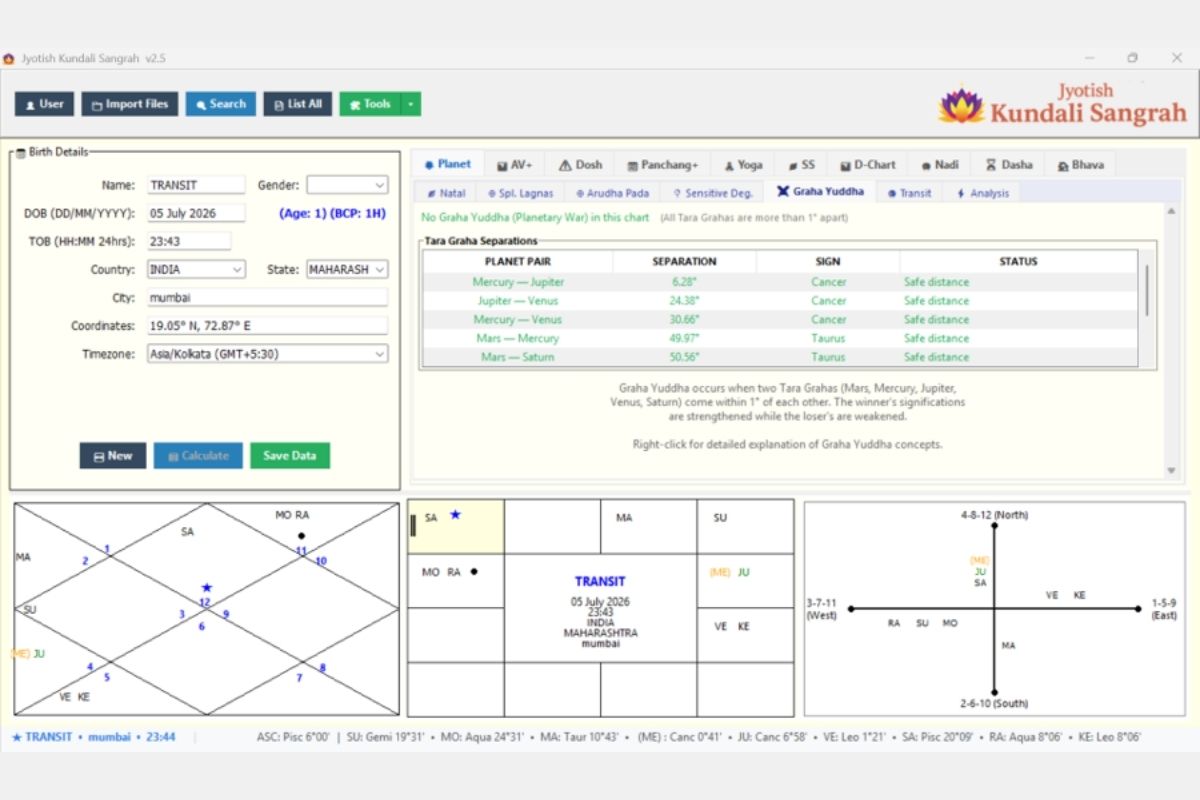
Graha Yuddha (Planetary War)Pada
Planetary war analysis showing:
- Tara Graha separation table (planet pairs within same sign)
- Separation in degrees between planet pairs
- Status: “Safe distance” or “WAR” when within 1°
- Classical explanation of Graha Yuddha concept
- Right-click for detailed Graha Yuddha concepts
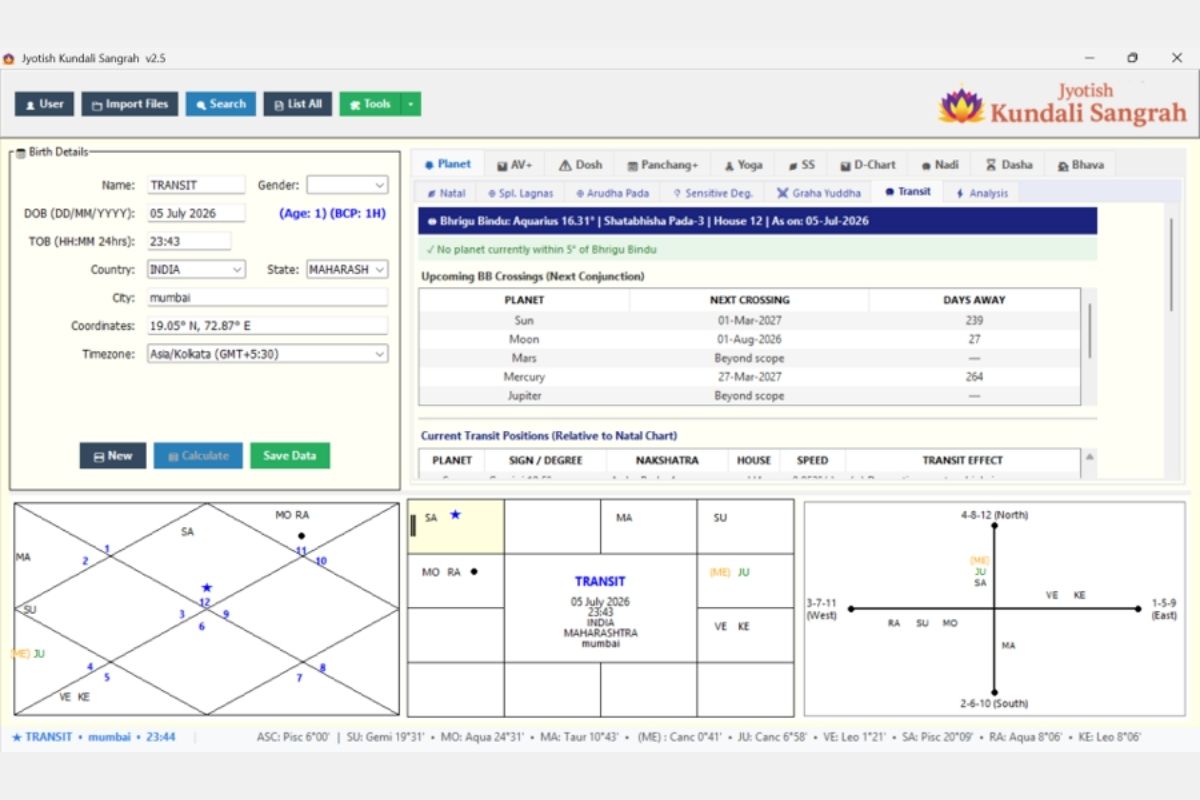
Transit (Bhrigu Bindu Crossings)
Live transit analysis relative to natal chart:
- Bhrigu Bindu position with current sign, degree, nakshatra, house
- Upcoming BB Crossings: Next conjunction date and days away for each planet
- Current Transit Positions: Planet positions relative to natal chart with transit effects
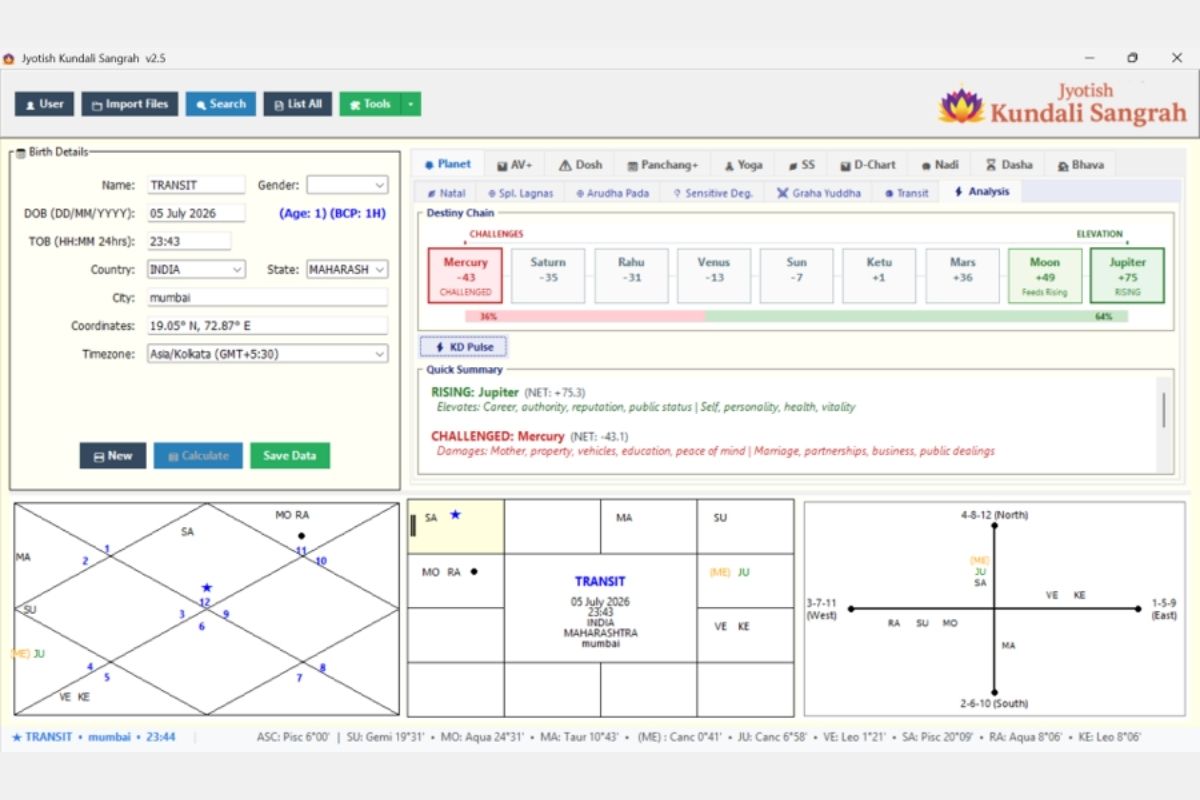
Analysis (Karma Destiny Chain)
Unique Karma Destiny analysis showing:
- Destiny Chain: Visual representation of planets ordered from most Challenged to most Elevated
- Percentage split (Challenges 36% vs Elevation 64%)
- KD Pulse button for quick assessment
- Quick Summary: Rising planet (Jupiter +75) and Challenged planet (Mercury -43)
- Signification of elevating and challenging influences on life areas
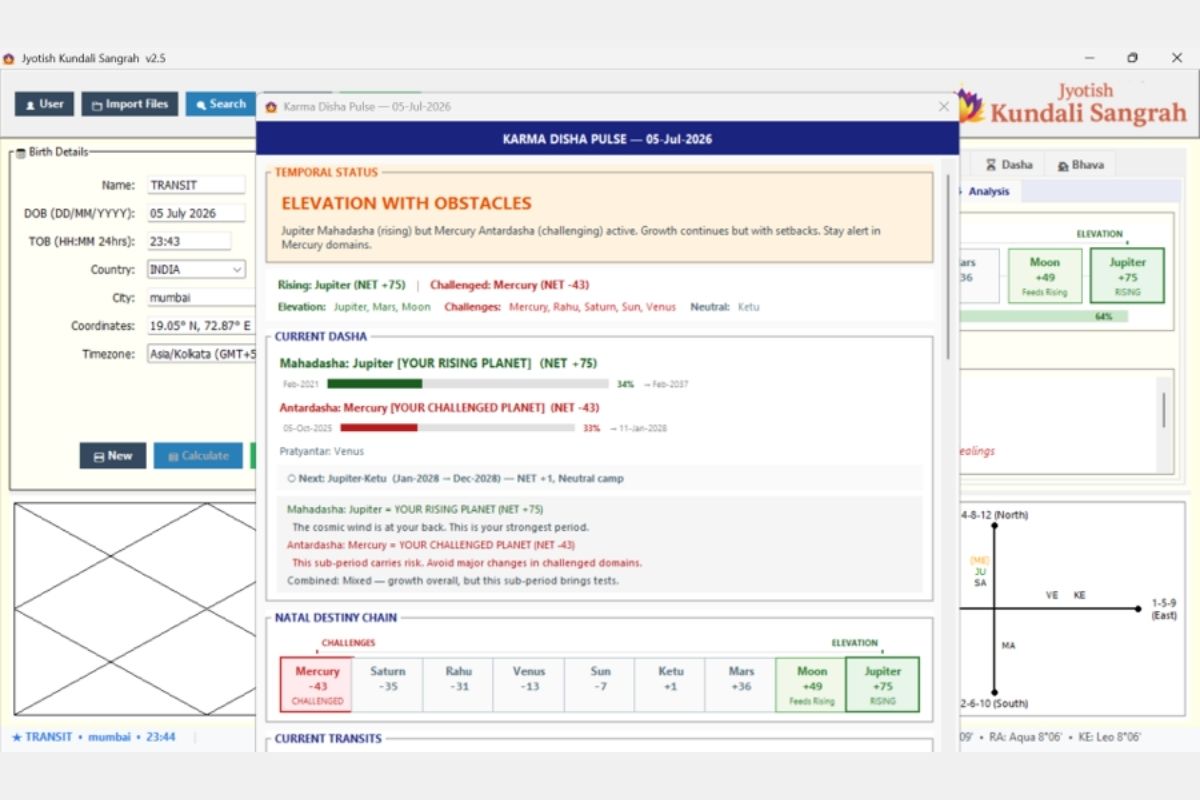
Karma Disha Pulse — Daily Assessment
Real-time Karma Disha Pulse report (date-stamped):
- Temporal Status: Current overall assessment (e.g., “ELEVATION WITH OBSTACLES” — Jupiter Mahadasha rising but Mercury Antardasha challenging)
- Current Dasha integration: Mahadasha lord label (YOUR RISING PLANET / YOUR CHALLENGED PLANET) with NET score and progress bar percentage
- Next period prediction: Upcoming Antardasha with NET score and camp classification (Neutral/Rising/Challenging)
- Pratyantara level: Current sub-sub-period lord
- Interpretation text: Combined reading of Mahadasha + Antardasha energy (“The cosmic wind is at your back… this sub-period carries risk”)
- Natal Destiny Chain: Visual strip showing all planets ordered from most Challenged (Mercury -43) to most Elevated (Jupiter +75) with color-coded boxes (red = challenged, green = rising)
- Current Transits section (below): Live transit overlay on the Karma Destiny framework
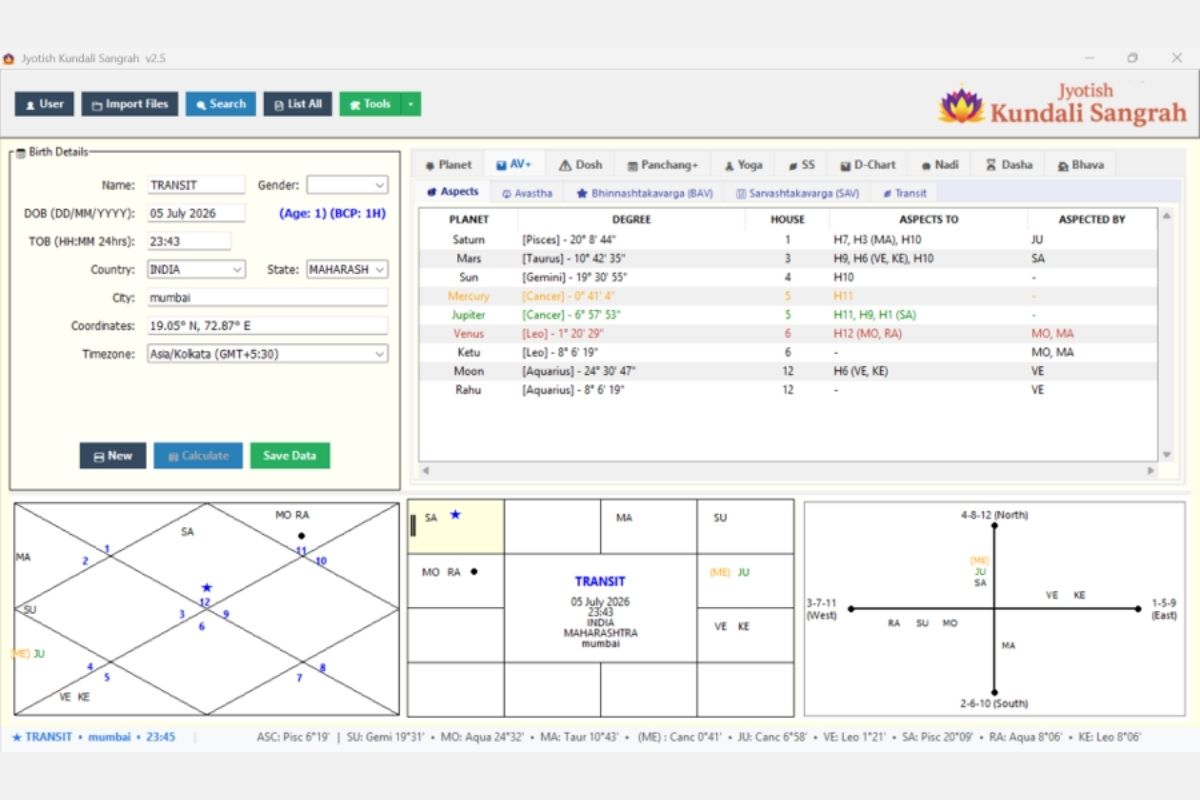
AV+ TAB — ASHTAKAVARGA & ASPECTS
Classical Vedic Graha Drishti (planetary aspects):
- Each planet showing: Degree, House, “Aspects To” (houses and planets aspected), “Aspected By” (planets casting aspect on it)
- Sub-tabs: Aspects, Avastha, Bhinnashtakavarga (BAV), Sarvashtakavarga (SAV), Transit
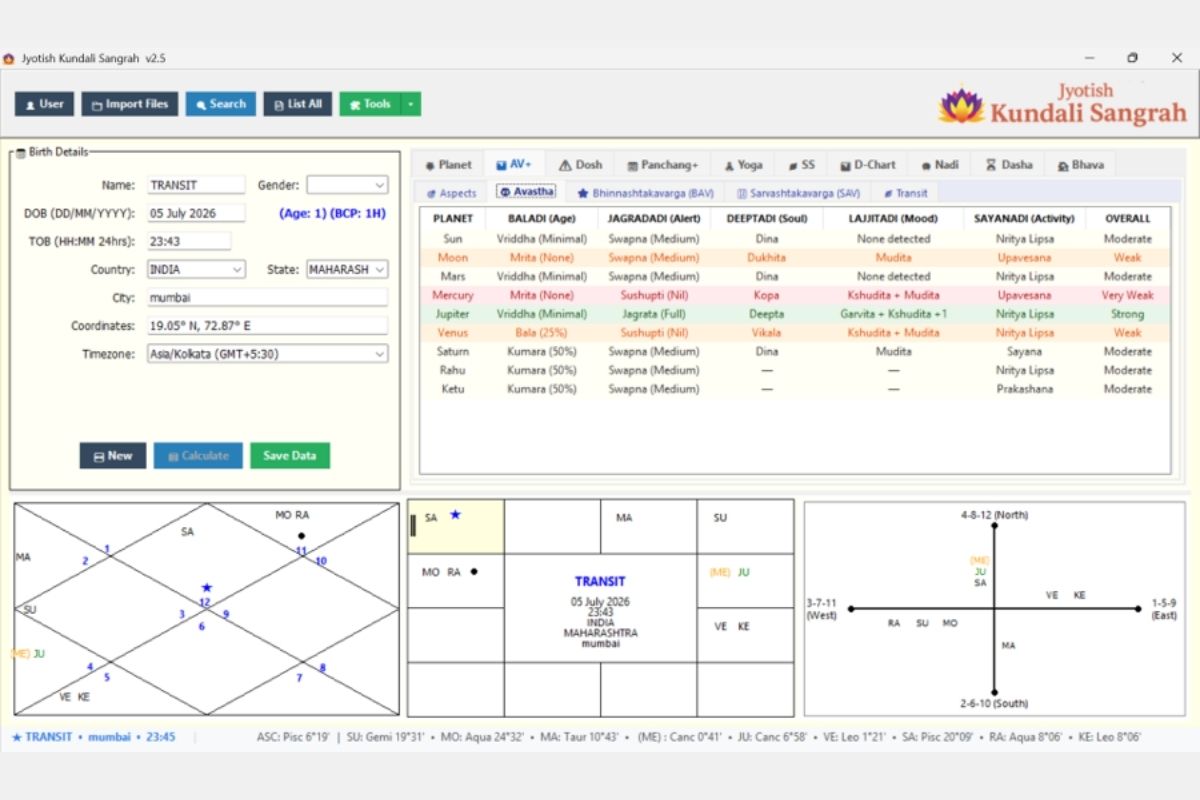
Planetary Avasthas
Five classical avastha (state) systems from BPHS Chapter 45:
- Baladi (Age): Bala, Kumara, Yuva, Vriddha, Mrita — with percentage strength
- Jagradadi (Alertness): Jagrata (Full), Swapna (Medium), Sushupti (Nil)
- Deeptadi (Soul): Deepta, Dina, Kopa, Vikala, etc.
- Lajjitadi (Mood): Mudita, Kshudita, Garvita, etc.
- Sayanadi (Activity): Nritya Lipsa, Sayana, Upavesana, Prakashana
- Overall assessment combining all systems
- Color-coded: Strong (green), Weak (red), pink highlighting for afflicted
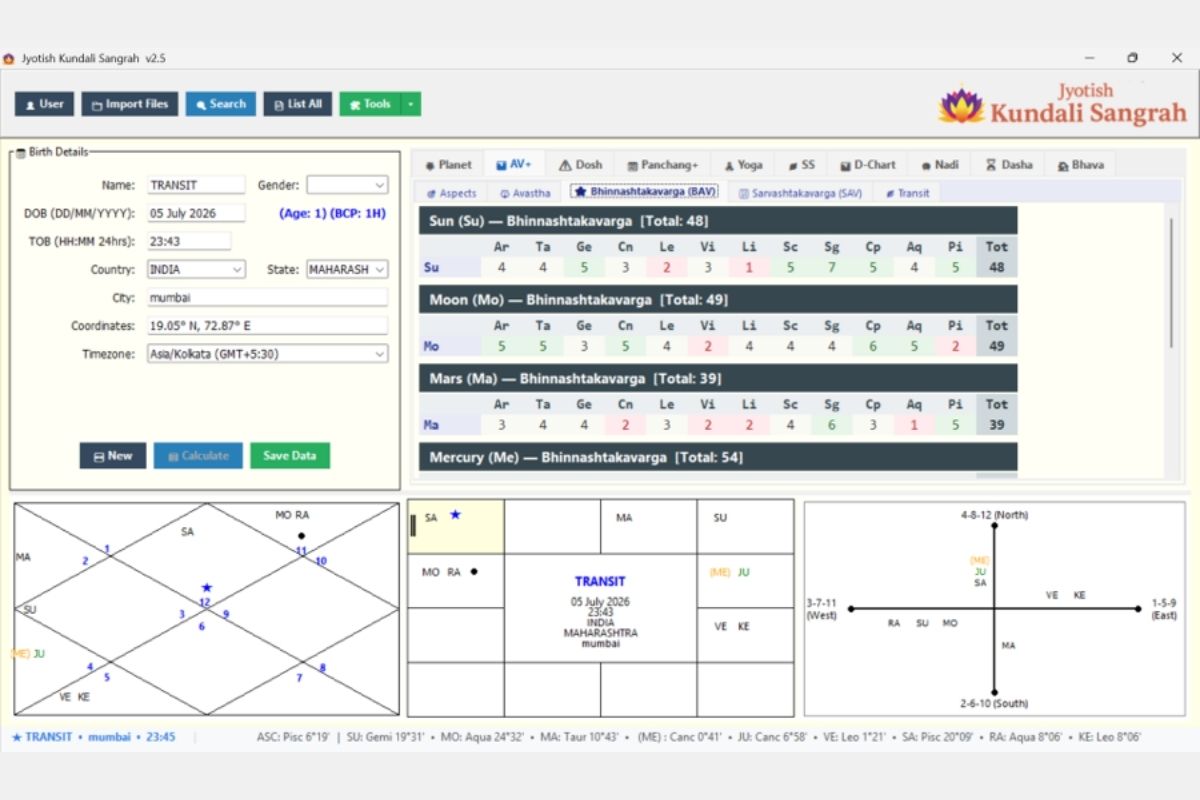
Bhinnashtakavarga (BAV)
Individual Ashtakavarga tables for each of 7 planets:
- Benefic points (bindus) across all 12 signs for each planet
- Total points per planet
- Color-coded cells: Green (5+, strong), Red (0-2, weak)
- Separate table for Sun, Moon, Mars, Mercury, Jupiter, Venus, Saturn
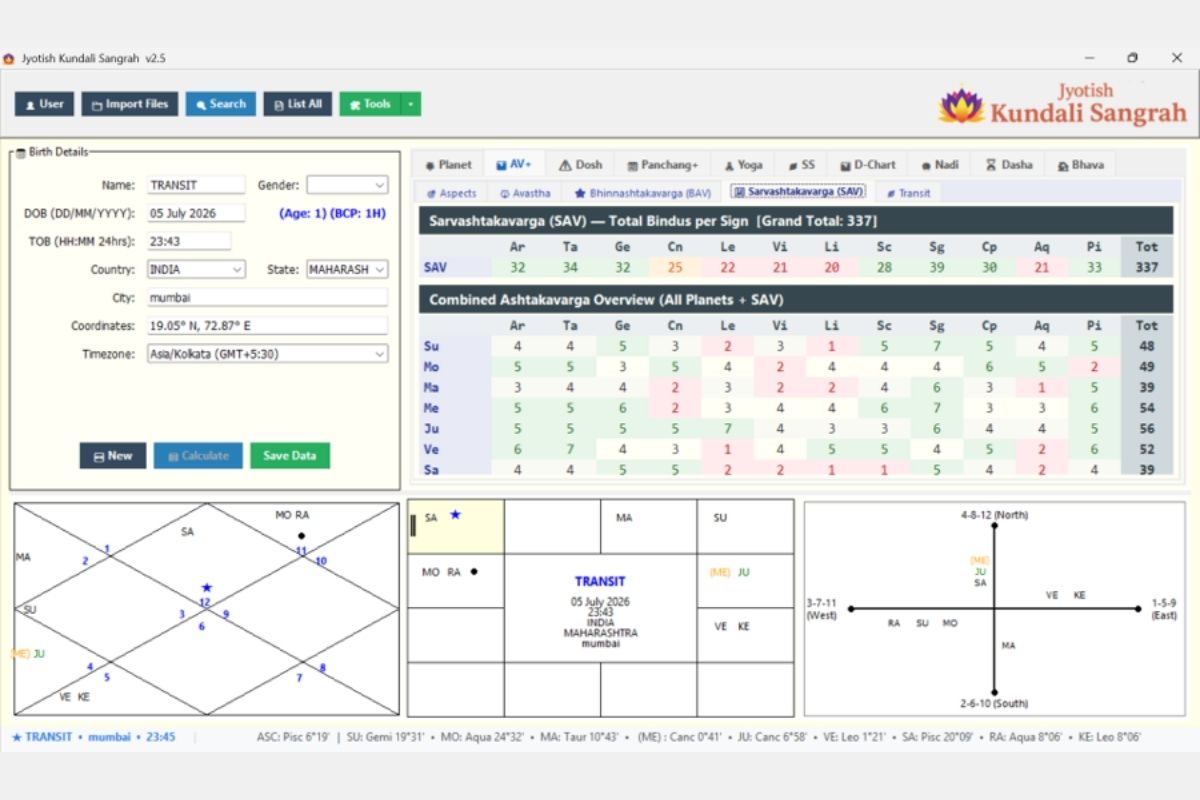
Sarvashtakavarga (SAV)
Combined Ashtakavarga overview:
- SAV row: Total bindus per sign (Grand Total always = 337)
- Combined Overview: All 7 planets’ individual scores in a master grid
- Color-coded: Green (30+ SAV, strong sign), Orange/Red (≤25, weak sign)
- Useful for transit timing and strength assessment
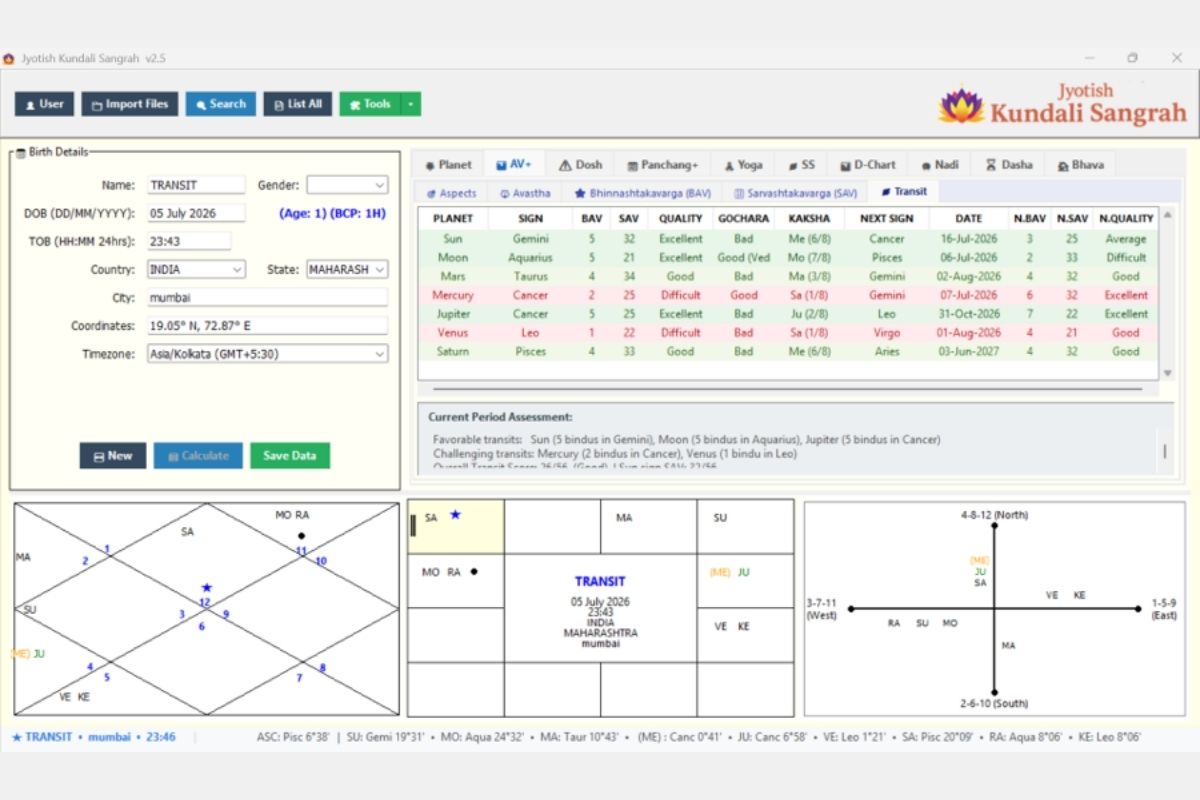
AV Transit Analysis
Ashtakavarga-based transit assessment:
- Each planet’s current transit sign with BAV score, SAV score, Quality rating
- Gochara (transit) quality: Excellent/Good/Difficult/Bad
- Kaksha lord identification
- Next sign change date with new BAV/SAV/Quality prediction
- Current Period Assessment: Summary of favorable and challenging transits
- Overall Transit Score calculation
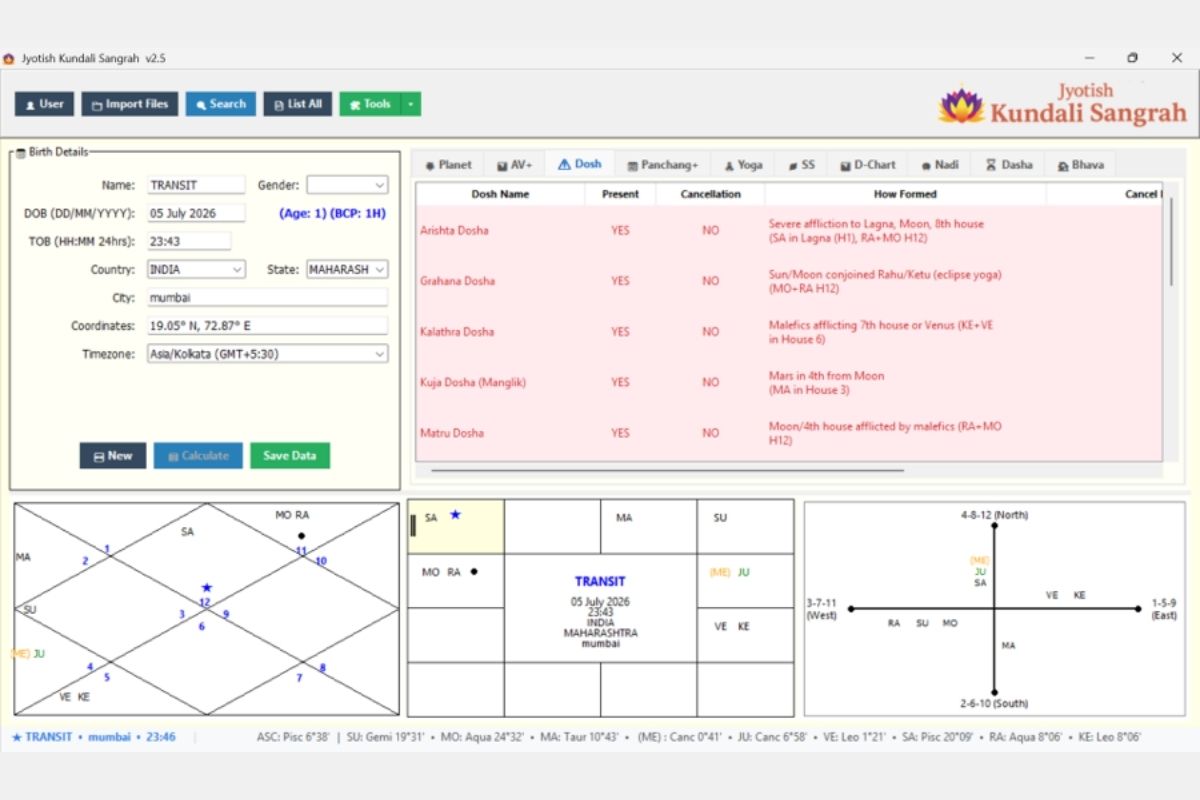
DOSHA ANALYSIS
Comprehensive dosha (affliction) analysis:
- 18 classical Vedic doshas checked
- Three-column status: Present (YES/NO), Cancellation (YES/NO), How Formed (detailed explanation)
- Doshas include: Arishta, Grahana, Kalathra, Kuja (Manglik), Matru, and more
- Red-highlighted dosha names for those present
- Clear formation logic showing planet positions and house placements
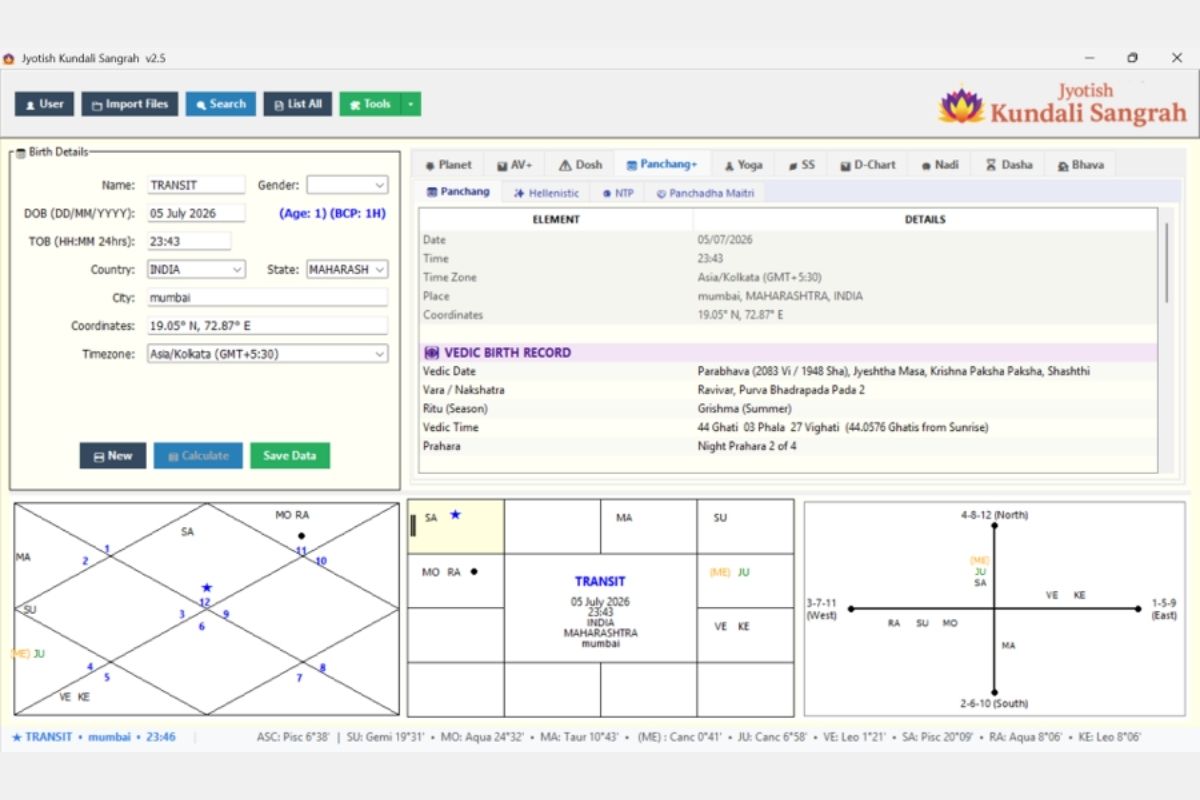
PANCHANG + TAB
Complete Vedic birth record:
- Date, Time, Time Zone, Place, Coordinates
- Vedic Birth Record: Vedic Date (Samvat/Shakabda), Masa, Paksha, Tithi
- Vara / Nakshatra with Pada
- Ritu (Season)
- Vedic Time in Ghati-Phala-Vighati format
- Prahara (watch of day/night)
- Sub-tabs: Panchang, Hellenistic, NTP, Panchadha Maitri
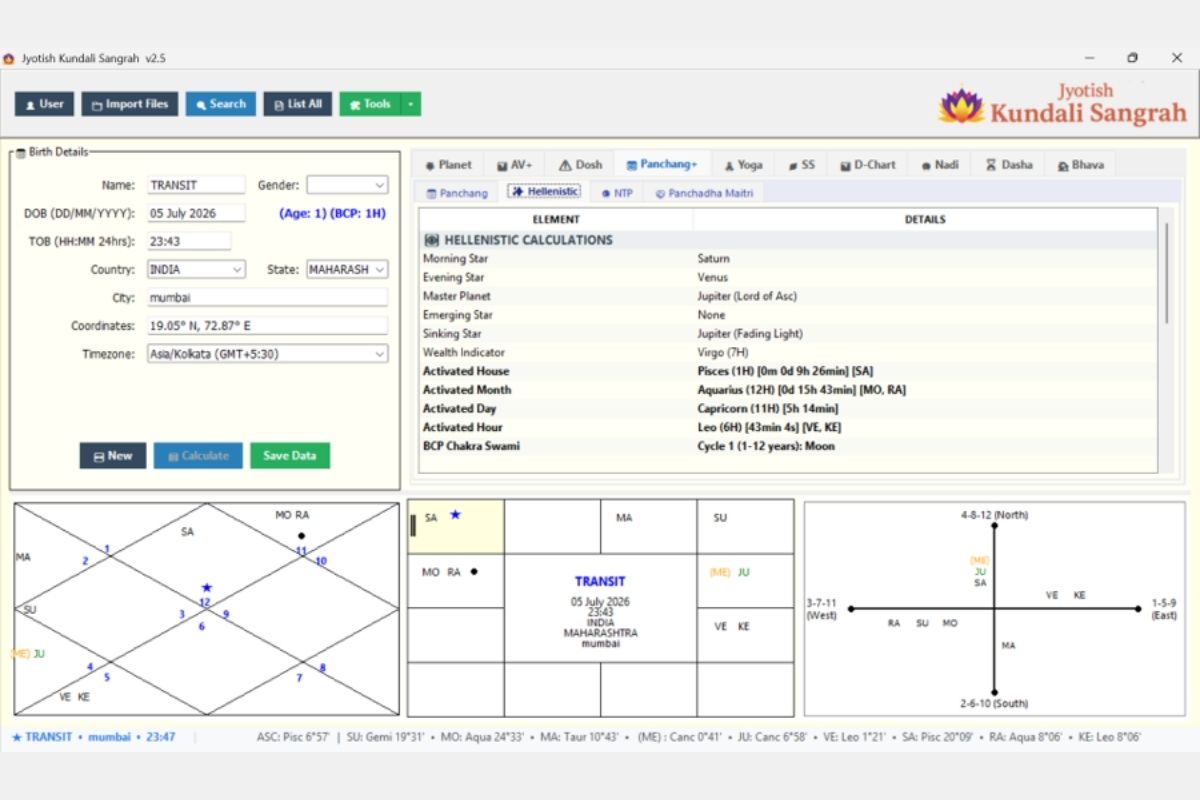
Hellenistic Calculations
Western classical astrology elements:
- Morning Star, Evening Star identification
- Master Planet (Lord of Ascendant)
- Emerging Star, Sinking Star
- Wealth Indicator
- Activated House/Month/Day/Hour with planetary rulerships and time durations
- BCP Chakra Swami (Bhrigu Chakra Paddati)
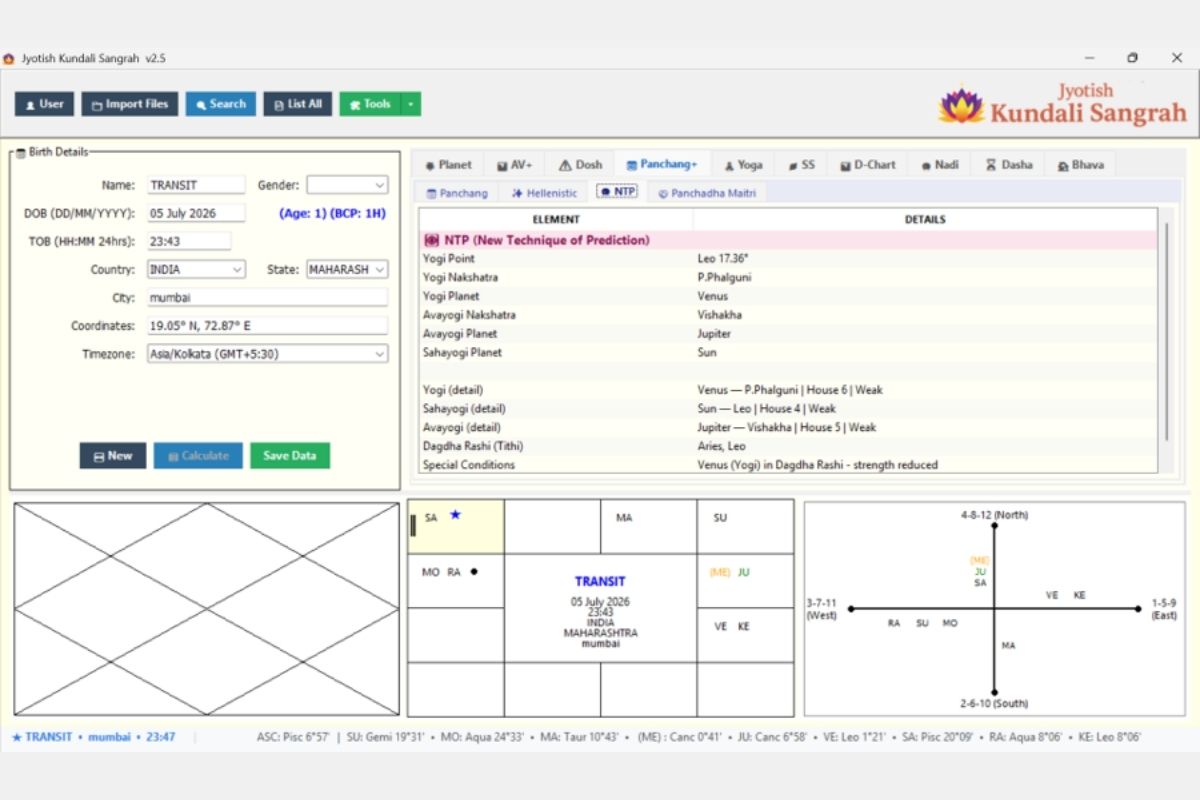
NTP (New Technique of Prediction)
Yogi/Avayogi system:
- Yogi Point (degree), Yogi Nakshatra, Yogi Planet
- Avayogi Nakshatra, Avayogi Planet
- Sahayogi Planet
- Detailed strength assessment (House, Dignity)
- Dagdha Rashi (Tithi-based burnt signs)
- Special Conditions affecting Yogi planet strength
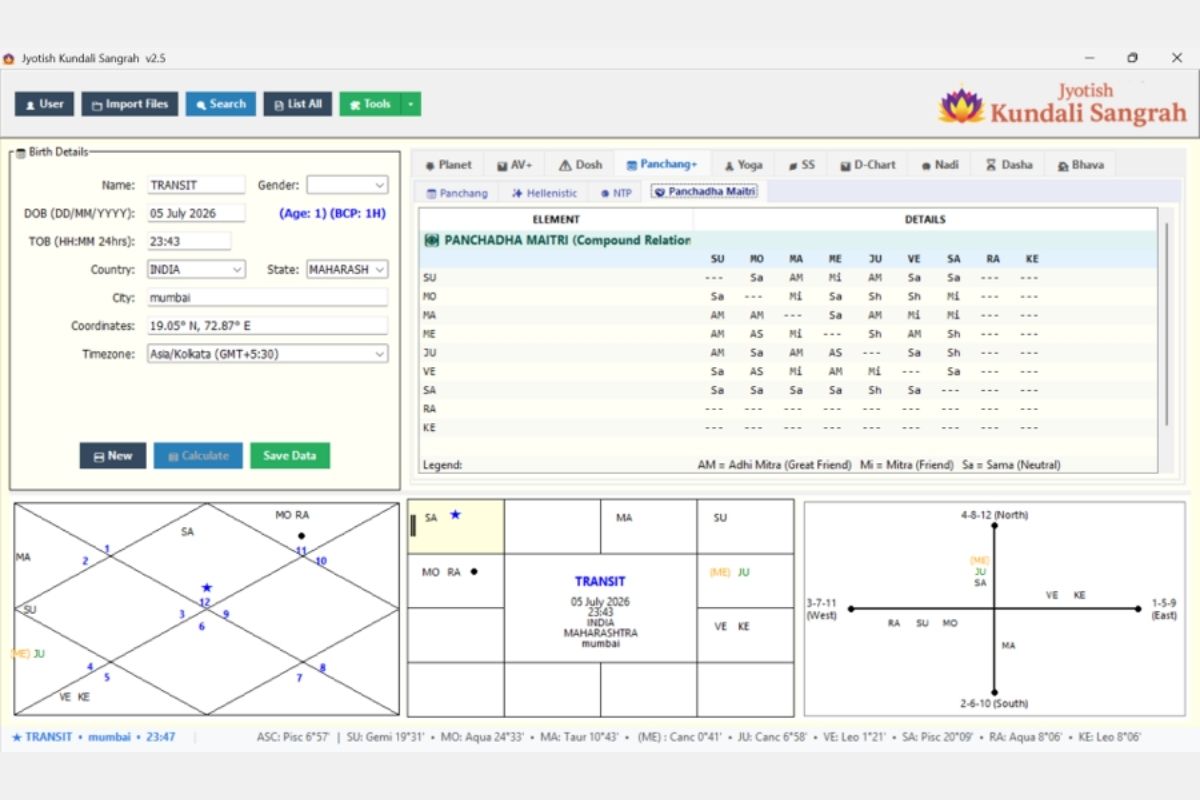
Panchadha Maitri
Compound relationship matrix (Panchadha Maitri):
- 9×9 grid showing relationships between all planets
- Categories: AM (Adhi Mitra/Great Friend), Mi (Mitra/Friend), Sa (Sama/Neutral), Sh (Shatru/Enemy), AS (Adhi Shatru/Great Enemy)
- Combines natural + temporal relationships for the specific chart
YOGA ANALYSIS
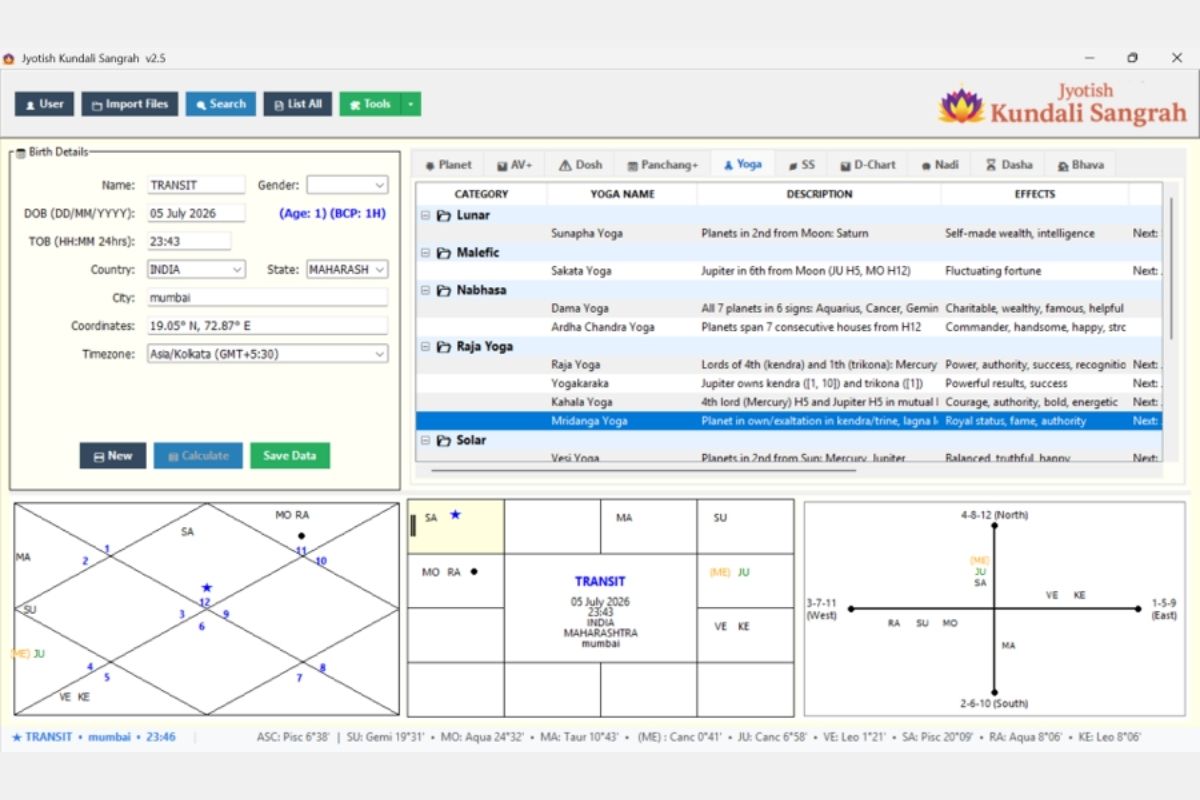
Comprehensive yoga detection engine:
- Categories: Lunar, Malefic, Nabhasa, Raja Yoga, Solar, and more
- Expandable/collapsible category groups
- Columns: Category, Yoga Name, Description (formation logic), Effects
- Highlighted rows for currently active/powerful yogas (e.g., Mridanga Yoga in green)
- 50+ yogas detected per chart from classical texts
SADE SATI & SATURN TRANSITS
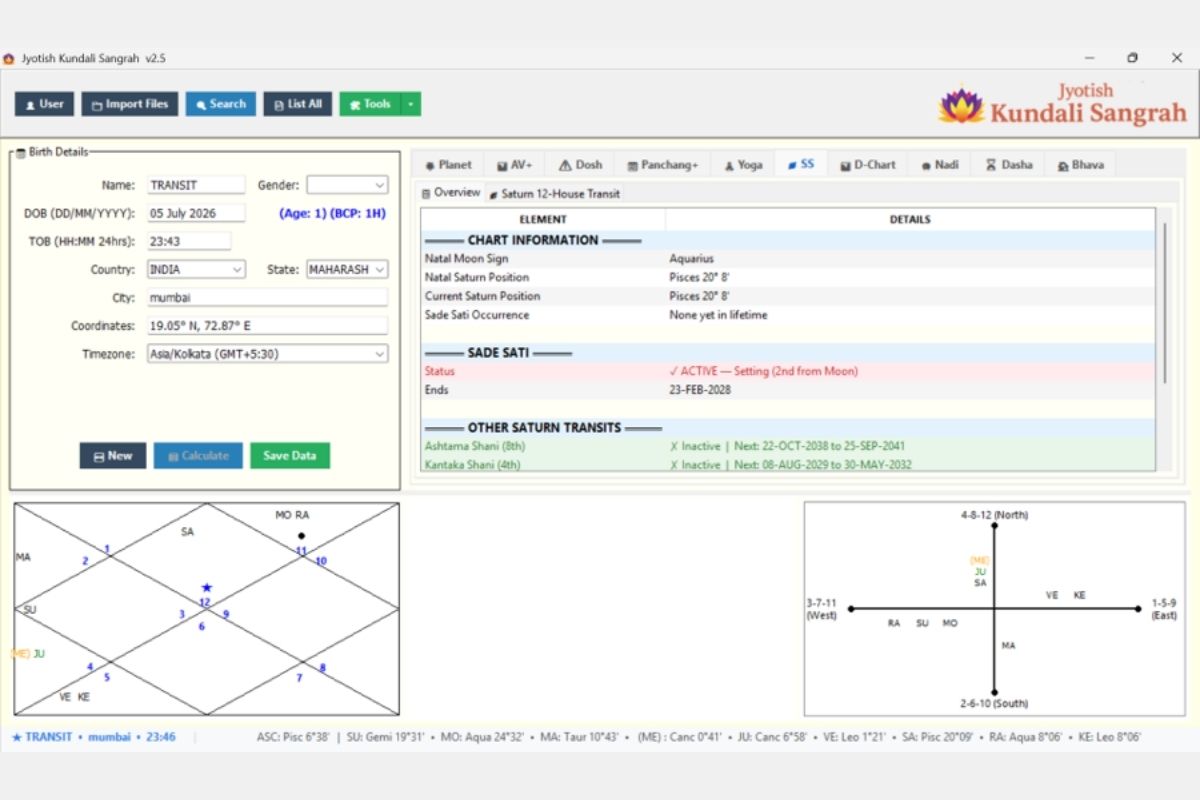
Saturn transit analysis:
- Chart Information: Natal Moon Sign, Saturn positions (natal and current)
- Sade Sati Status: Active/Inactive with current phase (Rising/Peak/Setting) and end date
- Other Saturn Transits: Ashtama Shani (8th), Kantaka Shani (4th), with next occurrence dates
- Color-coded: Active periods in red/pink, inactive in green
DIVISIONAL CHARTS
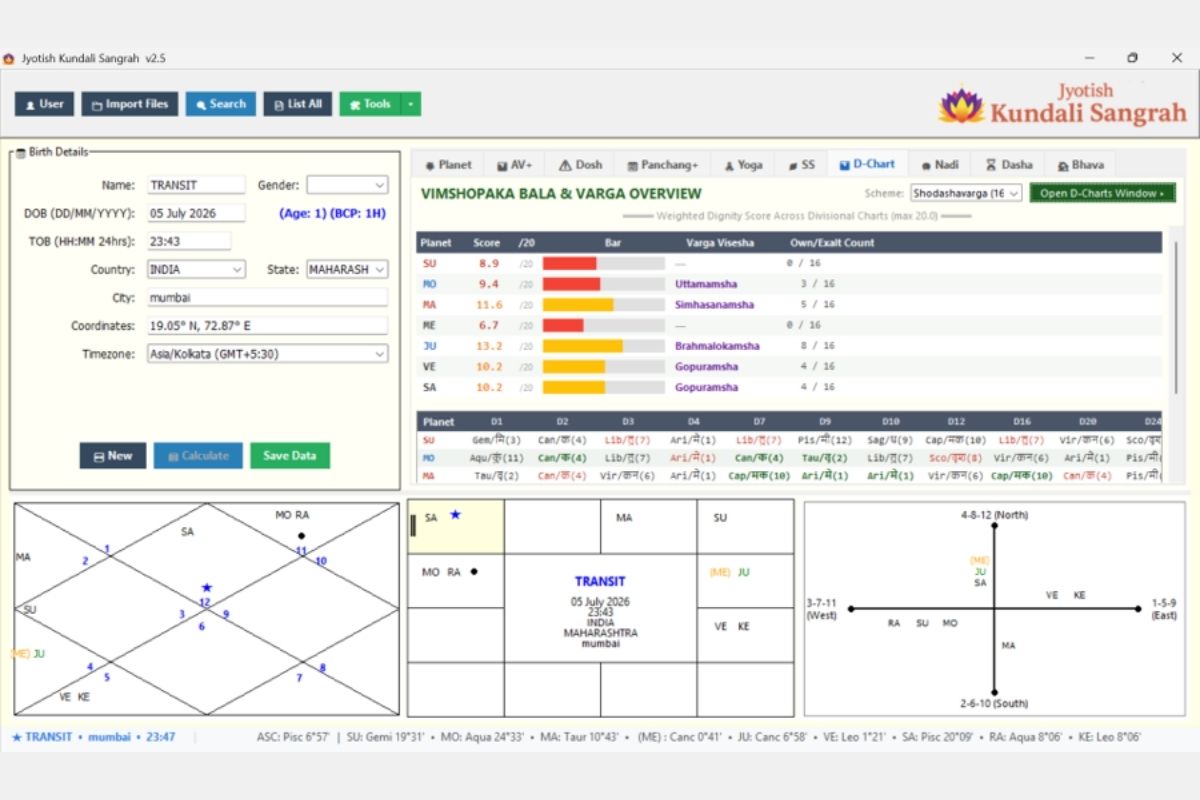
Divisional chart strength analysis:
- Vimshopaka Bala: Weighted dignity score across all D-charts (max 20.0) with visual bar
- Varga Vishesha: Special varga designations (Uttamamsha, Simhasanamsha, Brahmalokamsha, Gopuramsha)
- Own/Exalt Count across 16 divisional charts
- Detailed grid: Planet positions in D1 through D60 with sign and dignity markers
- Scheme selector: Shodashavarga (16), Saptavarga (7), etc.
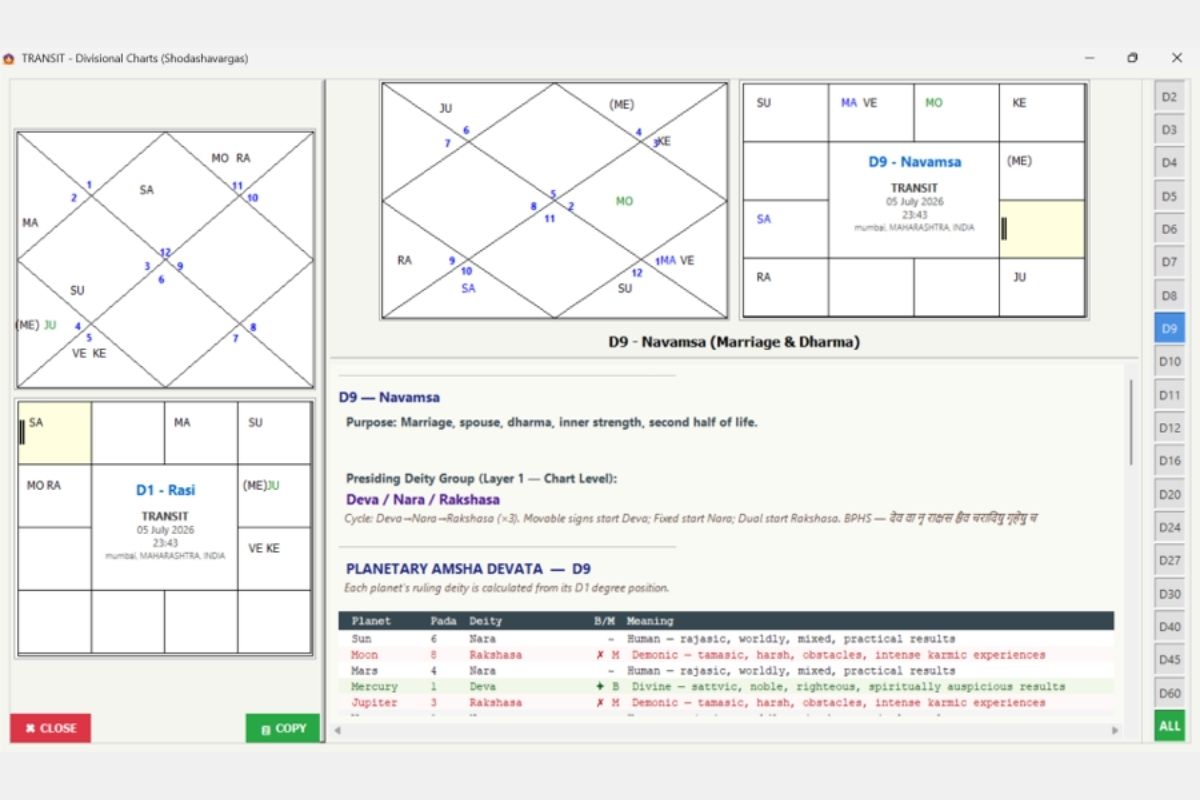
D-Chart Window — Individual Chart Detail
Dedicated divisional chart window:
- Full North Indian + South Indian chart display for selected D-chart
- D1 (Rashi) reference chart for comparison
- D-Chart description: Purpose and classical significance (e.g., “D9 — Navamsa: Marriage, spouse, dharma, inner strength, second half of life”)
- Presiding Deity Group: Deva/Nara/Rakshasa classification with BPHS shloka
- Planetary Amsha Devata table: Each planet’s Pada, Deity, Benefic/Malefic nature, Meaning
- Quick-access sidebar: D2-D60 buttons
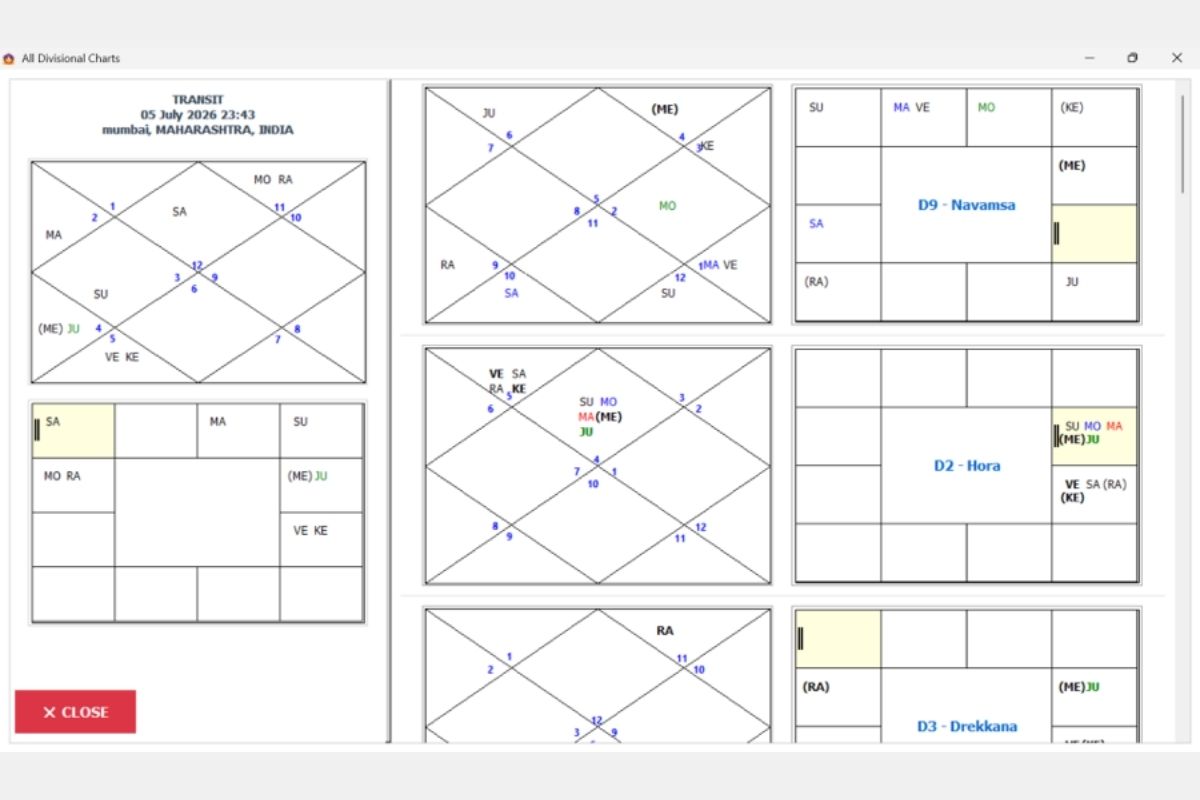
All Divisional Charts View
Simultaneous display of all divisional charts:
- D1 (Rashi), D9 (Navamsa), D2 (Hora), D3 (Drekkana), and more
- Both North and South Indian formats
- Scrollable grid layout for research comparison
- Chart identification labels (D9 – Navamsa, D2 – Hora, etc.)
NADI JYOTISH TOOLS
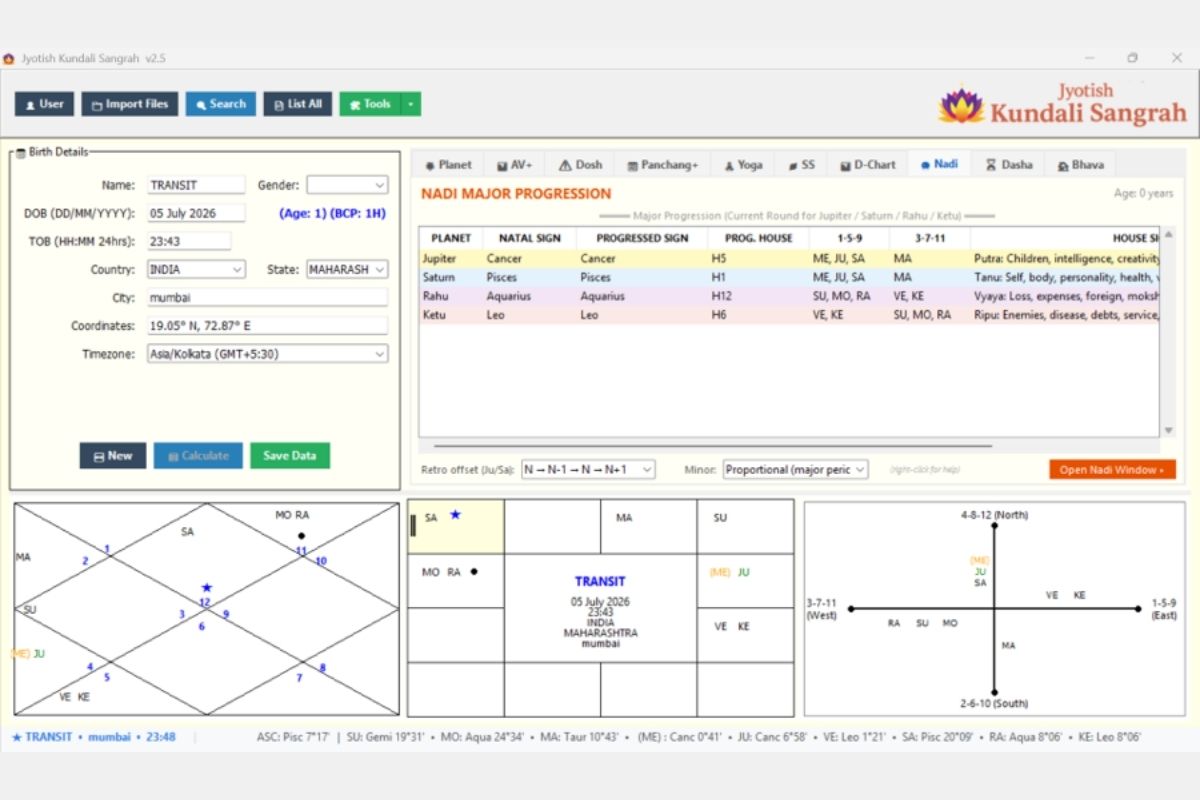
Quick Nadi overview on main screen:
- Current round for Jupiter/Saturn/Rahu/Ketu progressions
- Natal Sign, Progressed Sign, Progressed House
- BNN Aspect groups: 1-5-9 and 3-7-11 positions
- House Signification interpretation
- Retrograde offset and Minor period settings
- “Open Nadi Window” button for full tools
- Research option to select the traversing of JU and SA when retrograde
- JU aspect on retro SA option enabled when SA is retro in the chart to set the traverse pattern
Nadi Progression (Full Window)
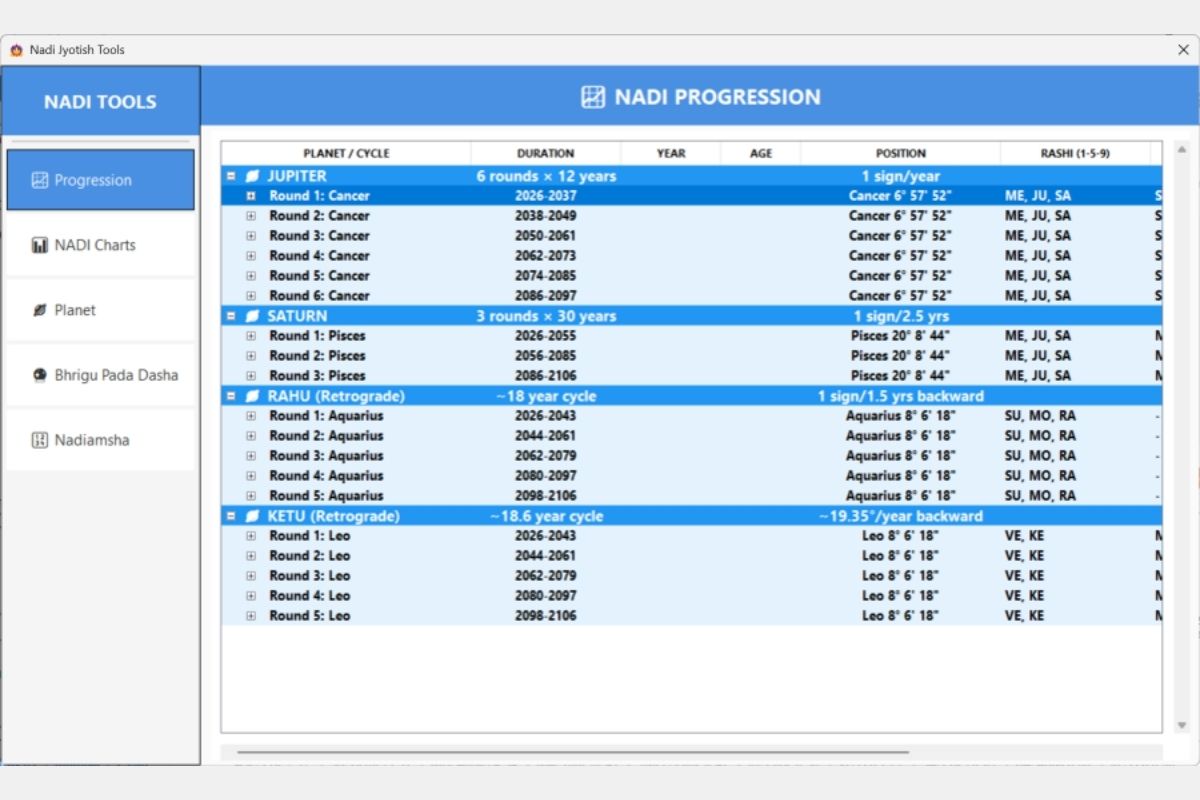
Complete 80-year Nadi progression system:
- Jupiter: 6 rounds × 12 years (1 sign/year)
- Saturn: 3 rounds × 30 years (1 sign/2.5 years)
- Rahu (Retrograde): ~18-year cycle (1 sign/1.5 years backward)
- Ketu (Retrograde): ~18.6-year cycle (~19.35°/year backward)
- Expandable tree structure showing rounds → years → months
- Position and BNN aspect (Rashi 1-5-9) for each period
- Current period highlighted in blue
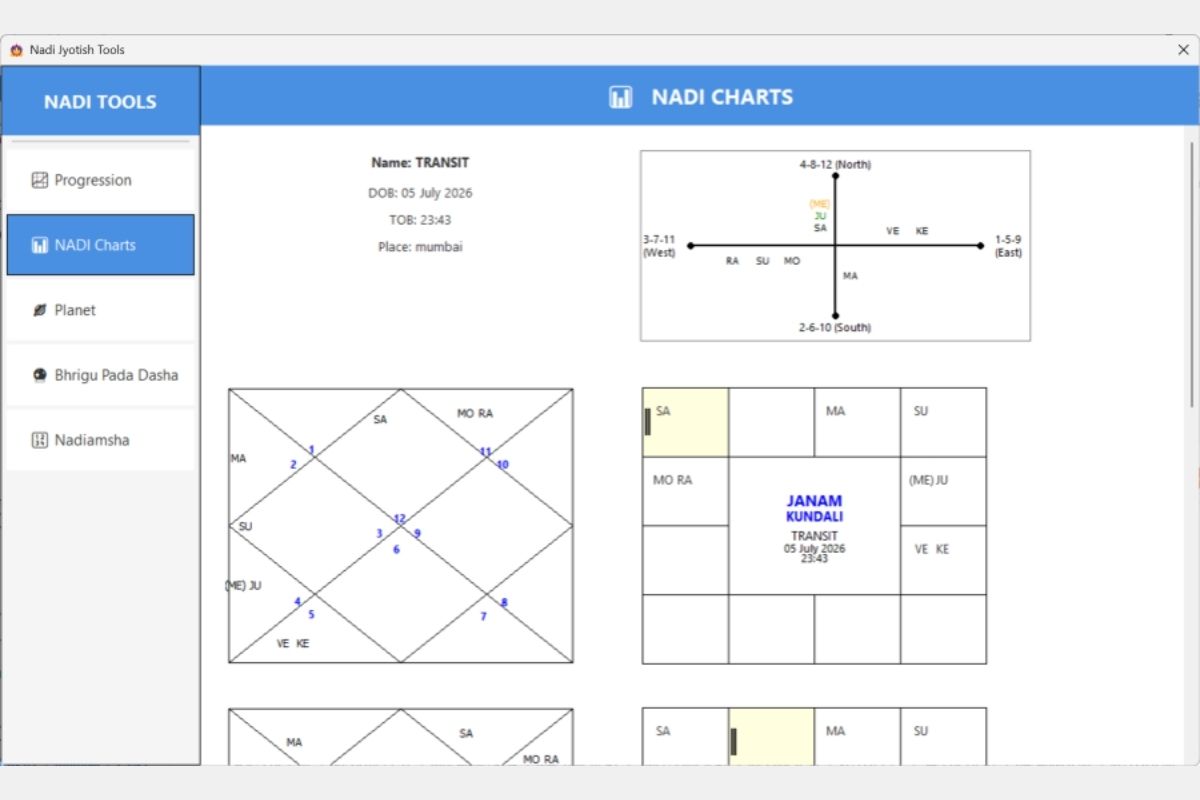
Nadi Charts (5 Perspectives)
Five specialized chart views:
- BNN Directional Chart (cross-axis: 4-8-12 North, 1-5-9 East, 2-6-10 South, 3-7-11 West)
- Native Rashi Chart (North Indian)
- Janam Kundali (South Indian)
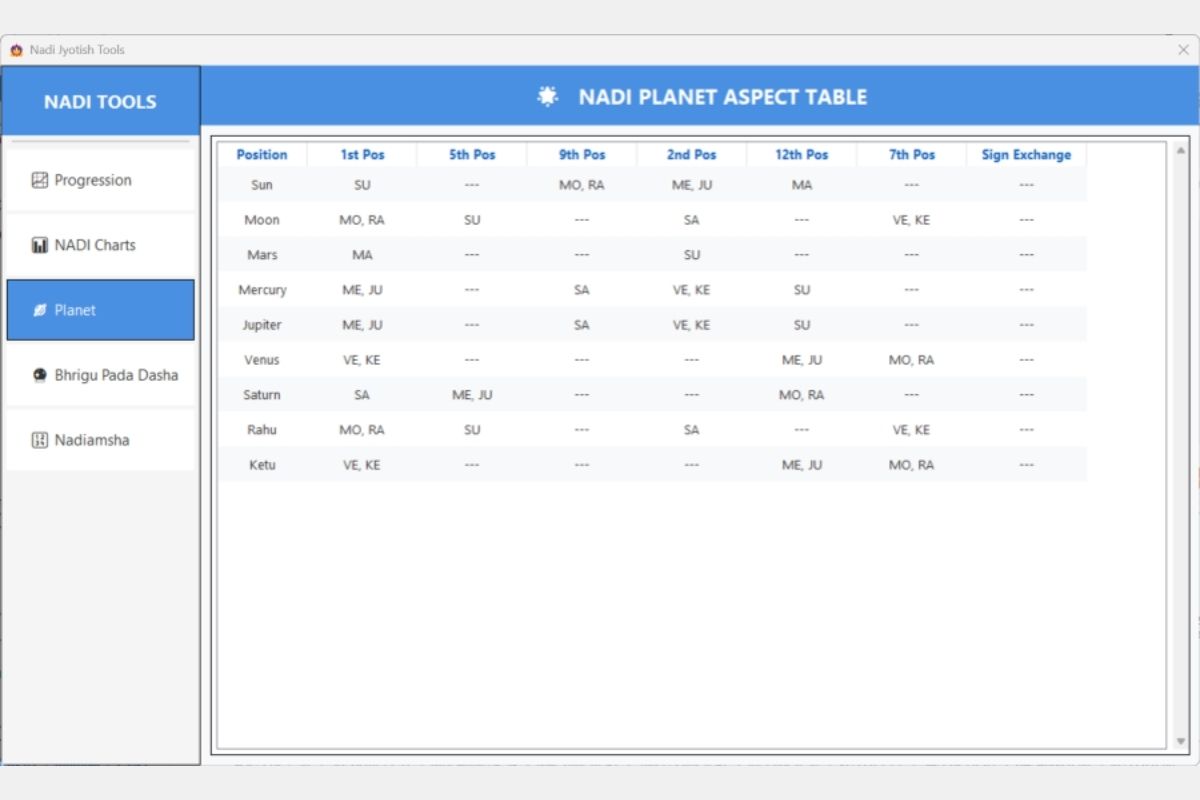
Nadi Planet Aspect Table
BNN aspect analysis for all planets:
- Columns: Position (1st), 5th, 9th, 2nd, 12th, 7th positions, Sign Exchange
- Shows which planets occupy each BNN aspect position relative to every other planet
- Essential for Nadi predictive methodology
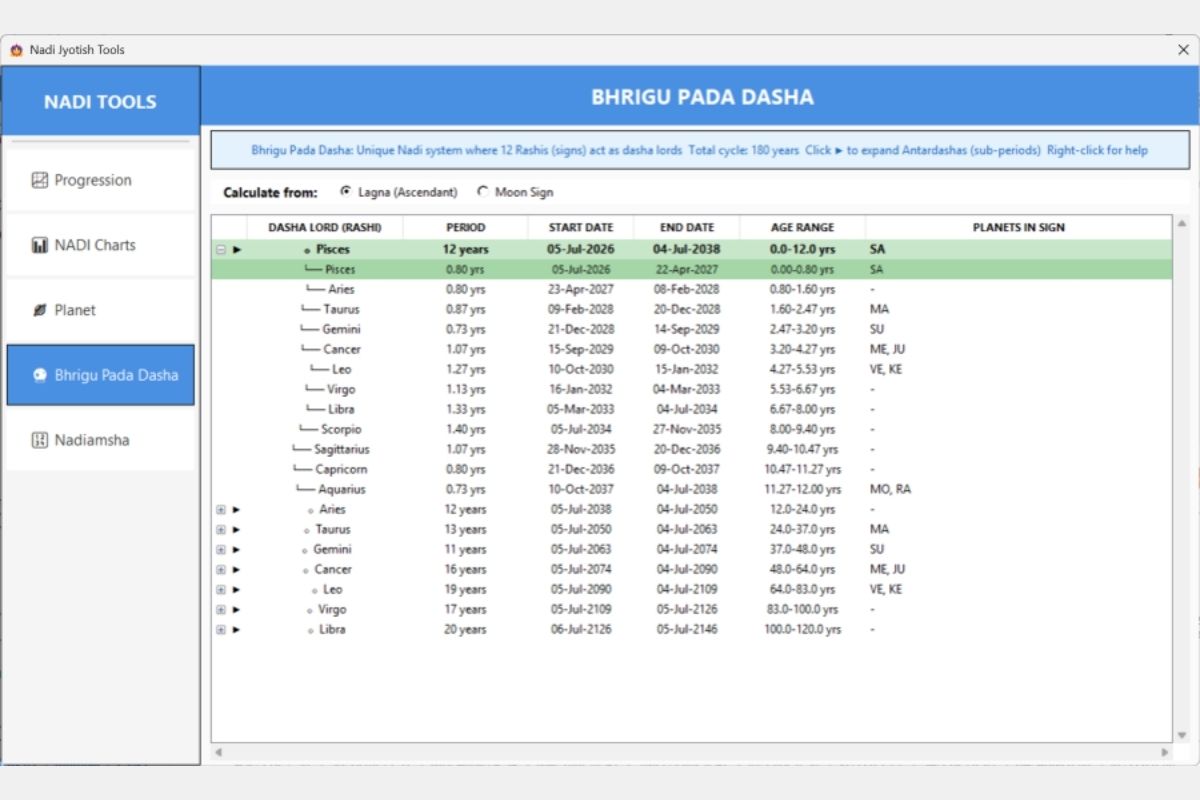
Bhrigu Pada Dasha
Unique 180-year Nadi dasha system:
- 12 Rashis act as dasha lords (sign-based periods)
- Calculate from Lagna (Ascendant) or Moon Sign
- Expandable tree: Main period → Sub-periods (Antardashas for each sign within the main sign)
- Shows: Period duration, Start/End dates, Age range, Planets in sign
- Current period highlighted in green
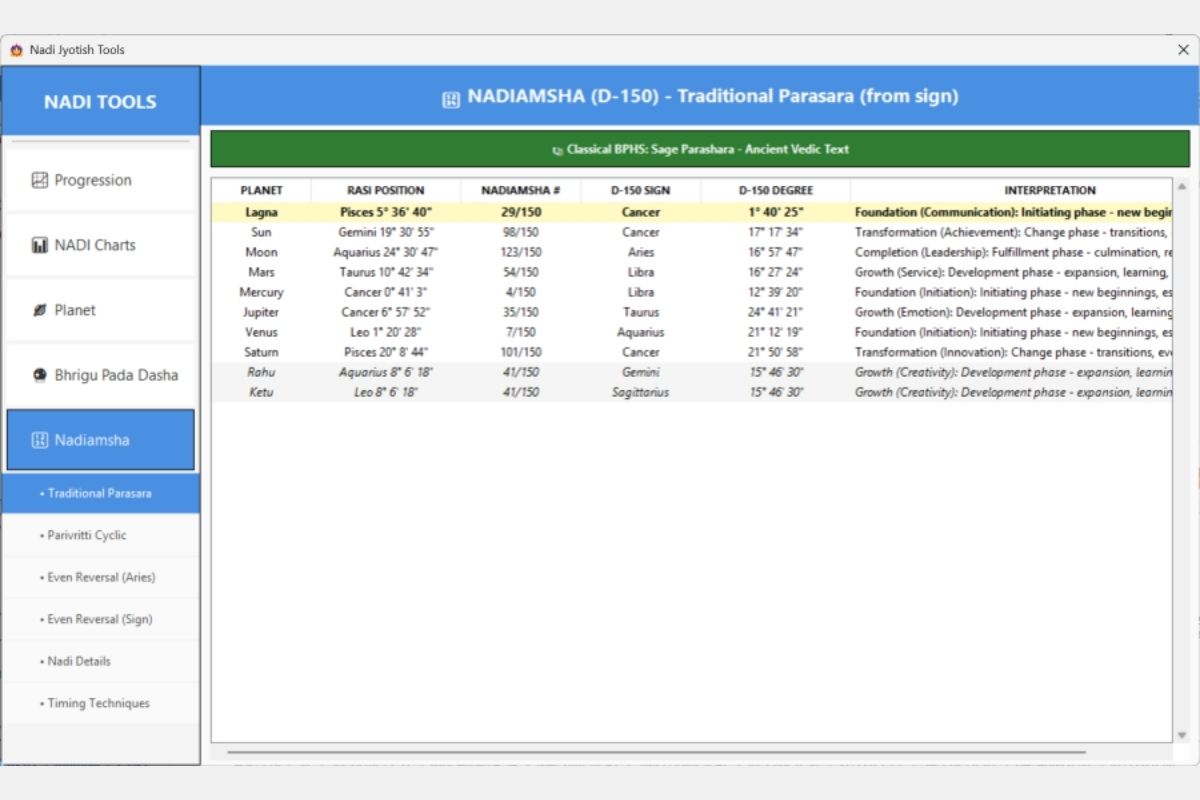
Nadiamsha (D-150)
D-150 (Nadiamsha) divisional chart:
- 4 calculation methods: Traditional Parasara, Parivritti Cyclic, Even Reversal (Aries), Even Reversal (Sign)
- Columns: Planet, Rasi Position, Nadiamsha # (1-150), D-150 Sign, D-150 Degree, Interpretation
- Each interpretation combines concept + phase (Foundation, Growth, Transformation, Completion)
- Classical BPHS reference: “Sage Parashara – Ancient Vedic Text”
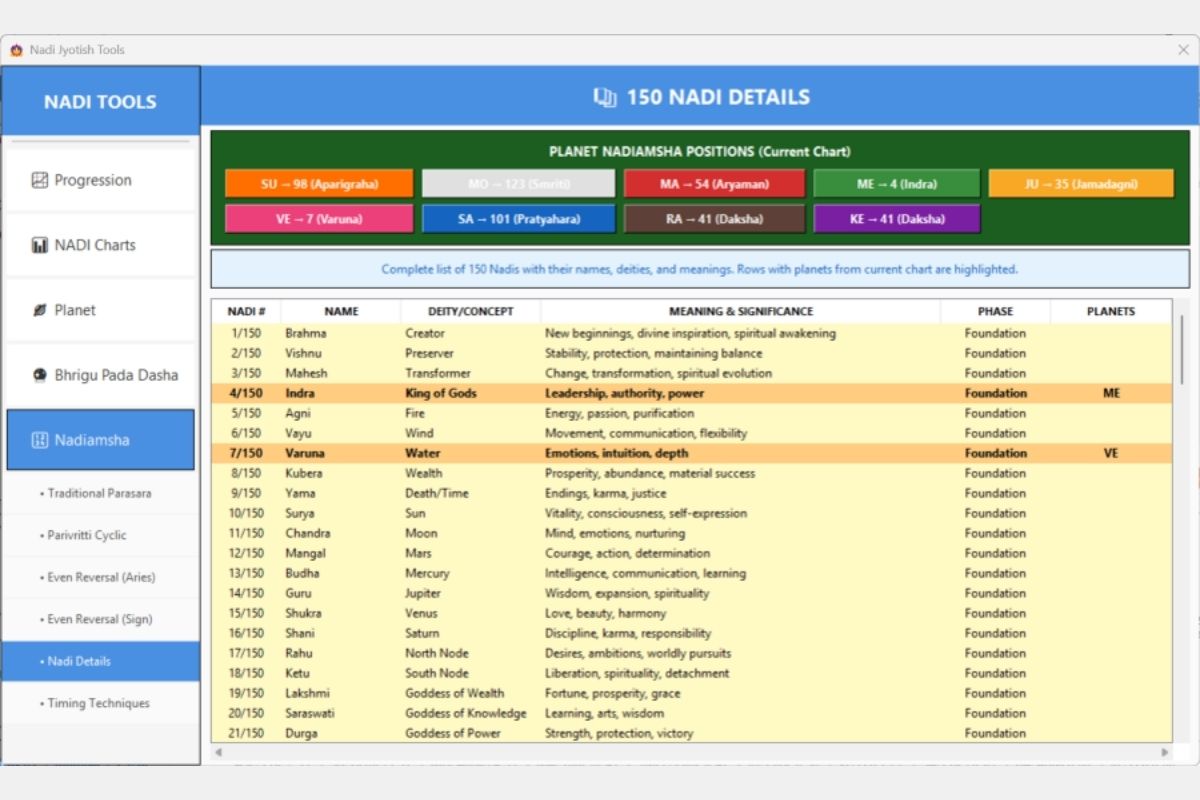
Nadi Amsha Details (150 Nadis)
Complete reference of all 150 Nadiamsha positions:
- Planet positions shown with color-coded badges (SU→98, MO→123, MA→54, etc.)
- Full table: Nadi #, Name, Deity/Concept, Meaning & Significance, Phase, Planets
- Rows with current chart’s planets highlighted in bold/yellow
- Sub-sections: Nadi Details, Timing Techniques
DASHA SYSTEMS
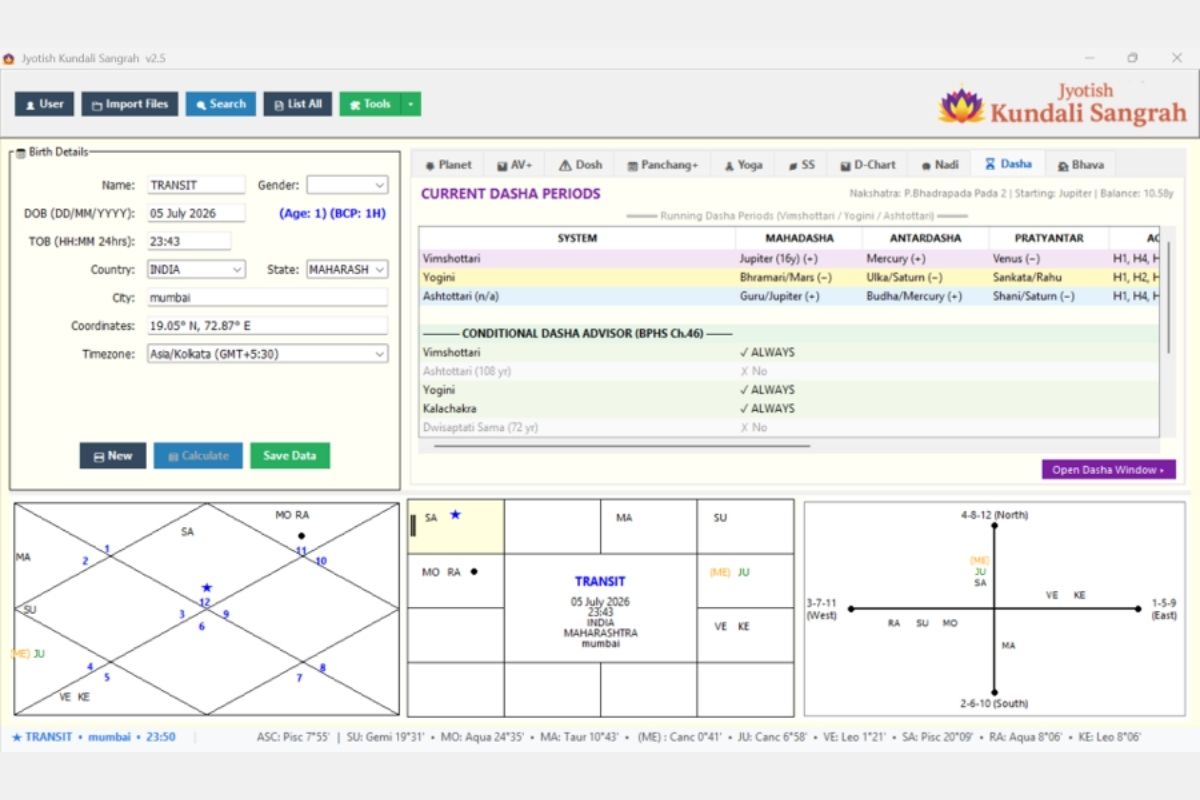
Quick dasha overview on main screen:
- Running periods for Vimshottari, Yogini, and Ashtottari simultaneously
- Each showing: Mahadasha, Antardasha, Pratyantara levels with +/- benefic indicators
- Conditional Dasha Advisor (BPHS Ch.46): Which dasha systems are applicable to this chart
- Nakshatra/Starting Mahadasha/Balance information
- “Open Dasha Window” button
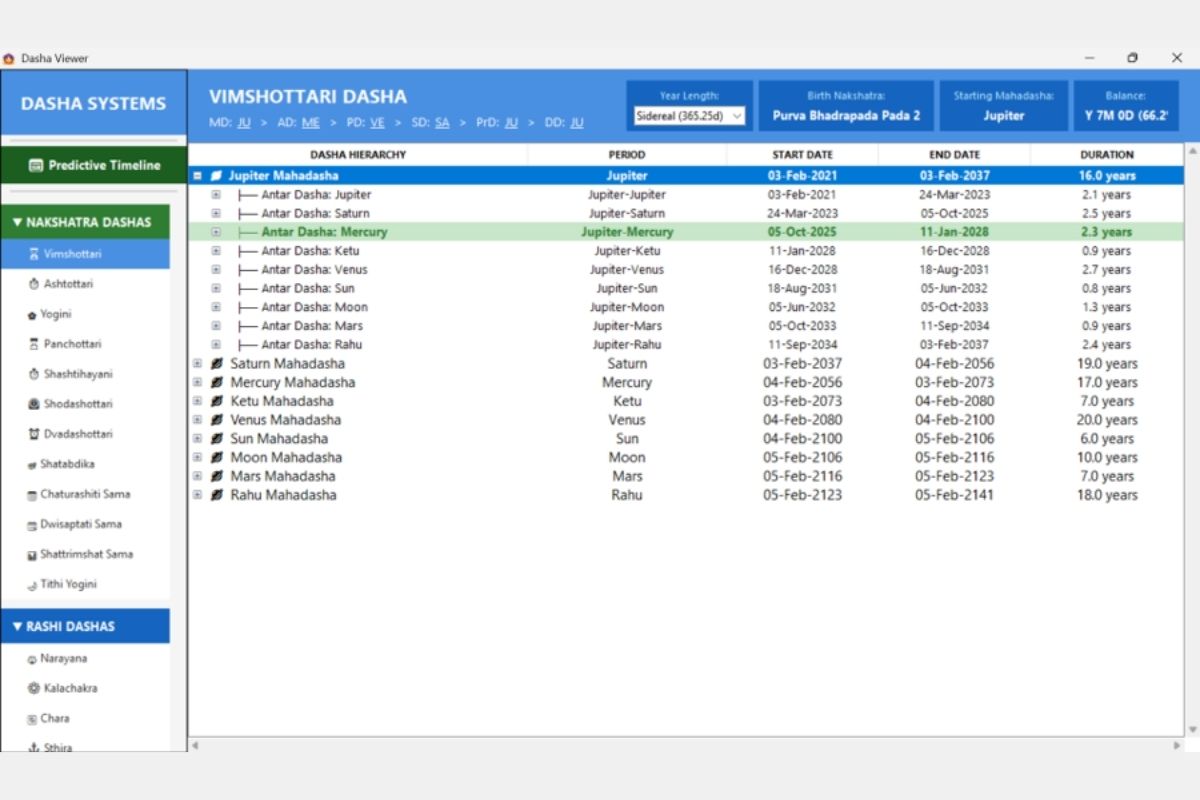
Dasha Viewer — Full Window
Comprehensive dasha explorer with 19 dasha systems:
- NAKSHATRA DASHAS (13): Vimshottari, Ashtottari, Yogini, Panchottari, Shashtihayani, Shodashottari, Dvadashottari, Shatabdika, Chaturashiti Sama, Dwisaptati Sama, Shattrimshat Sama, Tithi Yogini
- RASHI DASHAS (5): Narayana, Kalachakra, Chara, Sthira, + more
- Predictive Timeline view
- Hierarchical tree: Mahadasha → Antardasha → Pratyantara → Sookshma → Prana
- Breadcrumb showing current position (MD > AD > PD > SD > DD)
- Year length selector (Sidereal 365.25d)
- Duration in years for each period
- Currently running period highlighted in green/teal
BHAVA (HOUSE) ANALYSIS
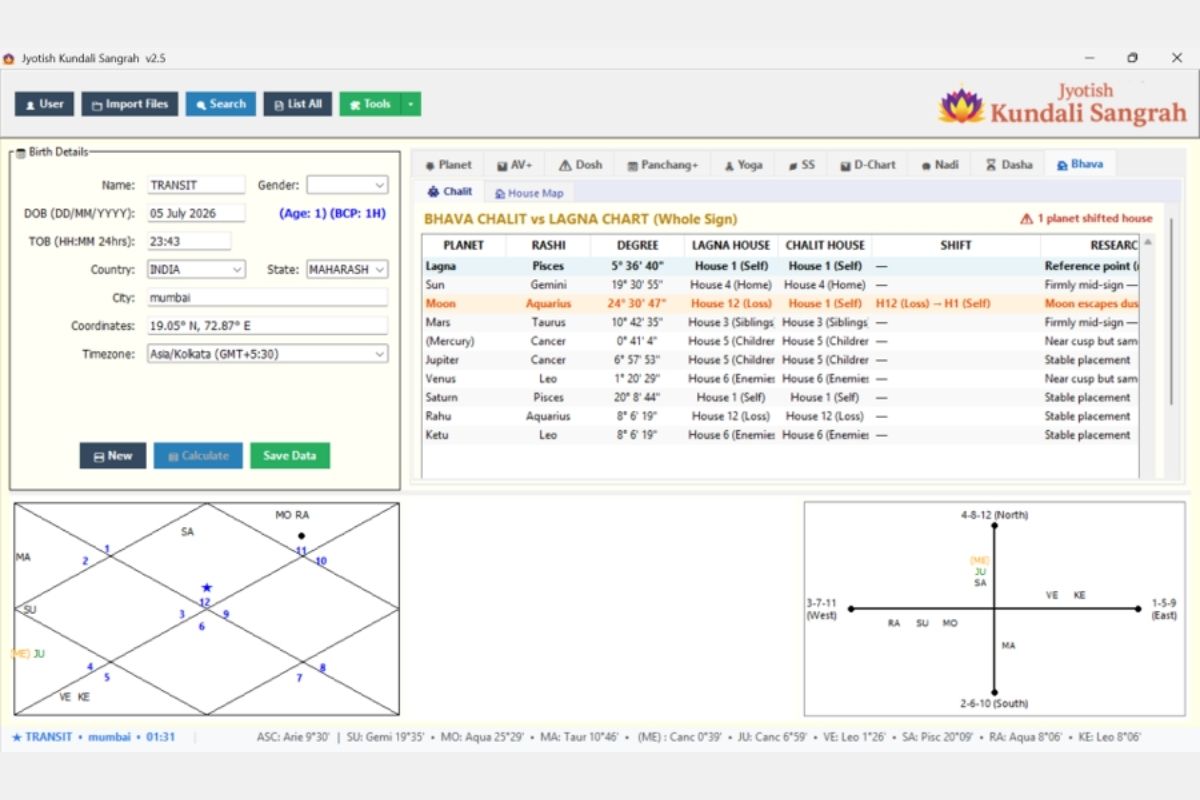
Whole Sign vs Bhava Chalit comparison:
- Side-by-side: Lagna House (whole sign) vs Chalit House (degree-based)
- Shift column: Shows which planets change houses (highlighted in orange)
- Research notes explaining shift logic (e.g., “Moon escapes dusthana”)
- Alert: “1 planet shifted house” notification
House Mapping
Unique dual-house system analysis:
- Whole House (Topic): What life area the planet signifies
- Degree House (Power): Where the planet draws its operational strength
- Momentum Status: Settled Power, Rising Power, Fading Power, Receding Power (Unstable)
- Includes Upagrahas (Dhuma, etc.) in the analysis
- Helps resolve the “which house system” debate by showing both simultaneously
TRANSIT TOOLS
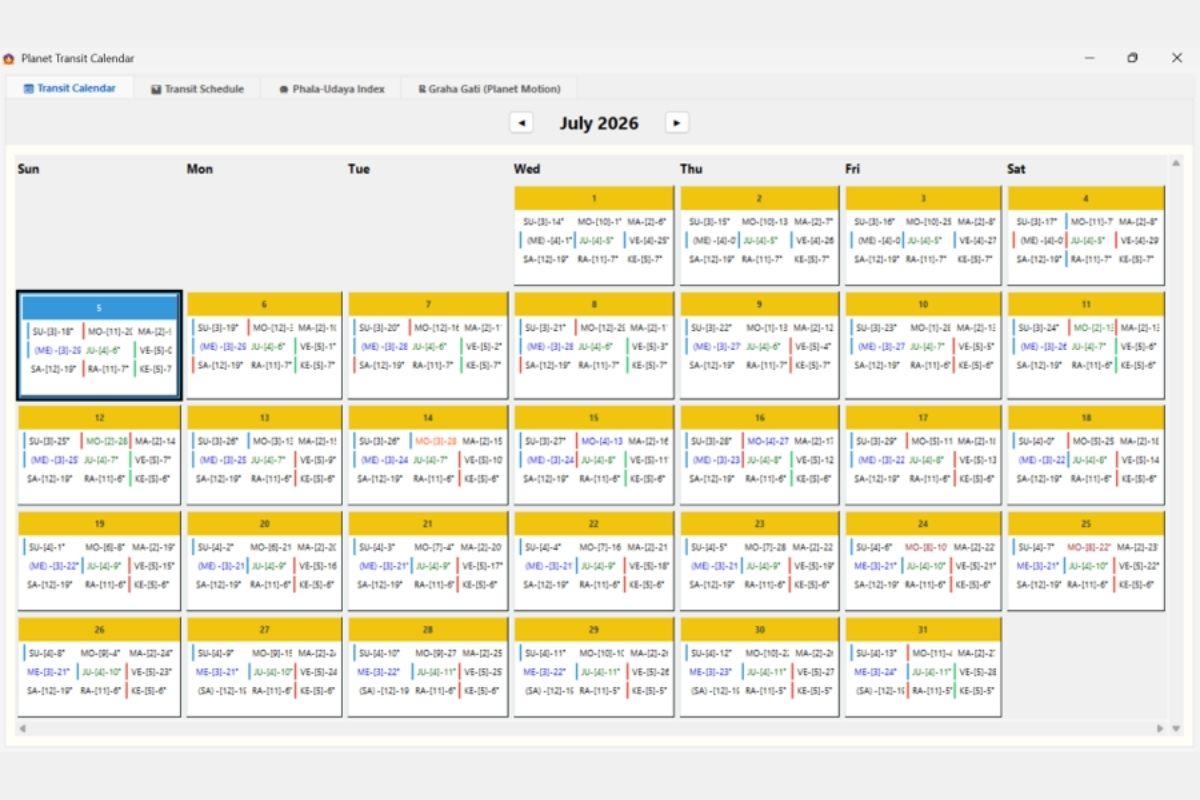
Monthly calendar view of planetary transits:
- Grid format (Sun-Sat) with all planets shown daily
- Color-coded dignity indicators: Yellow/Gold (own/exalted), Red text (enemy/debilitated), Green (neutral)
- Today’s date highlighted with blue border
- Compact format: Planet-[House]-Degree for each entry
- Navigation arrows for month-by-month browsing
- Tabs: Transit Calendar, Transit Schedule, Phala-Udaya Index, Graha Gati
Transit Schedule
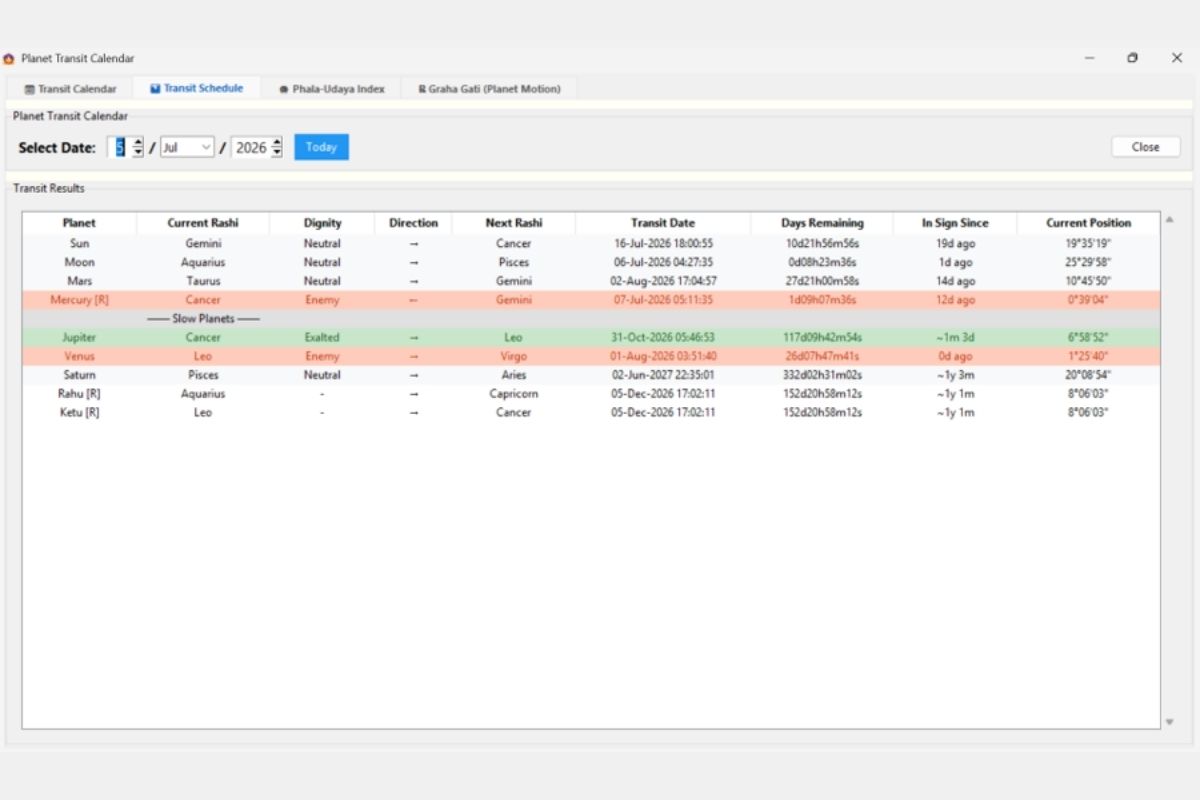
Detailed planetary transit data:
- Columns: Planet, Current Rashi, Dignity, Direction, Next Rashi, Transit Date, Days Remaining, In Sign Since, Current Position (degrees)
- Color-coded rows: Green (exalted, e.g., Jupiter in Cancer), Orange/Red (enemy sign, imminent transit)
- Separates Fast Planets from Slow Planets
- Date picker for any date analysis
- “Today” quick button
Phala-Udaya Index (Karma Activation)
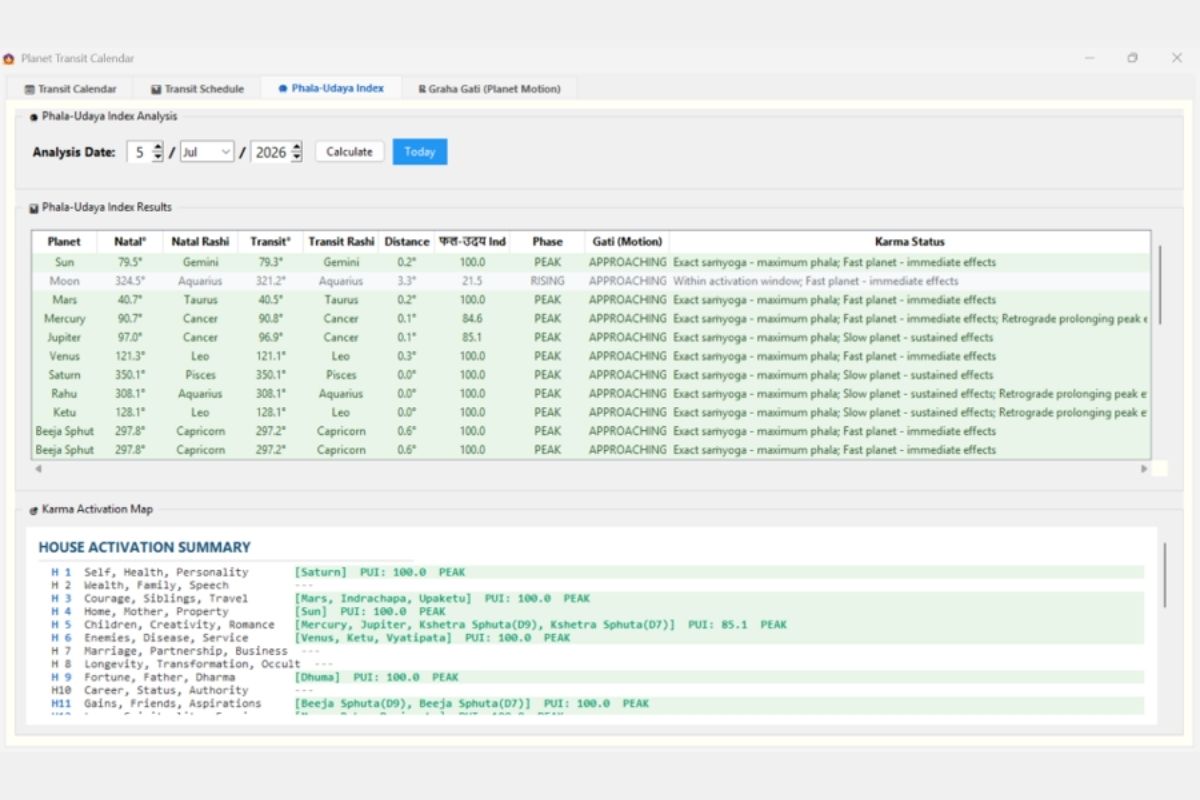
Proprietary transit-to-natal activation scoring:
- Phala-Udaya Index Results: Natal degree, Transit degree, Distance, PUI Score (0-100), Phase, Gati (Motion), Karma Status
- Phases: PEAK (exact conjunction), RISING (approaching), FADING
- Karma Activation Map: House-by-house summary showing which houses are activated and by which planets
- Based on transit proximity to natal positions — “Exact samyoga = maximum phala”
- Includes Upagrahas (Beeja Sphuta) in the analysis
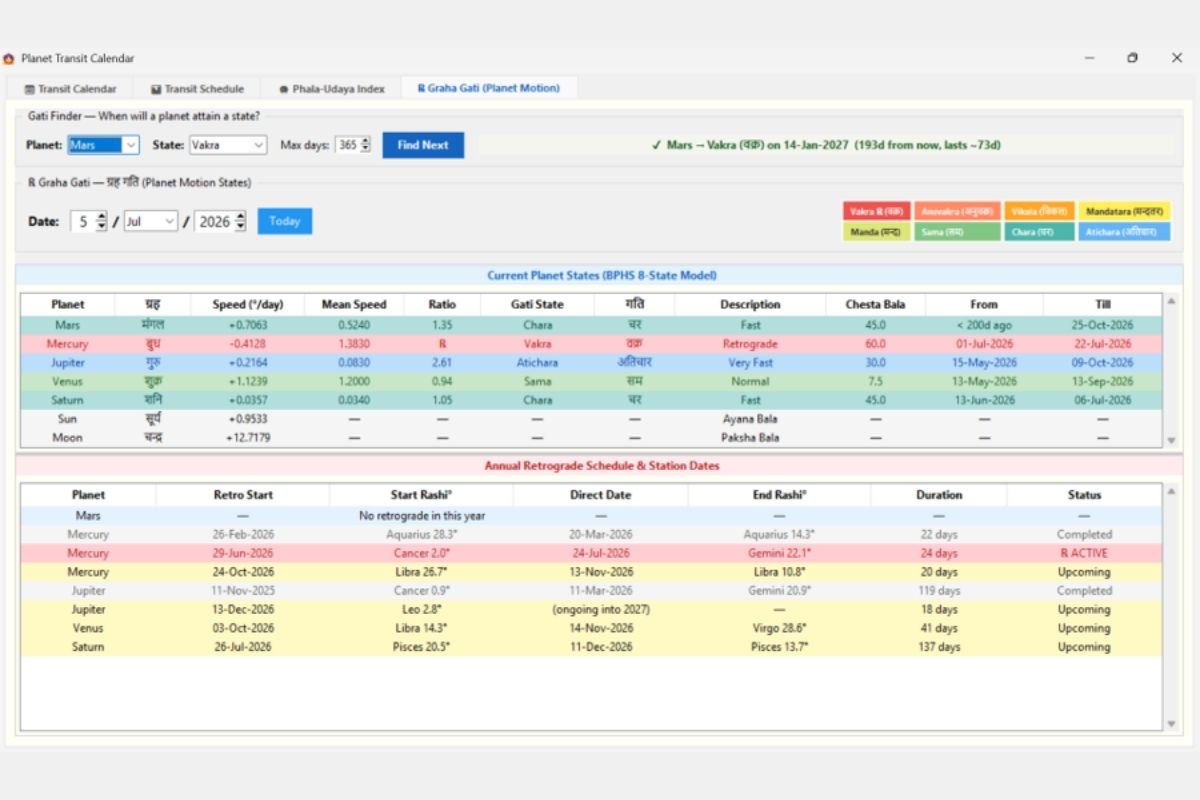
Graha Gati (Planet Motion States)
BPHS 8-state planetary motion model:
- Current States: Speed (°/day), Mean Speed, Ratio, Gati State (Chara/Vakra/Atichara/Sama/Manda/Vikala/Mandatara/Anuvakra), Chesta Bala
- States shown in both English and Sanskrit (with Devanagari)
- Color-coded state legend at top
- Gati Finder: “When will a planet attain a state?” tool with date prediction
- Annual Retrograde Schedule: Start date, Start Rashi°, Direct Date, End Rashi°, Duration, Status (Active/Upcoming/Completed)
VARSHAPHAL (SOLAR RETURN)
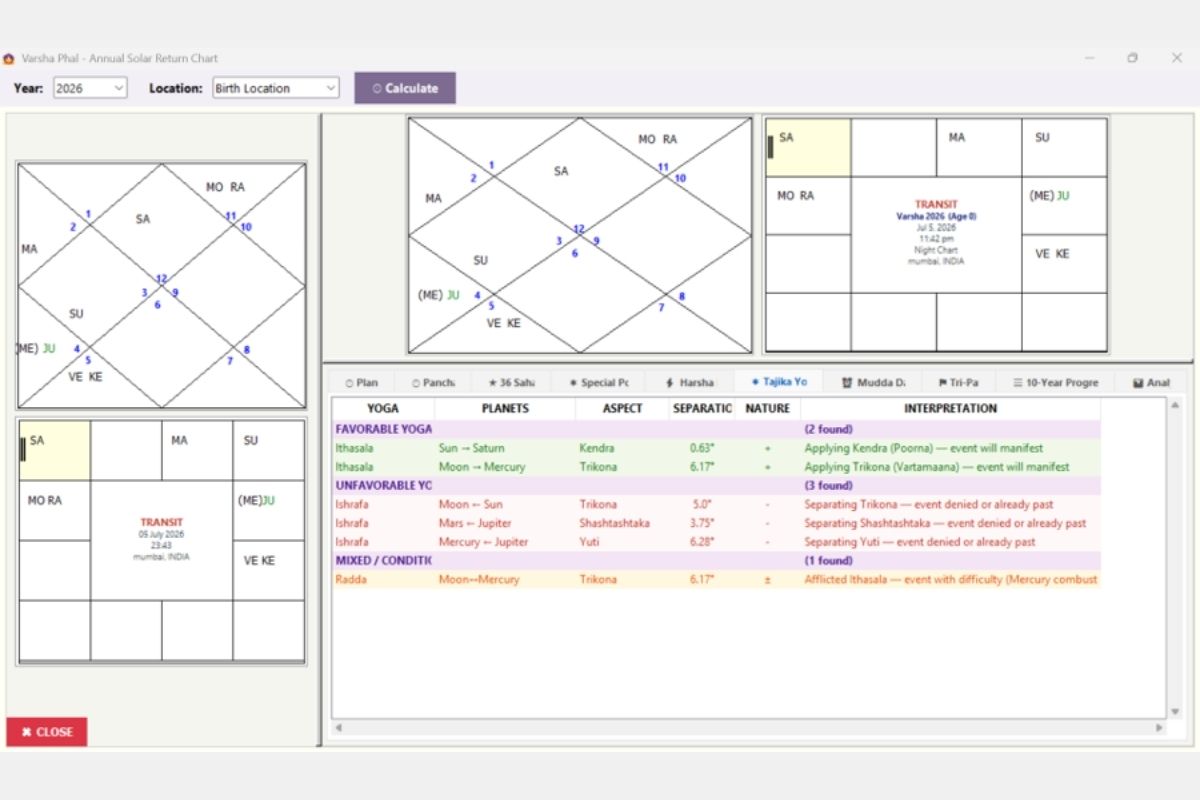
Complete Tajika annual chart system:
- Year selector with Birth/Current Location option
- Three chart displays: Natal (North), Varsha (North), Varsha (South)
- Analysis tabs: Plan, Panchang, 36 Sahams, Special Points, Harsha, Tajika Yogas, Mudda Dasha, Tri-Pataki, 10-Year Progression, Analysis
- Tajika Yogas panel: Favorable (Ithasala), Unfavorable (Ishrafa), Mixed/Conditional (Radda)
- Each yoga showing: Planets, Aspect type, Separation degrees, Nature (+/-), Interpretation
- Night/Day chart identification
TITHI PRAVESH (LUNI-SOLAR RETURN)
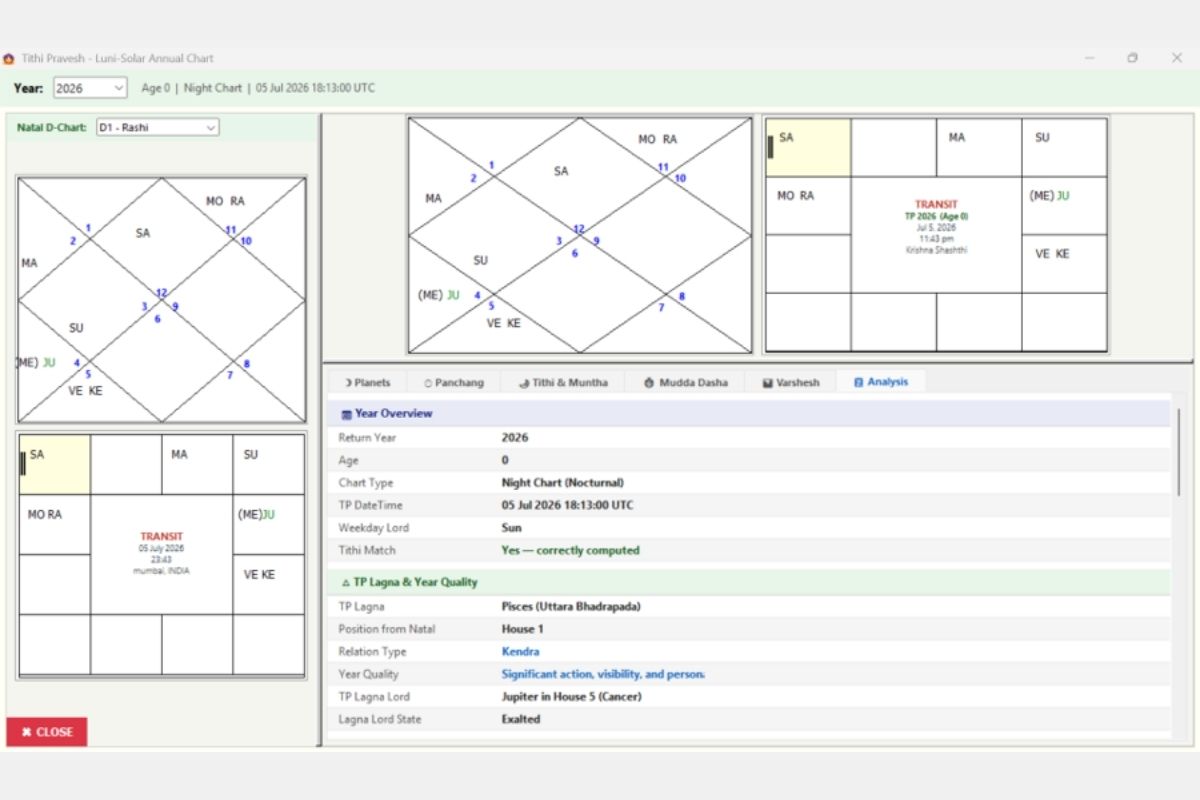
Annual chart based on birth Tithi return:
- Year selector with Night/Day chart identification
- Precise TP DateTime in UTC
- Three chart formats displayed
- Analysis tabs: Planets, Panchang, Tithi & Muntha, Mudda Dasha, Varshesh, Analysis
- Year Overview: Return Year, Age, Chart Type, TP DateTime, Weekday Lord, Tithi Match verification
- TP Lagna & Year Quality: Lagna sign, Position from Natal, Relation Type (Kendra/Trikona/etc.), Year Quality interpretation
- TP Lagna Lord state (Exalted/Debilitated)
PRASHNA (HORARY ASTROLOGY)
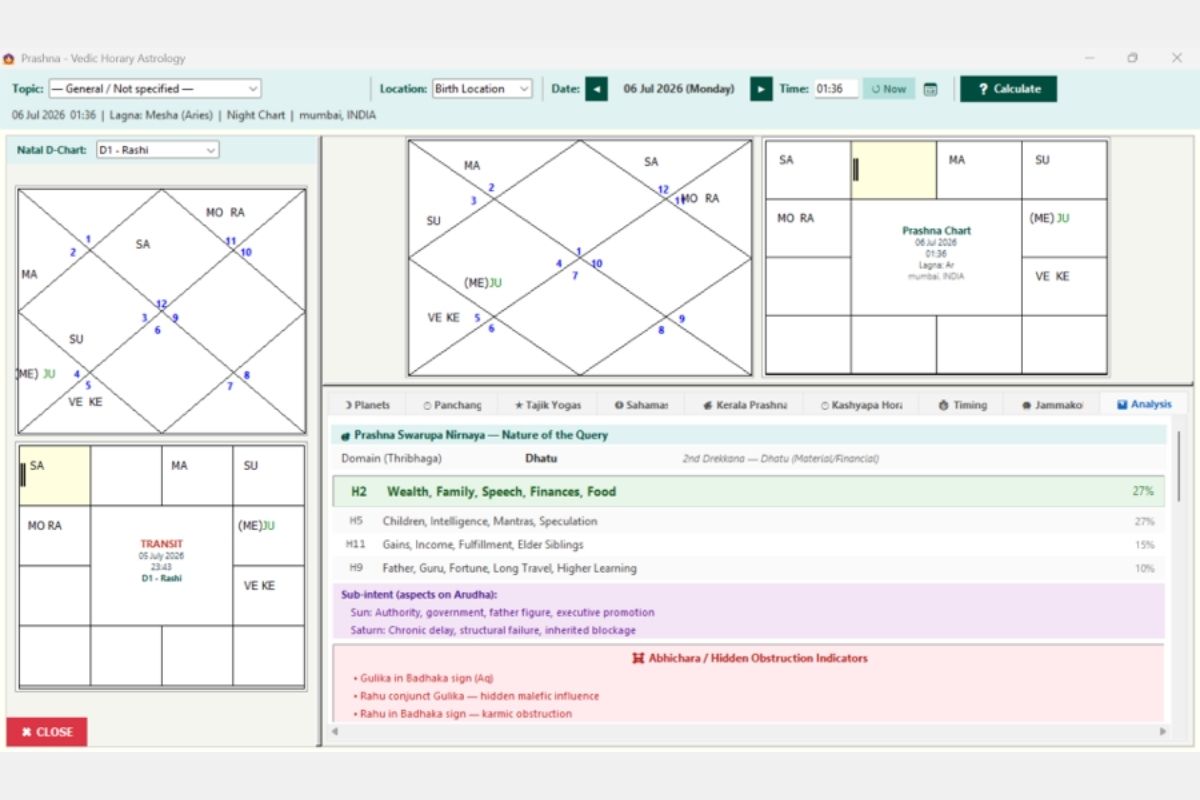
Complete Prashna (horary) module:
- Topic selector, Location (Birth/Current), Date/Time with “Now” button
- Three chart displays: Natal D-chart, Prashna chart (North), Prashna chart (South)
- 9 Analysis tabs: Planets, Panchang, Tajik Yogas, Sahamsa, Kerala Prashna, Kashyapa Hora, Timing, Jammakol, Analysis
- Prashna Swarupa Nirnaya: Nature of the Query — Domain (Thribhaga: Dhatu/Moola/Jeeva)
- House-wise percentage breakdown of query topic
- Sub-intent analysis: Aspects on Arudha
- Abhichara / Hidden Obstruction Indicators with Gulika/Rahu analysis
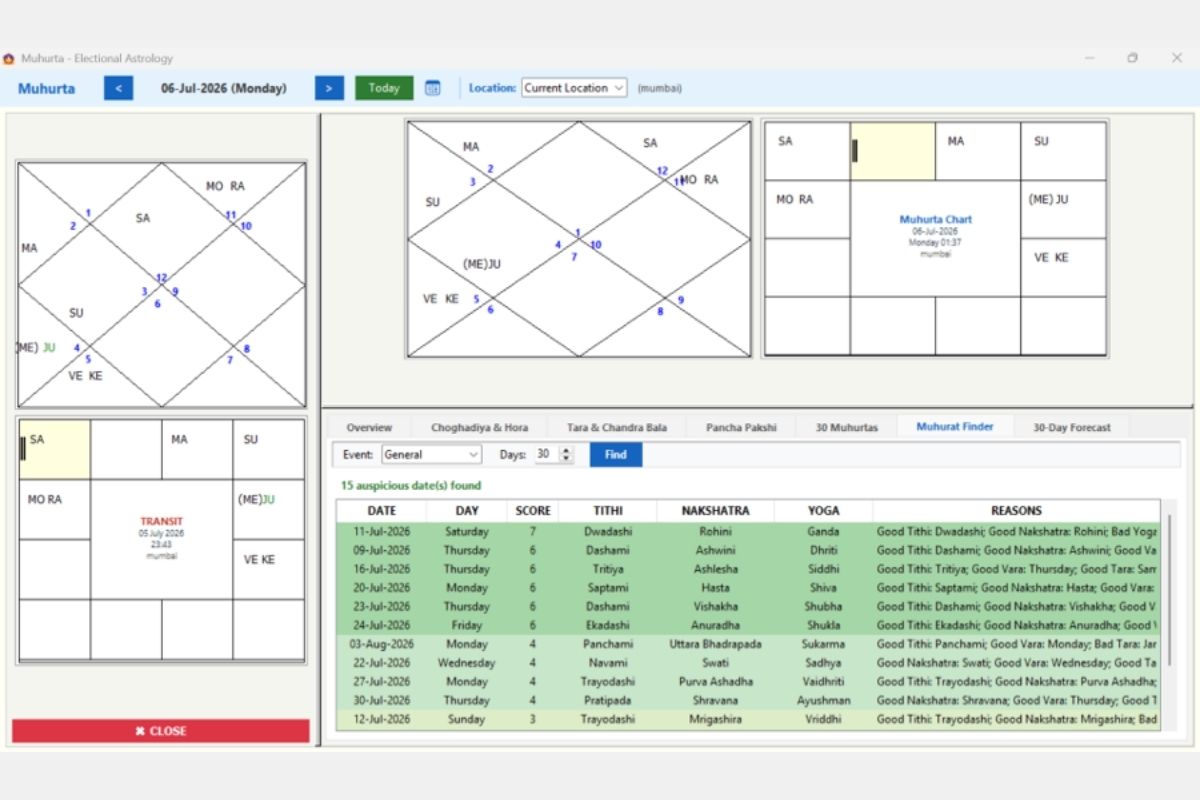
MUHURAT (ELECTIONAL ASTROLOGY)
Auspicious timing selection tool:
- Date navigation with “Today” button, Location selector
- Three chart formats for the muhurat moment
- 7 Analysis tabs: Overview, Choghadiya & Hora, Tara & Chandra Bala, Pancha Pakshi, 30 Muhurtas, Muhurat Finder, 30-Day Forecast
- Muhurat Finder: Event type selector, Days range, “Find” button
- Results table: Date, Day, Score (1-10), Tithi, Nakshatra, Yoga, Reasons
- Sorted by score — best dates first (green highlighted)
- Multiple factors evaluated: Tithi quality, Nakshatra quality, Vara, Tara compatibility
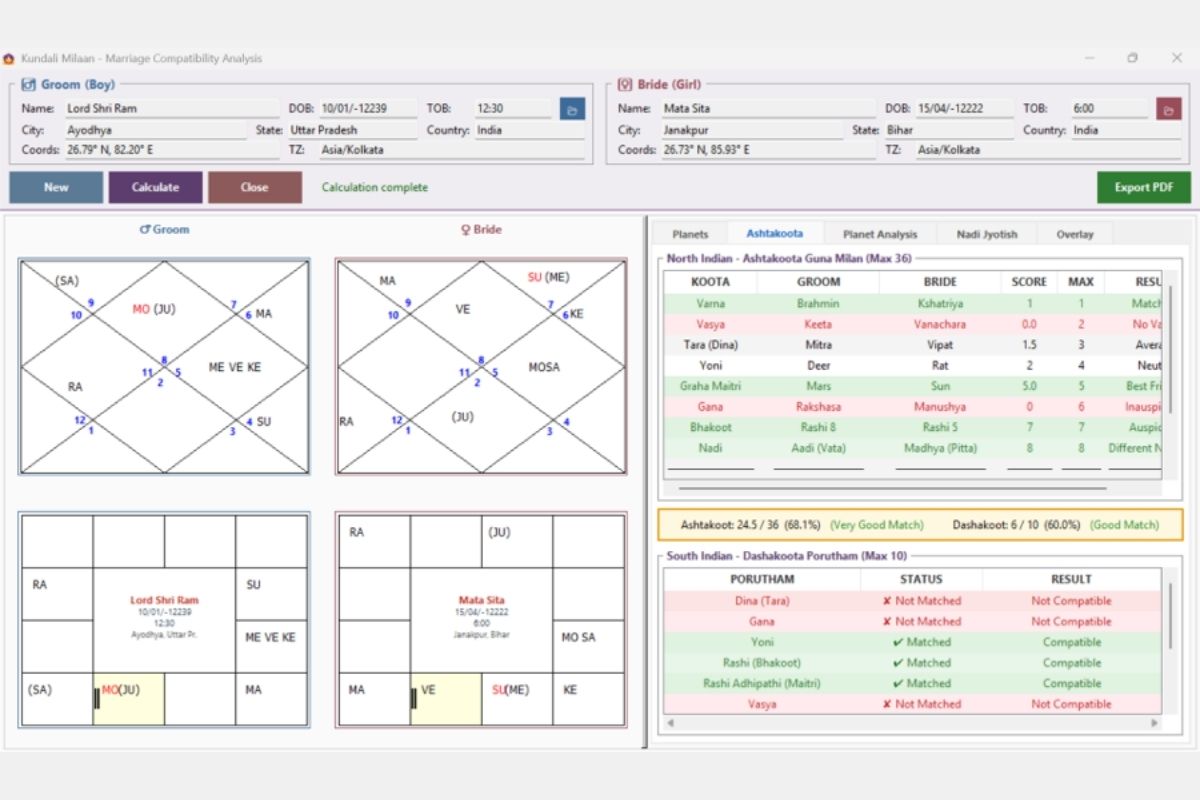
KUNDALI MILAAN (COMPATIBILITY)
Comprehensive compatibility analysis:
- Groom & Bride panels: Complete birth details with auto-coordinate lookup
- Four chart displays: Both charts in North and South Indian formats
- 5 Analysis tabs: Planets, Ashtakoota, Planet Analysis, Nadi Jyotish, Overlay
- North Indian Ashtakoota Guna Milan (Max 36): Varna, Vasya, Tara, Yoni, Graha Maitri, Gana, Bhakoot, Nadi — with scores and results
- South Indian Dashakoota Porutham (Max 10): Dina, Gana, Yoni, Rashi, Rashi Adhipathi, Vasya — Matched/Not Matched
- Color-coded results: Green (compatible), Red (not compatible)
- Export PDF button for professional reports
- Overall scores: “Ashtakoot: 24.5/36 (68.1%) — Very Good Match”
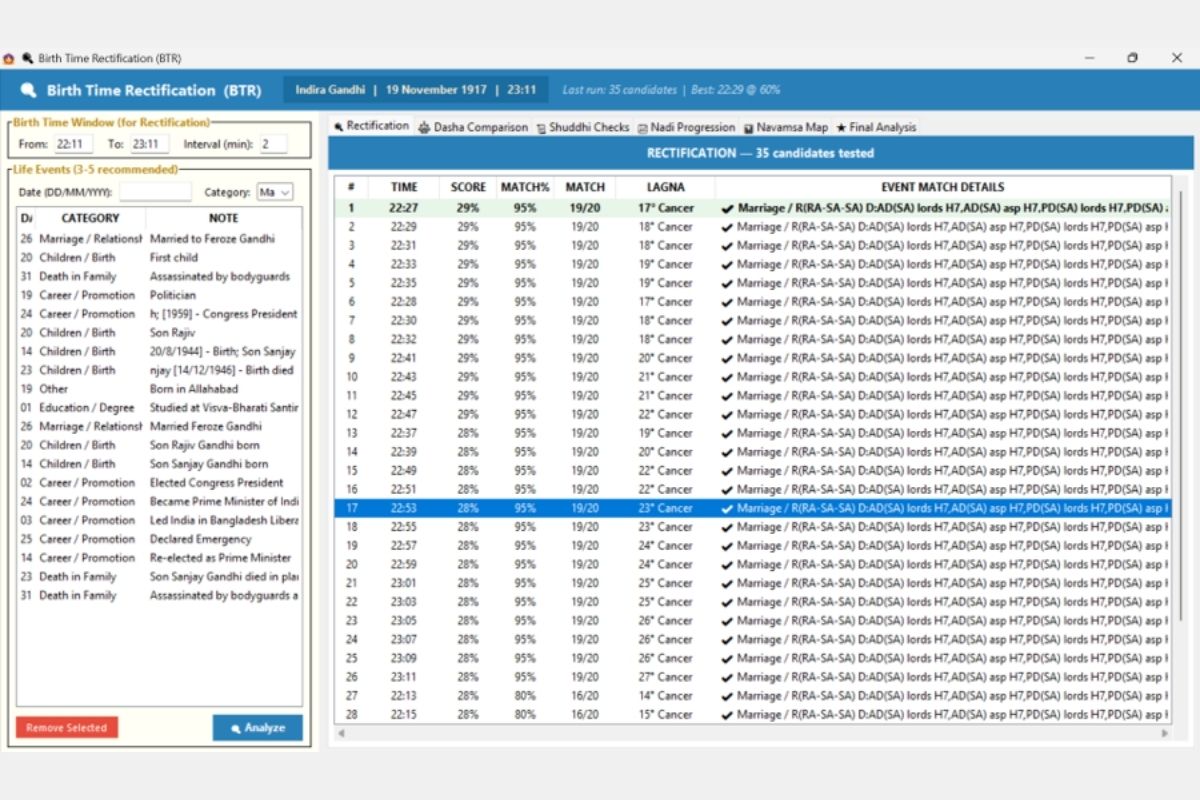
BIRTH TIME RECTIFICATION (BTR)
Advanced birth time rectification module:
- Input: Birth Time Window (From/To), Interval (minutes)
- Life Events panel: Date, Category, Note — 3-5 events recommended (e.g., Marriage, Children/Birth, Death in Family, Career/Promotion)
- 6 Analysis tabs: Rectification, Dasha Comparison, Shuddhi Checks, Nadi Progression, Navamsa Map, Final Analysis
- Results table: Candidate times ranked by Score, Match%, total Match count, Lagna degree
- Event Match Details column showing which dasha lords match events
- Best candidate highlighted in blue
- Example: Indira Gandhi rectification testing 35 candidates from 22:11 to 23:11
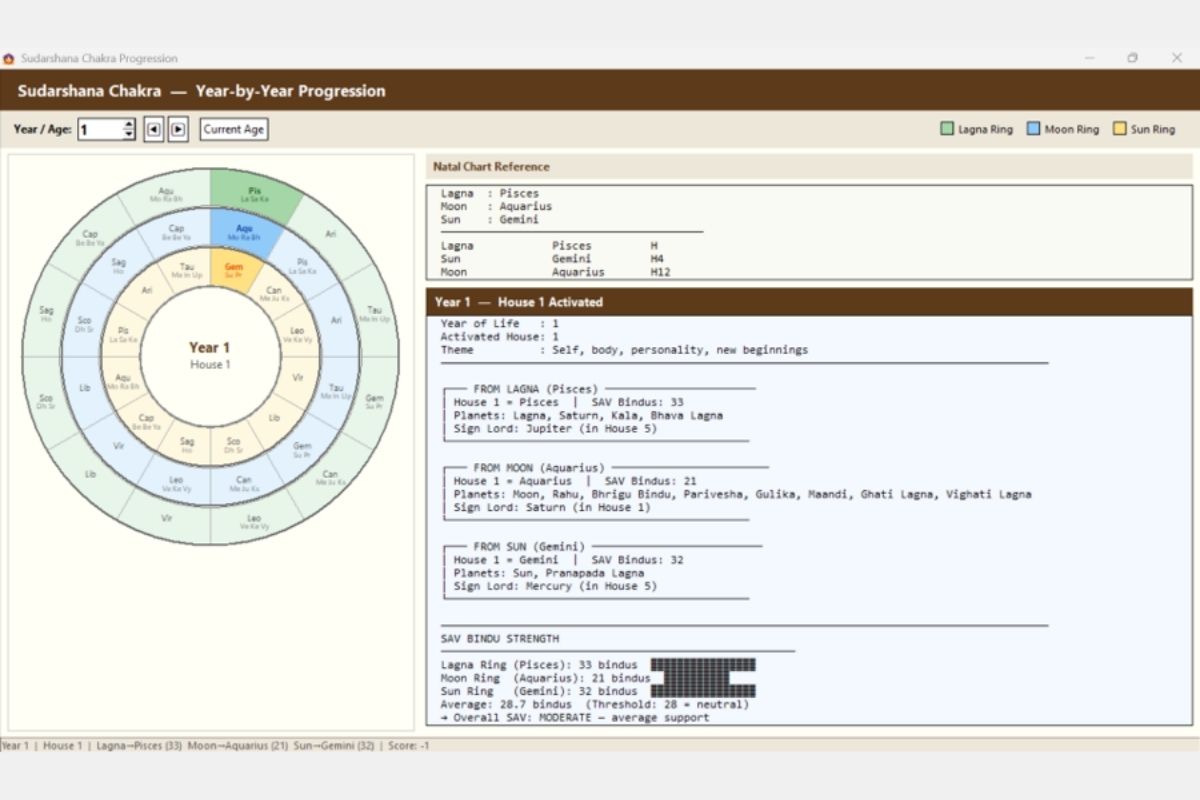
CHAKRA SYSTEMS
Year-by-year Sudarshana Chakra analysis:
- Visual Chakra wheel: Three concentric rings (Lagna, Moon, Sun) showing 12 houses in each ring
- Year/Age selector with navigation buttons
- Natal Chart Reference: Lagna, Moon, Sun signs
- Activated House analysis: Theme interpretation, SAV Bindus per ring
- FROM LAGNA: House = sign, Planets present, Sign Lord
- FROM MOON: Same analysis from Moon
- FROM SUN: Same analysis from Sun
- SAV Bindu Strength: Bar chart comparison across three rings with overall assessment
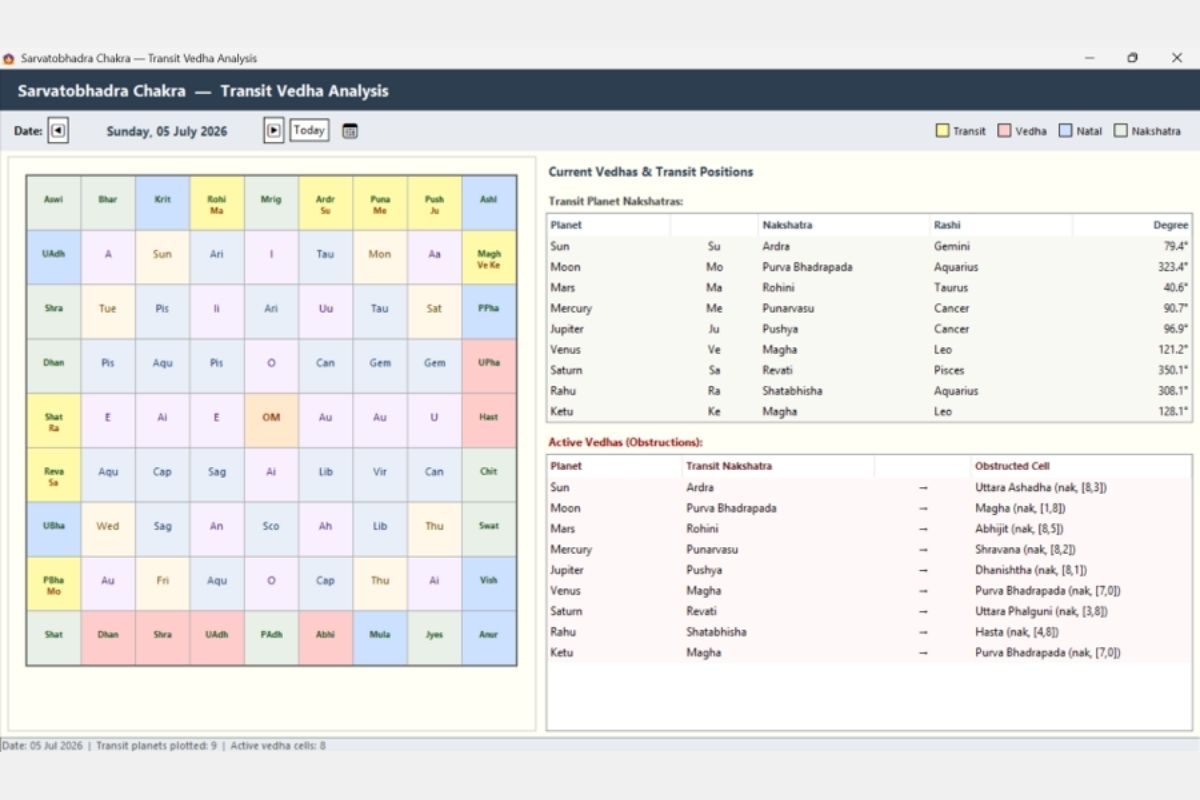
Sarvatobhadra Chakra — Transit Vedha Analysis
Classical SBC transit analysis:
- 8×8 grid populated with Nakshatras, Vowels, Tithis, Varas
- Transit planets color-coded on the grid
- Date navigation with “Today” button
- Transit Planet Nakshatras table: Each planet’s current nakshatra, rashi, degree
- Active Vedhas (Obstructions): Which transit planet creates vedha to which natal cell
- Toggle options: Transit, Vedha, Natal, Nakshatra layers
- Status bar: “Transit planets plotted: 9 | Active vedha cells: 8”
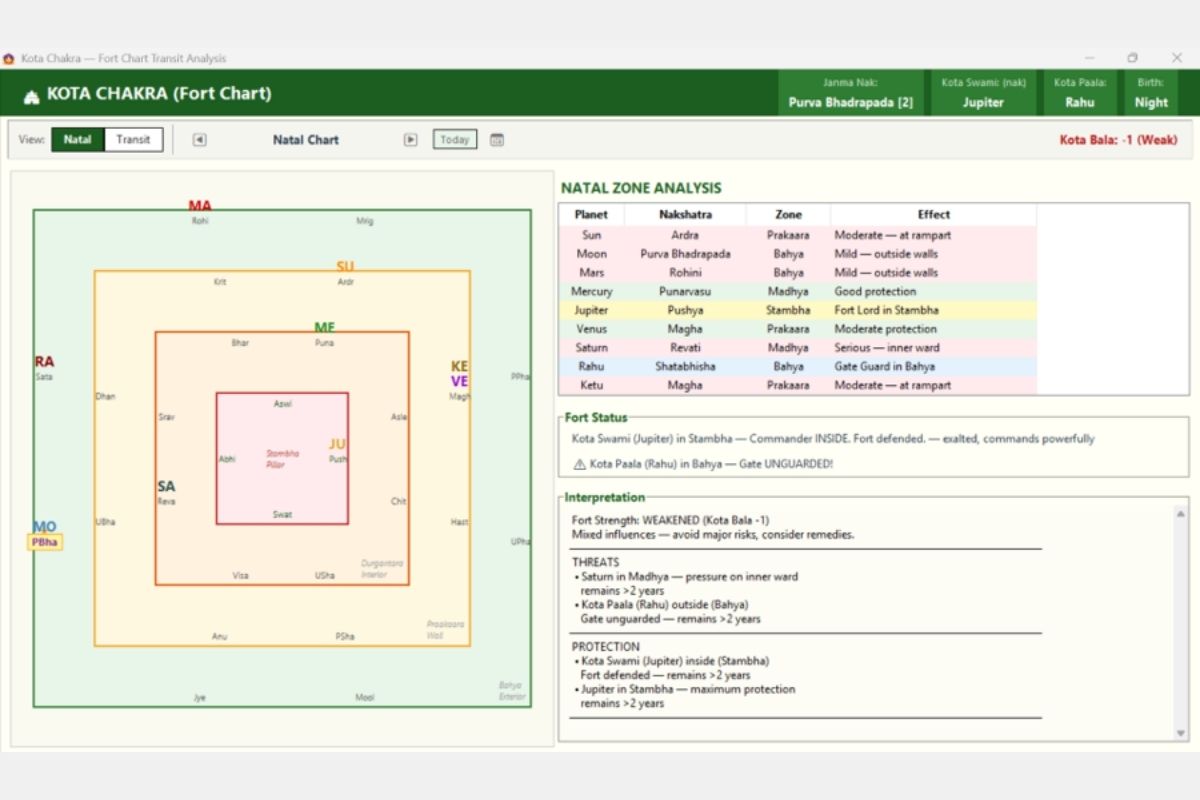
Kota Chakra (Fort Chart) — Transit Analysis
Fort-based protection analysis:
- Visual fort diagram: Concentric squares representing Stambha (pillar/center), Madhya, Prakaara (walls), Bahya (exterior)
- Planets placed in their nakshatra-determined zones
- Header: Janma Nakshatra, Kota Swami, Kota Paala, Birth type (Day/Night)
- Natal Zone Analysis table: Planet, Nakshatra, Zone, Effect (protection level)
- Fort Status: Commander (Kota Swami) position, Gate Guard (Kota Paala) position
- Kota Bala score: Fort strength (-1 = Weak, +1 = Strong)
- Interpretation: Threats and Protection analysis with duration estimates
- Toggle: Natal/Transit views
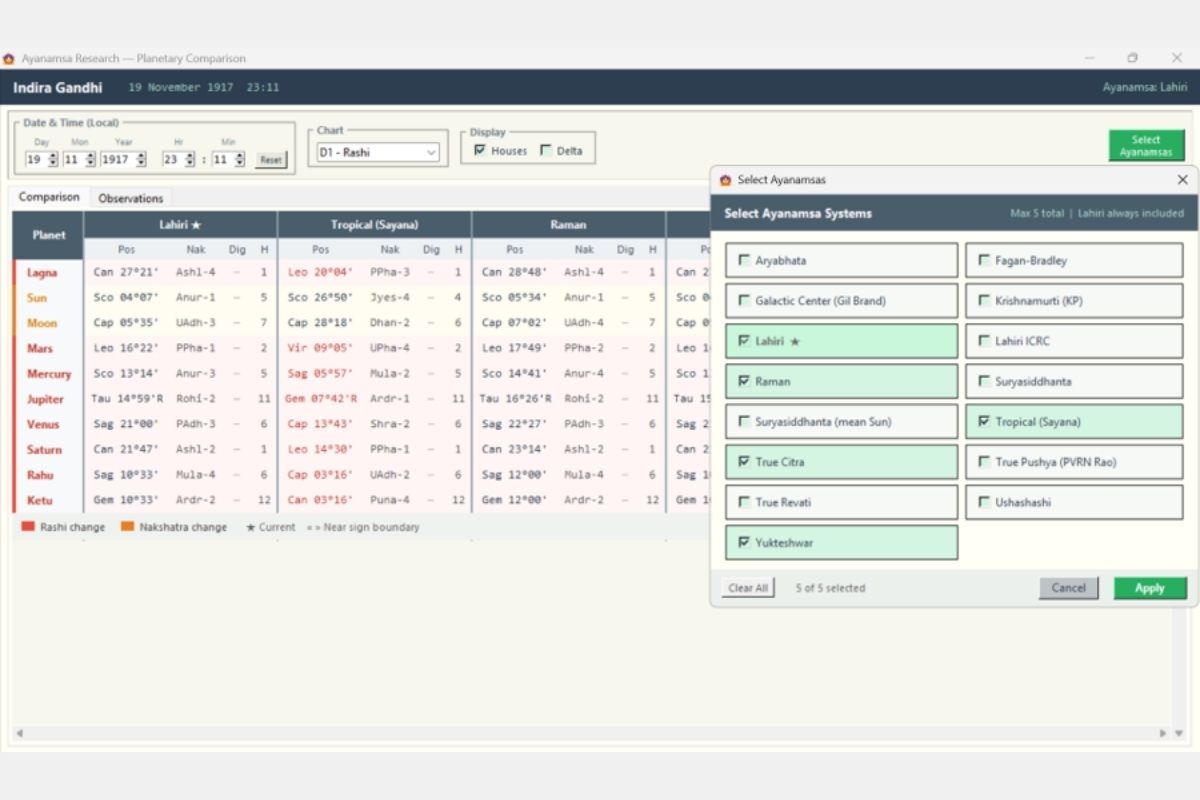
AYANAMSA RESEARCH
Multi-ayanamsa comparison tool:
- 16 Ayanamsa systems available: Aryabhata, Fagan-Bradley, Galactic Center, Krishnamurti (KP), Lahiri, Lahiri ICRC, Raman, Suryasiddhanta, True Citra, True Pushya (PVRN Rao), True Revati, Ushashashi, Yukteshwar, Tropical (Sayana), Suryasiddhanta (mean Sun)
- Select up to 5 for side-by-side comparison
- Comparison table: Each planet’s Position, Nakshatra, Dignity, House — under each selected ayanamsa
- Color-coded changes: Red background = Rashi changes, Orange = Nakshatra changes
- Star marker (★) for current default ayanamsa
- Chart and Date/Time adjustable for any moment
- “Observations” tab for research notes
AI ANALYSIS
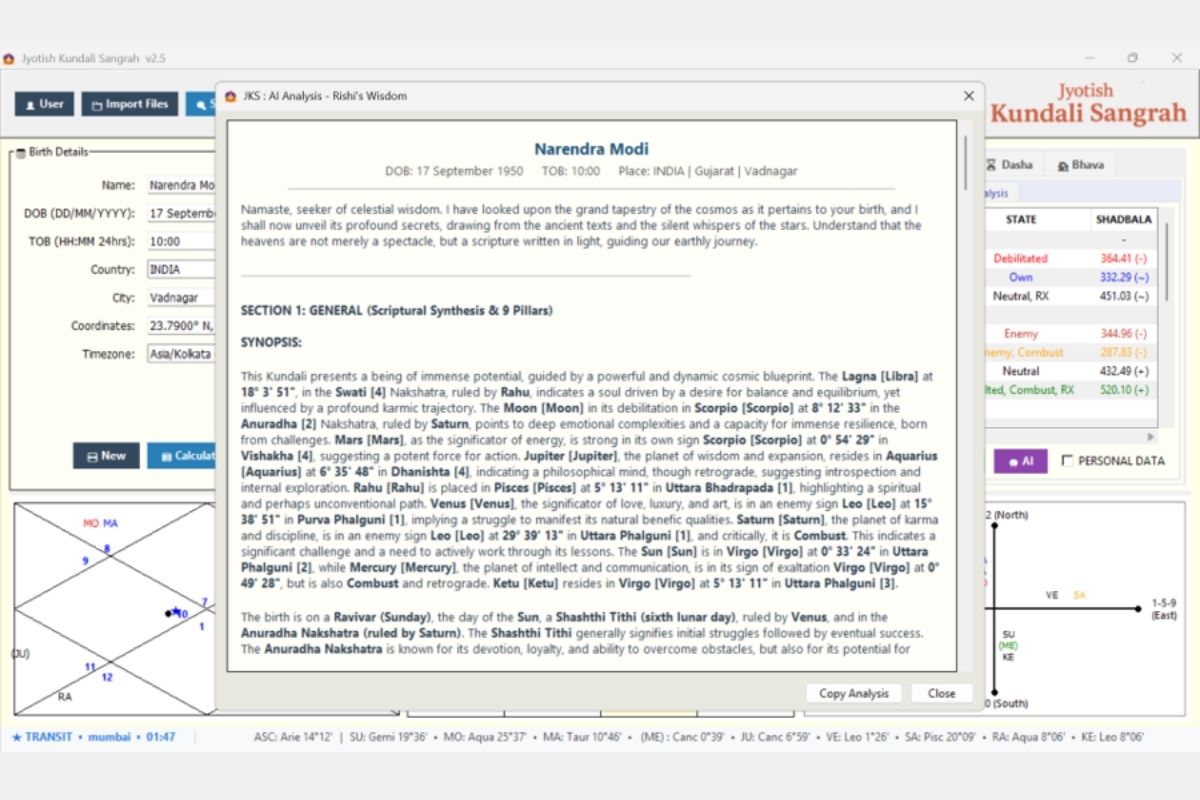
Gemini AI integration for chart interpretation:
- Full astrological analysis in classical Sanskrit-inspired narrative style
- Sections: General (Scriptural Synthesis & 9 Pillars), Synopsis
- Covers: Lagna analysis, Nakshatra interpretation, planetary positions with degrees
- Classical references and Panchanga elements (Tithi, Vara, Nakshatra)
- Birth data header: Name, DOB, TOB, Place
- “Copy Analysis” button for sharing
- Requires API key configured in Settings
MULTI-CHART VIEW
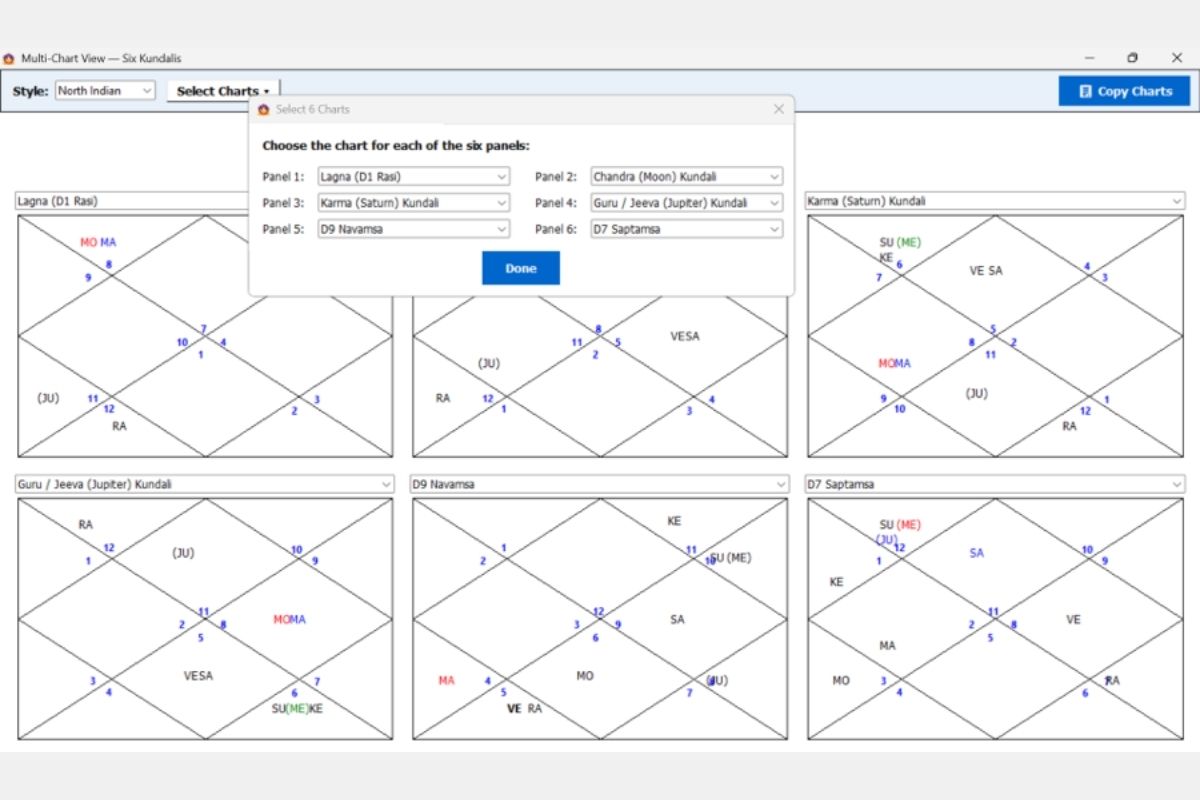
Six charts displayed simultaneously:
- Configurable panels: Select any 6 charts from dropdown:
- Lagna (D1 Rasi), Chandra (Moon) Kundali, Karma (Saturn) Kundali, Guru/Jeeva (Jupiter) Kundali, D9 Navamsa, D7 Saptamsa, and more
- Style selector: North Indian / South Indian
- “Select Charts” dialog for customization
- “Copy Charts” button for export
- Ideal for comparative analysis and consultation
BUILT-IN LEARNING GUIDE
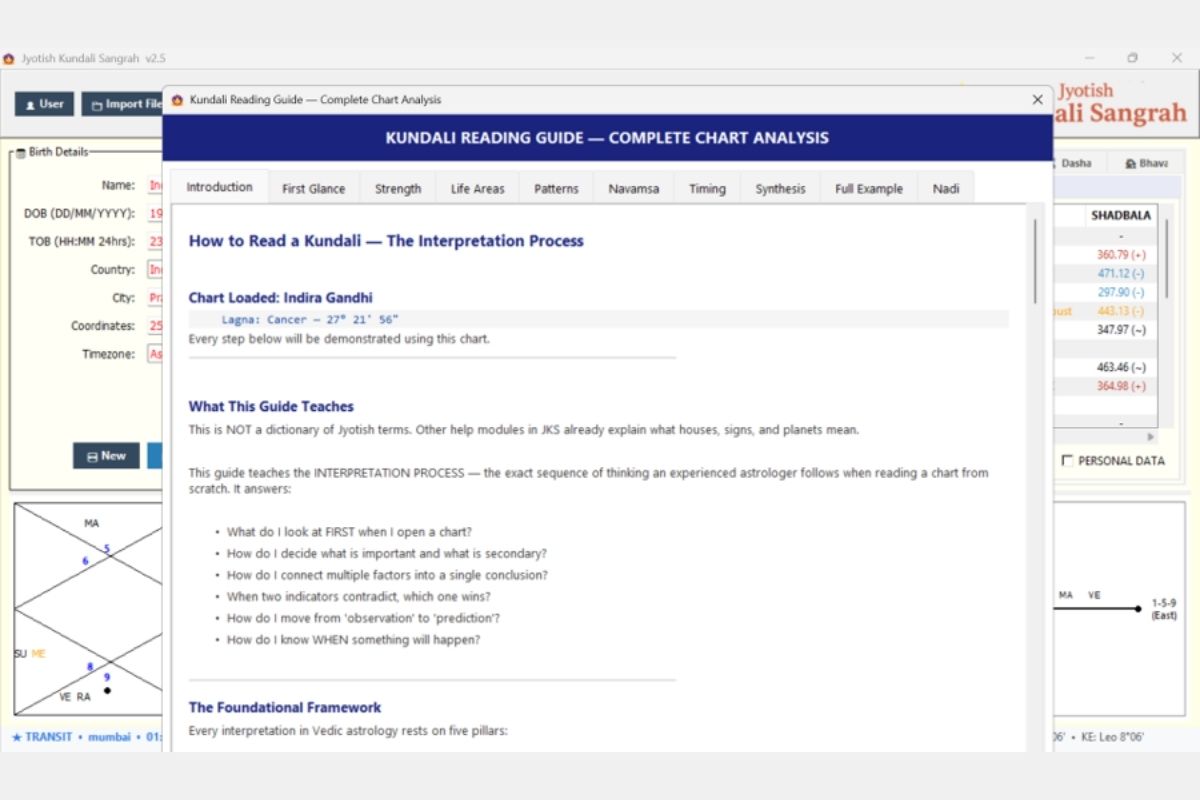
Complete chart interpretation tutorial:
- 8 Chapters: Introduction, First Glance, Strength, Life Areas, Patterns, Navamsa, Timing, Synthesis, Full Example, Nadi
- Interactive guide using the currently loaded chart as a live example
- Teaches the INTERPRETATION PROCESS — “the exact sequence of thinking an experienced astrologer follows when reading a chart from scratch”
- Questions covered: What to look at first, prioritization, resolving contradictions, moving from observation to prediction, timing events
- Classical foundation with practical application
RIGHT-CLICK CONTEXTUAL HELP
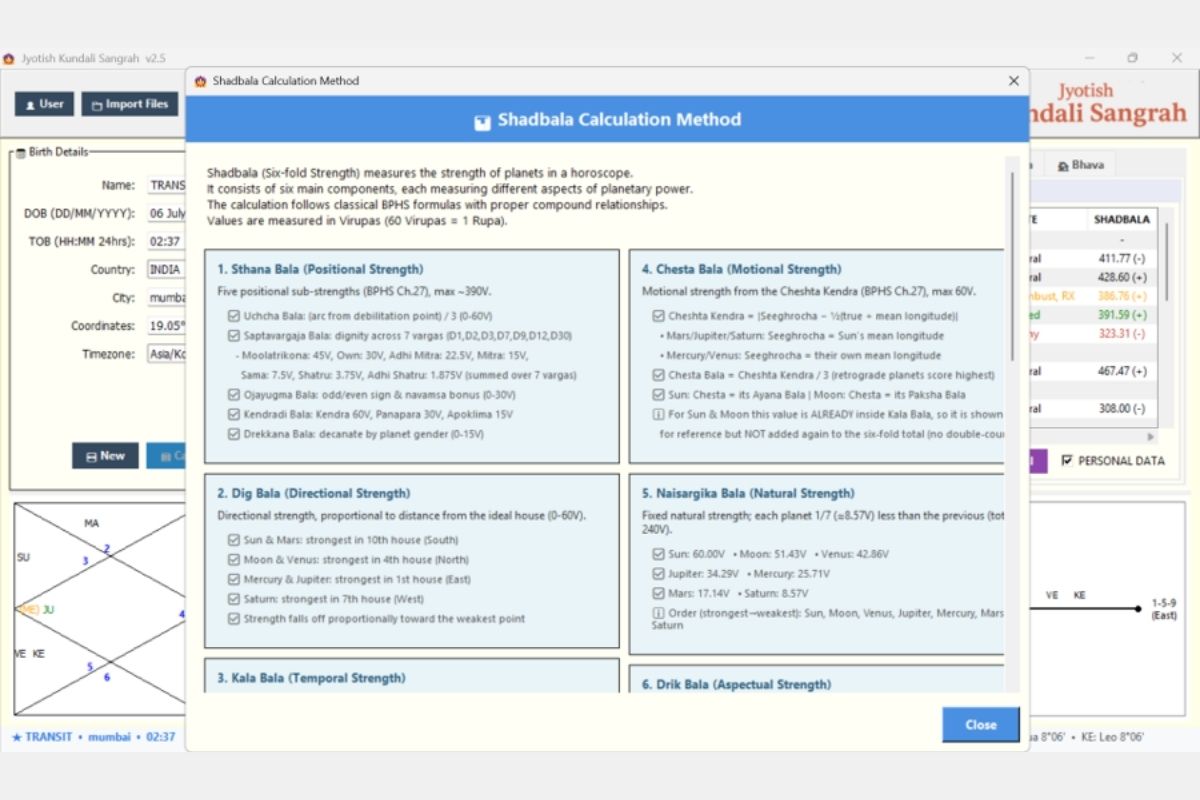
Comprehensive context-sensitive educational help system built into every module of the application. Right-click window to instantly access a detailed explanation of the underlying methodology, classical references, and calculation logic.
Available across ALL modules, including but not limited to:
- Shadbala (shown in screenshot): Six-fold strength calculation (Sthana, Dig, Kala, Chesta, Naisargika, Drik Bala) with BPHS chapter references and Virupa values
- Ashtakavarga: BAV/SAV calculation methodology, bindu assignment rules
- Dasha Systems: Period calculation logic, starting dasha balance formula, nakshatra-based allocation
- Avasthas: Baladi, Jagradadi, Deeptadi, Lajjitadi, Sayanadi — each state’s definition and scoring
- Graha Yuddha: Planetary war conditions, winner determination rules
- Doshas: Formation rules, cancellation conditions for each of the 18 doshas
- Yogas: Specific formation criteria and classical text references for each yoga
- Sensitive Degrees: Mrityubhaga, Pushkara, Gandanta — degree ranges and their significance
- Nadi Jyotish: BNN aspect system, progression cycle logic
- Transit Tools: Phala-Udaya Index scoring, Graha Gati state definitions
- Panchang: Tithi/Nakshatra/Yoga/Karana calculation methods
- House Systems: Whole Sign vs Bhava Chalit logic, momentum status definitions
AUTO-UPDATE SYSTEM
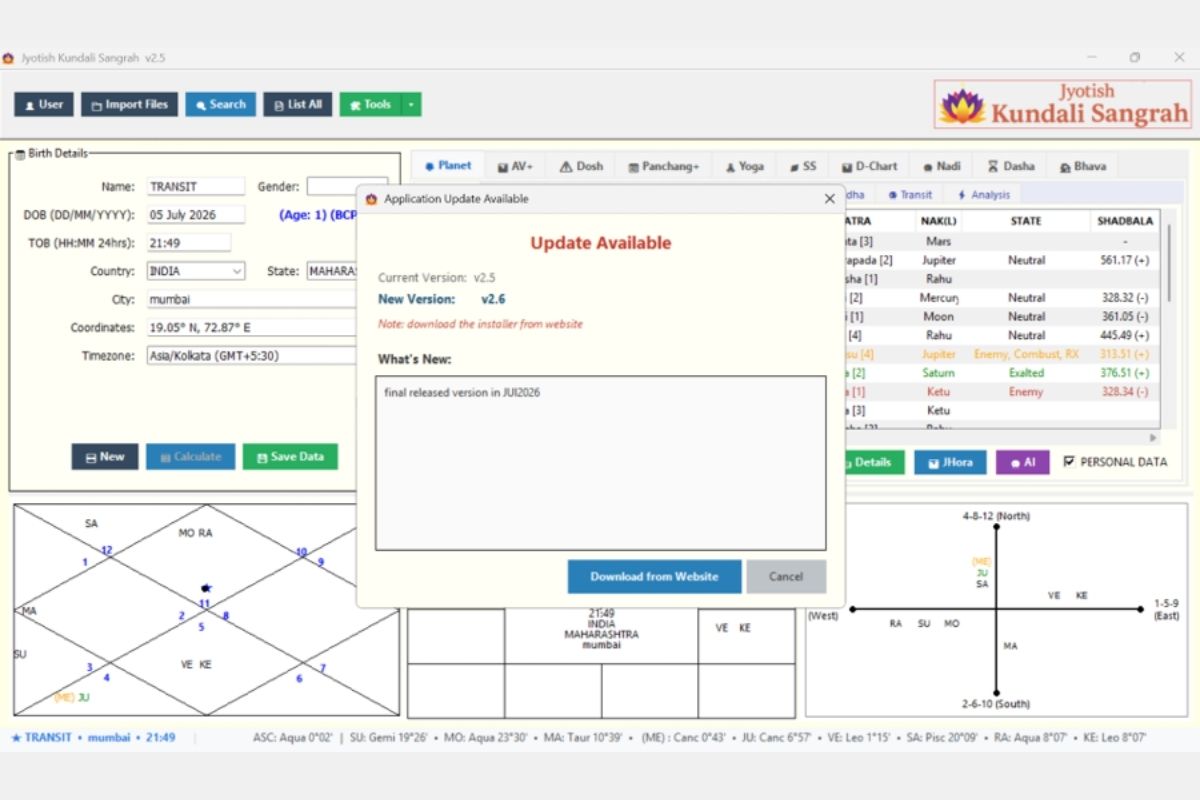
Built-in application update checker:
A red border around the top right logo , click on the logo will start the update process, either to directly download the update file or download the installer from the website. Screenshot shows the website downloader option.
- Action buttons: “Download from Website” (opens browser to download page) and “Cancel”
- Automatic check on startup ensures users always know when updates are available
WHAT JKS OFFERS THAT OTHERS DON’T
Capability | Other Software | JKS |
Price | Free to $300+ | Free |
Chart Database with Search | Not available or very limited | Yes (unlimited records) |
Search by Planetary Criteria | Not available | Yes (5 search types) |
BNN Nadi Progression System | Not available | Yes (full system) |
Bhrigu Pada Dasha (180-yr) | Not available | Yes |
Nadiamsha D-150 (4 methods) | Not available | Yes |
Dasha Systems | Typically 2-10 | 19 |
Conditional Dasha Advisor | Not available | Yes (BPHS Ch.46) |
Phala-Udaya Index | Not available | Yes (proprietary) |
Karma Destiny Chain | Not available | Yes (proprietary) |
Graha Gati (8-State Model) | Not available | Yes |
House Mapping (Topic + Power) | Not available | Yes |
Ayanamsa Comparison (16 systems) | Partial at best | Yes (side-by-side) |
BTR (Multi-Event, 6 methods) | Basic in some | Yes (systematic scoring) |
Prashna (7 methods) | Partial in some | Yes (complete system) |
Muhurat Finder (auto-scoring) | Available in some | Yes (multi-factor scoring) |
Kota Chakra | Not available | Yes |
Sarvatobhadra Chakra | Rare, partial | Yes (full vedha analysis) |
Sudarshana Chakra Progression | Rare, partial | Yes (3-ring with SAV) |
AI Chart Analysis | Paid in some | Yes (Gemini, free) |
Import from other software (.jhd) | Rarely supported | Yes |
Multi-Chart View (6 panels) | Not available | Yes |
Kundali Milaan (North + South) | Basic in most | Yes (Ashtakoota + Dashakoota + PDF) |
Built-in Learning Guide | Not available | Yes (8-chapter interactive) |
Right-Click Contextual Help | Not available | Yes (all modules) |
Auto-Update System | Varies | Yes (built-in checker) |
Import JHD (Jhora) Files
The Import JHD feature enables bulk import of birth chart data from JHORA (.jhd) files, automatically extracting essential information including name, birth date, time, and coordinates from the standardized file format.
Select multiple JHD files simultaneously through an intuitive interface that displays a preview table showing extracted details before import, with real-time progress tracking and error reporting.
Once imported, the data integrates seamlessly into the main database with full planetary calculations, making it effortless to migrate existing JHORA collections into the Kundali Sangrah research database, unlocking the JKS’s advanced search and analysis capabilities on your existing JHORA Kundali library.


Data Browser
The Birth Data List provides a comprehensive database browser displaying all saved kundali records in an organized table format. Navigate through thousands of records effortlessly using next/previous controls and apply intelligent filters by name, starting alphabet, gender, status, or profession to quickly locate specific charts.
The interface supports seamless record management: Double-click any entry to load it instantly into the main viewer for detailed analysis. This navigation system simplifies managing large collections of birth charts, facilitating astrological research and comparative studies.
Pro Tip: Right click context menu are available for Country, Profession columns to sort or filter the data


Transit Feature
The tool provides a comprehensive monthly view displaying real-time planetary positions for each day in an intuitive calendar format. Users can navigate through months and years to view planetary transits, with today’s date highlighted in blue for easy identification.
Double-click any date to open a detailed popup showing precise planetary positions, degrees, nakshatras, and dignities with color-coded grouping for planets in the same rashi (zodiac sign).
A dedicated Transit Schedule tab forecasts upcoming planetary sign changes with precise timing and countdown displays, making it an important tool for transit (gochara) timings and understanding planetary movements.
Transit Calendar
Visualize daily transits across the month for at-a-glance insights into transit (gochara) influences.


Transit Schedule
Check detailed planetary data (degrees, next/current rashi) for any specific date

Kundali Sangrah Search
JKS’s search functionality is expansive, covering almost all the major ways to create search conditions to start the research
1. Planetary Search: Find records by planetary positions, signs (rashis), houses (bhavas), nakshatras, yogas, combustion patterns, and special astrological conditions with flexible AND/OR logic combinations.

2. Name Search: Locate individuals using exact or fuzzy name matching with intelligent spelling variation support for names in different languages and transliterations.

3. Date/Time Search: Filter birth records by specific date ranges and time periods, ideal for demographic analysis and historical research of astrological patterns.

4. More Options: Specialized searches including empty houses analysis, planetary wars, statistical patterns, and other unique astrological research criteria.

5. Planetary Placement Search: Advanced queries for planet-in-sign combinations, conjunctions, and house placements to study specific astrological configurations.

Example: SUN placed 7th from JUPITER, here.
Search Results
The results window is a hub for action and insight

Multiple things can be done from the search result window
• Interactive Results Table: Displays matching records with sortable columns, checkboxes for multi-selection, and detailed birth information including coordinates and planetary data for thorough analysis.
• Chart Visualization: View up to 3 selected charts simultaneously in North/South Indian formats with planetary positions, allowing side-by-side comparison of astrological configurations.
• Transit Integration: Real-time transit overlays on birth charts with automatic updates, showing current planetary influences and their aspects to natal positions for predictive analysis. Any past transits can be drawn over the natal chart to study the effect of the transit planets
• Export & Analysis Tools: Export selected records to JHora software, generate detailed reports, and perform statistical analysis on search results for research purposes.
• Quick Actions: Double-click any record to instantly load into main application, use zoom functionality for detailed chart examination with enhanced visibility.
Pro Tip: Double click any chart to load Event transits on top of the natal chart


Click ZOOM to open an enhanced view of the kundalis, displaying both North and South Indian style kundali displayed together

NOTE : Clicking the Jhora button instantly opens the selected kundali(s) in Jhora software.